
You are here:
update Transformation
The update Transformation updates the specified field values in an existing dataset based on data from another dataset, which we call the lookup dataset. The transformation looks up the new values from corresponding fields in the lookup dataset. The transformation stores the results in a new dataset.

When you create the transformation, you specify the keys that are used to match records between the two datasets. To dictate which field in the lookup dataset updates the field in the source dataset, you also map the corresponding fields from both dataset.
For example, you have an existing Accounts dataset that contains account information—Id, Name, and AnnualRevenue. Unfortunately, some of the account names in the dataset are now incorrect because of a series of mergers and acquisitions. To quickly update the account names in the dataset, you perform these tasks.
- Create a .csv file that contains the new account names and associated account IDs for accounts that have name changes.
- Upload the .csv file to create a dataset called UpdatedAccountNames.
- Create a dataflow definition file to update account names in the Accounts dataset by
looking up the new account names in the UpdatedAccountNames dataset.
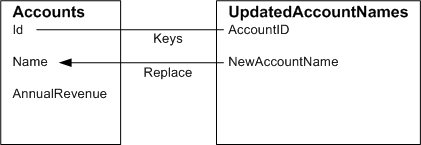
You create the following dataflow definition file.
{
   "Extract_AccountDetails": {
      "action": "sfdcDigest",
      "parameters": {
         "object": "Account",
         "fields": [
            { "name": "Id" },
            { "name": "Name" },
            { "name": "AnnualRevenue" }
         ]
      }
   },
   "Extract_UpdatedAccountNames": {
      "action": "edgemart",
      "parameters": { "alias": "UpdatedAccountNames" }
   },
   "Update_AccountRecords": {
      "action": "update",
      "parameters": {
         "left": "Extract_AccountDetails",
         "right": "Extract_UpdatedAccountNames",
         "left_key": [ "Id" ],
         "right_key": [ "AccountID" ],
         "update_columns": { "Name": "NewAccountName" }
      }
   },
   "Register_UpdatedAccountRecords": {
      "action": "sfdcRegister",
      "parameters": {
         "alias": "Accounts",
         "name": "Accounts",
         "source": "Update_AccountRecords"
      }
   }
}
Let’s look at another example, where a composite key is used to match records between both datasets. In this case, you match records using the account ID and account name fields.
You create the following dataflow definition file.
{
   "Extract_AccountDetails": {
      "action": "sfdcDigest",
      "parameters": {
         "object": "Account",
         "fields": [
            { "name": "Id" },
            { "name": "Name" },
            { "name": "AnnualRevenue" }
         ]
      }
   },
   "Extract_UpdatedAccountNames": {
      "action": "edgemart",
      "parameters": { "alias": "UpdatedAccountNames" }
   },
   "Update_AccountRecords": {
      "action": "update",
      "parameters": {
         "left": "Extract_AccountDetails",
         "right": "Extract_UpdatedAccountNames",
         "left_key": ["Id","Name"],
         "right_key": ["AccountId","NewAccountName"],
         "update_columns": {
            "Name": "NewAccountName",
            "CreatedDate":"NewCreatedDate",
            "AnnualRevenue":"NewAnnualRevenue"
      }
   },
   "Register_UpdatedAccountRecords": {
      "action": "sfdcRegister",
      "parameters": {
         "alias": "Accounts",
         "name": "Accounts",
         "source": "Update_AccountRecords"
      }
   }
}- update Parameters
When you define an update transformation, you set the action attribute toupdateand specify the parameters.
