The CRM Analytics Learning Adventure app walks you through best practice examples
for designing just the right visualizations and for building powerful dynamic apps.
Hands-on examples are presented in dashboards that show you how to build dashboards.
Because it's an app, you can look under the hood and see the JSON used to build each
dashboard.
Required Editions
Available in: Salesforce Classic and Lightning
Experience.
Available for an extra cost in Enterprise,
Performance, and Unlimited Editions.
Also available in: Developer Edition.
User
Permissions Needed
To install the Learning Adventure App in CRM Analytics
Studio:
Manage CRM Analytics Templated Apps
To access the Learning Adventure App after it’s
installed:
Use CRM Analytics Templated Apps
With the CRM Analytics Learning Adventure app, you learn as you play with example
charts and dynamic visualizations. Some things you can expect to get out of this
Learning Adventure:
Learn how to choose the right visualization for your data, and your
audience.
Explore real examples of comparison, trending, relationship,
composition, distribution, metrics, and location charts – see what's
possible!
Understand the power of tables and learn how to take advantage of the
rich features across table types.
Write customized queries with help from the SAQL examples.
View the code behind dynamic visualizations (bindings) – explained in
plain English! – and apply it yourself with step-by-step
instructions.
If you have newly enabled CRM Analytics, the app is created for you by default. If
you have already enabled CRM Analytics for your org, you can install it manually
using the instructions below, or you can enable auto-installation in the Settings
menu.
Note To see the status of your auto-installed app, go to Setup >
Feature Settings > Analytics >
Analytics > Auto-Installed
Apps. This app auto-upgrades when the template is updated. To
learn about auto-upgrade, see Auto-Installed Apps.
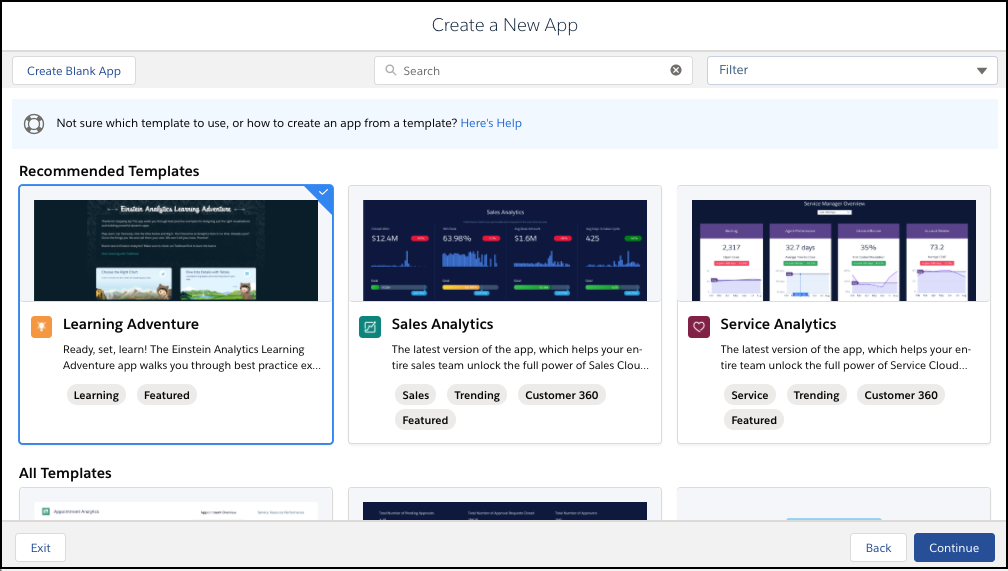
To add the Learning Adventure App to CRM Analytics Studio, click the
Create button and select App.
Or click Template Gallery in the left panel of the CRM
Analytics Studio home page. Then in the gallery, select Learning
Adventure.
Did this article solve your issue?
Let us know so we can improve!
Loading
Salesforce Help | Article
Cookie Consent Manager
General Information
Required Cookies
Functional Cookies
Advertising Cookies
General Information
We use three kinds of cookies on our websites: required, functional, and advertising. You can choose whether functional and advertising cookies apply. Click on the different cookie categories to find out more about each category and to change the default settings.
Privacy Statement
Required Cookies
Always Active
Required cookies are necessary for basic website functionality. Some examples include: session cookies needed to transmit the website, authentication cookies, and security cookies.
Functional Cookies
Functional cookies enhance functions, performance, and services on the website. Some examples include: cookies used to analyze site traffic, cookies used for market research, and cookies used to display advertising that is not directed to a particular individual.
Advertising Cookies
Advertising cookies track activity across websites in order to understand a viewer’s interests, and direct them specific marketing. Some examples include: cookies used for remarketing, or interest-based advertising.