
You are here:
Set Sharing Inheritance for a Dataflow
Specify which datasets inherit sharing settings and set a default security predicate.

Note We recommend that you test in a sandbox environment before rolling out sharing
inheritance to production. Test your particular use cases against your Salesforce org’s
security model and data to make sure that sharing inheritance works for you.
Configure Dataflows
Update the dataflow that generates the datasets that you want to inherit sharing. Specify which source object to inherit sharing from and the backup security predicate.
- Enable sharing inheritance for your org and synced objects if you haven’t already. For more information, see Enable Sharing Inheritance.
- If using the dataflow editor to specify the source object and backup security predicate:
- In CRM Analytics, click the gear icon (
 )
and then click Data Manager.
)
and then click Data Manager. - Click the Dataflows & Recipe tab.
- Click the dataflow that you want to edit, or click the actions button and select Edit.
- Click the sfdcRegister node.
- Select the object to inherit sharing from in the Sharing Source field.
- Optionally, add a security predicate in the Security Predicate field. No value is “False,” so users not covered by sharing inheritance have no record visibility. For syntax and more information, see Add Row-Level Security with a Security Predicate.
- Click Save.
- In CRM Analytics, click the gear icon (
- If configuring the dataflow through the definition file:
- Add the
rowLevelSharingSourceparameter to thesfdcRegisternode parameters for the dataset. For more information, see sfdcRegister. TherowLevelSharingSourceparameter takes a string, which is the API name for the object to inherit sharing from. In this example, the parameter specifies to inherit the Salesforce sharing settings on the Opportunity object."reg": { "action": "sfdcRegister", "parameters": { "source": "Opportunity_final", "name": "Opportunity w/ Account", "alias": "Oppty_w_Acct", "rowLevelSharingSource": "Opportunity", "rowLevelSecurityFilter": "'OwnerId' == \"$User.Id\"" } },Note Only inherit sharing settings from objects extracted using the sfdcDigest transformation. - Specify the security predicate in the
rowLevelSecurityFilterparameter of therowLevelSharingSourceparameter. In the example, when sharing limits are exceeded, users see only the opportunities that they own. Set the security predicate tofalseto block all users not covered by sharing.
- Add the
Configure Datasets
Update the sharing inheritance settings for datasets on the edit dataset page.
Note The
settings in the dataset and dataflow must match. If they don’t, you receive the warning,
"The sharing source and security predicate in this dataset version must be the same as in
the dataflow."
- Edit the dataset. For more information, see Edit a Dataset.
- Click the pencil under Sharing Source.
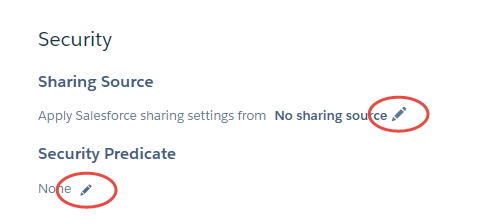
- Select the object to inherit sharing settings from. Only valid objects are displayed in the list. For example, the primary key of the object must be a field in the dataset.
- Optionally, click the pencil under Security Predicate. The security predicate is the row
visibility fallback when you exceed sharing inheritance limits, described here.
- Add your security predicate in the syntax described in Add Row-Level Security with a Security Predicate. The default on existing datasets is
false, so users not covered by sharing inheritance have no record visibility.
- Add your security predicate in the syntax described in Add Row-Level Security with a Security Predicate. The default on existing datasets is
Did this article solve your issue?
Let us know so we can improve!
