
You are here:
Determine If Sharing Inheritance Will Work for You
To understand how well sharing inheritance can work for your dataset row-level sharing needs, review these supported objects, maximum number of sharing descriptors, and considerations. Use the Sharing Inheritance Coverage Assessment tool to evaluate and understand your object and user eligibility.

Supported Objects for Sharing Inheritance
Which Salesforce object does your dataset inherit sharing from? Each dataset can inherit sharing settings from one object, regardless of how many source objects are used to create it. Supported objects for sharing inheritance are:
- Account
- Case
- Contact
- Lead
- Opportunity
Sharing Settings Change Frequency
How often do the sharing settings change for the source object (object selected to inherit sharing from), and how long can you wait for sharing inheritance to catch the change? Each full data sync captures sharing setting changes, so evaluate your sync settings. For more information, see Security Metadata Drift.
Run the Sharing Inheritance Coverage Assessment Report
Does your object have any records or users with more than your org’s maximum sharing descriptors? And what is your org’s maximum sharing descriptors?

After you turn on sharing inheritance, run the Sharing Inheritance Coverage Assessment report on an object. Then view the assessment’s user coverage to investigate how well sharing inheritance will work for you.
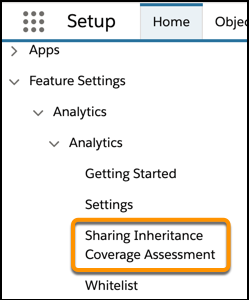
- In the Salesforce Setup menu, under Analytics, select Sharing Inheritance
Coverage Assessment.
- In the Salesforce Objects tab, choose the object to evaluate (1).
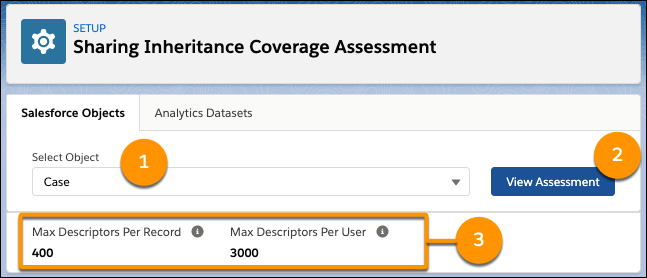
- Select View Assessment (2). Records from the evaluated object
with more than your org’s maximum descriptors (3) are found. The top records with too many
descriptors are listed along with their descriptor count.
If records exceed the limit, depending on your org’s sharing strategy flexibility, choose to reduce the number of descriptors per record or contact Salesforce Support to evaluate whether higher limits are an option.
- Select View User Coverage to see which users have more than the max descriptors on the selected object. The users not covered by sharing inheritance, who need a security predicate to manage their row-level access, are listed.
