
You are here:
CRM Analytics Security Implementation Guide
CRM Analytics has different levels of security that your organization can implement to ensure that the right user has access to the right data.
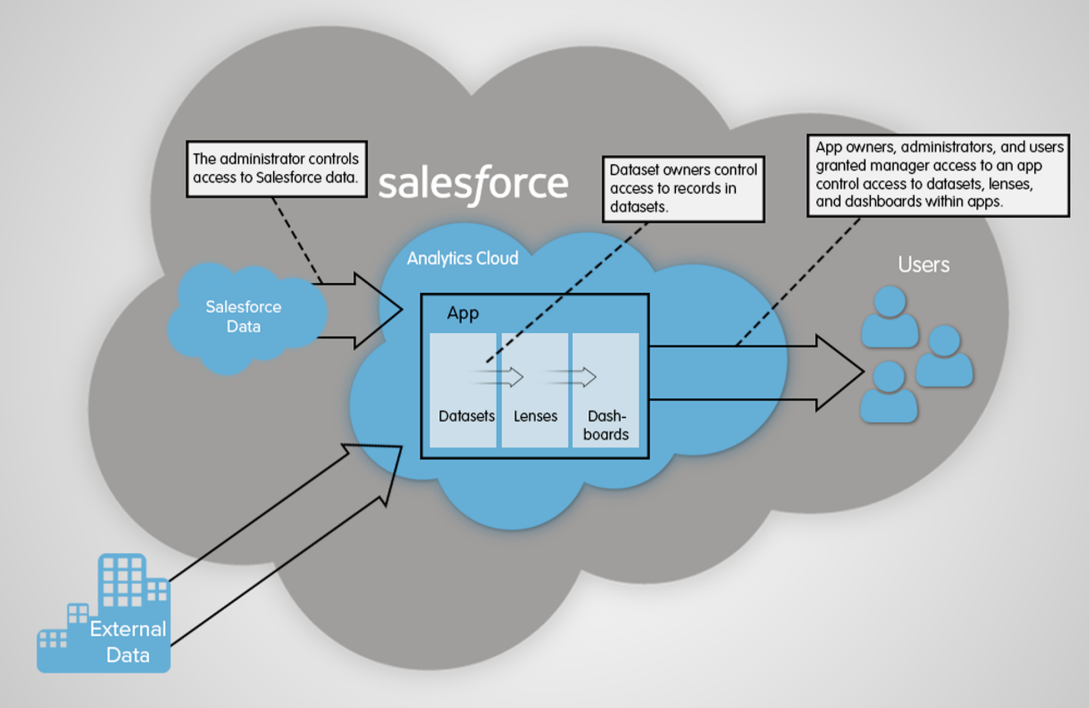
- The administrator can implement object-level and field-level security to control access to Salesforce data. For example, the administrator can restrict access to prevent the dataflow from loading sensitive Salesforce data into datasets. This document describes how CRM Analytics uses object-level and field-level security on Salesforce data and how to configure permissions on Salesforce objects and fields.
- Dataset owners can implement row-level security on each dataset that they create to restrict access to it’s records. If a dataset does not have row-level security, users who have access to the dataset can view all records. This document describes how to configure row-level security on datasets and provides some sample implementations based on datasets created from Salesforce data and external data.
- App owners, administrators, and users granted manager access to an app control access to
datasets, lenses, and dashboards within apps. This document describes the different levels of
access for apps and how to share datasets, lenses, dashboards in an app with other
users.
 Note CRM Analytics supports security predicates, a robust row-level security feature that enables you to model many different types of access controls on datasets. Also, CRM Analytics supports sharing inheritance, to synchronize with sharing that’s configured in Salesforce, subject to certain limitations. If you use sharing inheritance, you must also set a security predicate to take over in situations when sharing settings can’t be honored.
Did this article solve your issue?
Let us know so we can improve!
