
You are here:
Modify the Dataflow Based on Row-Level Security
Now it’s time to modify the dataflow definition file to account for the predicate.
Required Editions
| Available in Salesforce Classic and Lightning Experience. |
| Available with CRM Analytics, which is available for an extra cost in Enterprise, Performance, and Unlimited Editions. Also available in Developer Edition. |
In this scenario, you have to make changes to the dataflow based on the predicate.
- Add a column in the dataset that stores a comma-separated list of the role IDs of all
parents for each opportunity owner. When you defined the predicate in the previous step, you
temporarily referred to this column as “ParentRoleIDs.” To add the column, you redesign the
dataflow as shown in the following diagram:
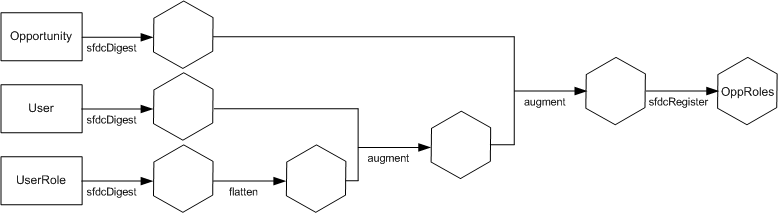
The new dataflow design contains the following changes:
- Extracts the role IDs from the UserRole object.
- Uses the Flatten transformation to generate a column that stores a comma-separated list of the role IDs of all parents of each user. When you determined the predicate in the previous step, you temporarily referred to this column as “ParentRoleIDs.”
- Link the new column to the OppRoles dataset.
- Add the predicate to the Register transformation that registers the OppRoles dataset.
You modify the dataflow as shown below.
{
   "Extract_Opportunity": {
      "action": "sfdcDigest",
      "parameters": {
         "object": "Opportunity",
         "fields": [
            { "name": "Id" },
            { "name": "Name" },
            { "name": "Amount" },
            { "name": "StageName" },
            { "name": "AccountId" },
            { "name": "OwnerId" }
         ]
      }
   },
   "Extract_User": {
      "action": "sfdcDigest",
      "parameters": {
         "object": "User",
         "fields": [
            { "name": "Id" },
            { "name": "Username" },
            { "name": "LastName" },
            { "name": "FirstName" },
            { "name": "Name" },
            { "name": "CompanyName" },
            { "name": "Division" },
            { "name": "Department" },
            { "name": "Title" },
            { "name": "Alias" },
            { "name": "CommunityNickname" },
            { "name": "UserType" },
            { "name": "UserRoleId" }
         ]
      }
   },
   "Extract_UserRole": {
      "action": "sfdcDigest",
      "parameters": {
         "object": "UserRole",
         "fields": [
            { "name": "Id" },
            { "name": "ParentRoleId" },
            { "name": "RollupDescription" },
            { "name": "OpportunityAccessForAccountOwner" },
            { "name": "CaseAccessForAccountOwner" },
            { "name": "ContactAccessForAccountOwner" },
            { "name": "ForecastUserId" },
            { "name": "MayForecastManagerShare" },
            { "name": "LastModifiedDate" },
            { "name": "LastModifiedById" },
            { "name": "SystemModstamp" },
            { "name": "DeveloperName" },
            { "name": "PortalAccountId" },
            { "name": "PortalType" },
            { "name": "PortalAccountOwnerId" }
         ]
      }
   },
   "Flatten_UserRole": {
      "action": "flatten",
      "parameters": {
         "multi_field": "Roles",
         "parent_field": "ParentRoleId",
         "path_field": "RolePath",
         "self_field": "Id",
         "source": "Extract_UserRole"
      }
   },
   "Augment_User_FlattenUserRole": {
      "action": "augment",
      "parameters": {
         "left": "Extract_User",
         "left_key": [
            "UserRoleId"
         ],
         "relationship": "Role",
         "right": "Flatten_UserRole",
         "right_key": [
            "Id"
         ],
         "right_select": [
            "Roles",
            "RolePath"
         ]
      }
   },
   "Augment_Opportunity_UserWithRoles": {
      "action": "augment",
      "parameters": {
         "left": "Extract_Opportunity",
         "left_key": [
            "OwnerId"
         ],
         "right": "Augment_User_FlattenUserRole",
         "relationship": "Owner",
         "right_select": [
            "Name",
            "Role.Roles",
            "Role.RolePath"
         ],
         "right_key": [
            "Id"
         ]
      }
   },
   "Register": {
      "action": "sfdcRegister",
      "parameters": {
         "alias": "OppRoles",
         "name": "OppRoles",
         "source": "Augment_Opportunity_UserWithRoles",
         "rowLevelSecurityFilter": "'Owner.Role.Roles' == \"$User.UserRoleId\" || 'OwnerId' == \"$User.Id\""
      }
   }
}
Note In this example, the dataset has columns Owner.Role.Roles and OwnerId. A user can view the
values of these columns for each record to which they have access.
Did this article solve your issue?
Let us know so we can improve!
