
You are here:
Design the Dataflow to Load the Data
Now it’s time to figure out how the dataflow will extract the data and load it into a dataset. You start by creating this high-level design for the dataflow.
Required Editions
| Available in Salesforce Classic and Lightning Experience. |
| Available with CRM Analytics, which is available for an extra cost in Enterprise, Performance, and Unlimited Editions. Also available in Developer Edition. |
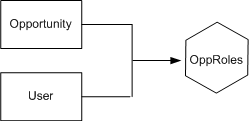
The dataflow will extract data from the Opportunity and User objects, join the data, and then load it into the OppRoles dataset.
Now let’s implement that design in JSON, which is the format of the dataflow definition file. A dataflow definition file contains transformations that extract, transform, and load data into a dataset.
Based on the design, you create the JSON shown below.
{
   "Extract_Opportunity": {
      "action": "sfdcDigest",
      "parameters": {
      "object": "Opportunity",
      "fields": [
         { "name": "Id" },
         { "name": "Name" },
         { "name": "Amount" },
         { "name": "StageName" },
         { "name": "AccountId" },
         { "name": "OwnerId" }
        ]
      }
   },
   "Extract_User": {
      "action": "sfdcDigest",
      "parameters": {
      "object": "User",
      "fields": [
         { "name": "Id" },
         { "name": "Username" },
         { "name": "LastName" },
         { "name": "FirstName" },
         { "name": "Name" },
         { "name": "CompanyName" },
         { "name": "Division" },
         { "name": "Department" },
         { "name": "Title" },
         { "name": "Alias" },
         { "name": "CommunityNickname" },
         { "name": "UserType" },
         { "name": "UserRoleId" }
         ]
      }
   },
   "Augment_Opportunity_User": {
      "action": "augment",
      "parameters": {
         "left": "Extract_Opportunity",
         "left_key": [
            "OwnerId"
         ],
         "right": "Extract_User",
         "relationship": "Owner",
         "right_select": [
            "Name"
         ],
         "right_key": [
            "Id"
         ]
      }
   },
   "Register": {
      "action": "sfdcRegister",
      "parameters": {
         "alias": "OppRoles",
         "name": "OppRoles",
         "source": "Augment_Opportunity_User",
         "rowLevelSecurityFilter": ""
      }
   }
}
If you were to run this dataflow, CRM Analytics would generate a dataset with no row-level security. As a result, any user that has access to the dataset would be able to view all opportunities. For example, as shown below, Bill would be able to view all opportunities, including those owned by his manager Keith.
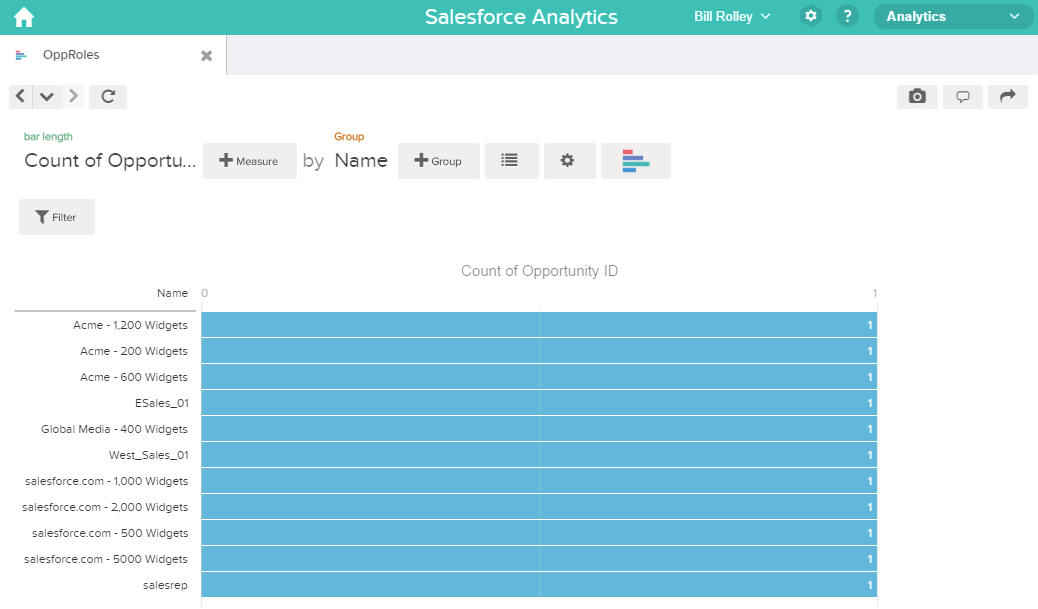
You need to apply row-level security to restrict access to records in this dataset.
