
You are here:
Account Insights
The Account Insights dashboard answers questions such as how many deals are being managed in a given account space? What are your customer interactions and profitability? And what meetings are scheduled with deal parties?
Use the Accounts Insights Dashboard
Use the Accounts Insights dashboard drill down into account details.
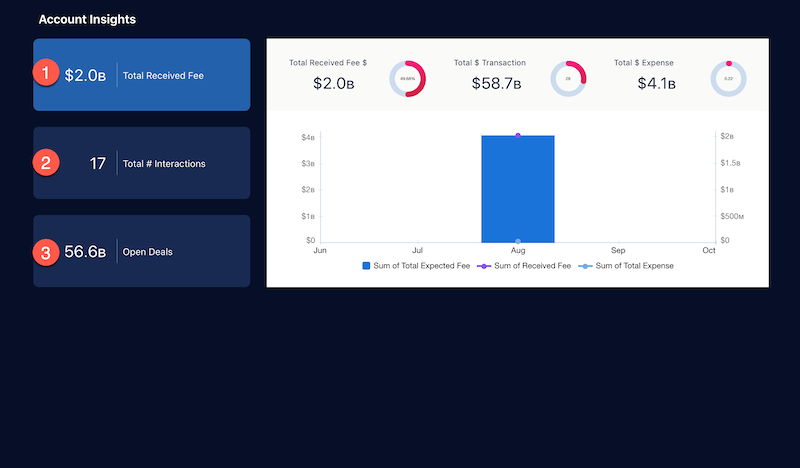
Click the fields on the left to populate the charts on the right. Click (1) Total Received Fee to understand what is the overall revenue generated from this account. Click (2) Total # Interactions to understand overall client engagement. Click (3) Open Deals to see how is overall client engagement.
KPI Calculations -Total Received Fee
- Received Fee: Sum of Received Fee for the Account.
- Received Fee Donut: Received Fee/ TotalExpectedFee for the Account.
- Total Expense: Sum of Total Expense for the Account.
- TotalExpense Donut: Sum of TotalExpense where Status is Open / sum of TotalExpense where Status is Closed.
- TransactionValue: Sum of TransactionValue where Status is Open.
- TransactionValue: Sum of TransactionValue where Status is Open / sum of TransactionValue where Status is Closed.
- Timelime Chart: ReceivedFee, Transaction Value, and TotalExpenses over time.
KPI Calculations - Total # Interactions
- Total # Interactions: Count of rows from Interaction Object.
- Total # Interaction Attendees: Unique count of Ids from InteractionAttendee object.
- Total # Participants: Count of rows from InteractionParticipant object.
- Interactions over time: Count of interactions for each Financial Deal by Interaction Start Date.
KPI Calculations - Open Deals
- Open Deals: Sum of TransactionValue where status= Open.
- Open Pipeline: Sum of TransactionValue where status= Open in YTD (SnapshotDate).
- Open Pipeline Last Year: Percent change of TransactionValue where status = 'Open' this year compared with Last year.
- On Hold: Sum of TransactionValue where status= 'On Hold' in YTD (SnapshotDate).
- On Hold Last Year: Percent change of TransactionValue where status = 'On Hold' this year compared with Last year.
- Open Deals by Stage: Sum of Transaction Value for Open Deals by Stage.
Did this article solve your issue?
Let us know so we can improve!
