
You are here:
Quote Insights Embedded Dashboard
The Quote Insights dashboard is designed to be embedded wherever you track your quotes. Use it to quickly and easily understand where to put your efforts.
Required Editions
| Available in: Developer edition and for an extra cost in Enterprise, Performance, and Unlimited editions. |
Embed the Quote Insights Dashboard
You can embed and access the Quote Insights dashboard in Lightning Experience pages and Salesforce Classic experiences.
The Quote Insights embedded dashboard requires filters to be added when embedding the
dashboard. Use the following syntax: {"datasets":{"Quote":[{"fields":["Id"],"filter":{"operator":"in","values":["$Id"]},"locked":true,"hidden":true}],"OrderItem":[{"fields":["Id"],"filter":{"operator":"in","values":["$Id"]},"locked":true,"hidden":true}],"QuoteMember":[{"fields":["Id"],"filter":{"operator":"in","values":["$Id"]},"locked":true,"hidden":true}]}}
For general instructions on embedding dashboards, see Embed Dashboards Everywhere in Salesforce Help.
For instructions on filtering embedded dashboards, see Filter and Selection Syntax for Embedded Dashboards in Salesforce Help.
Understand Your Quotes
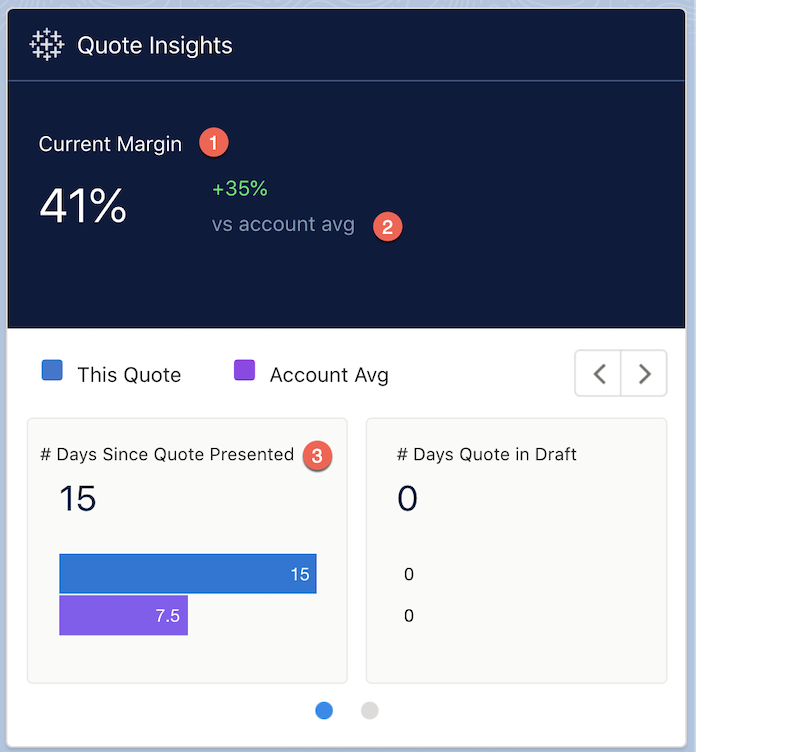
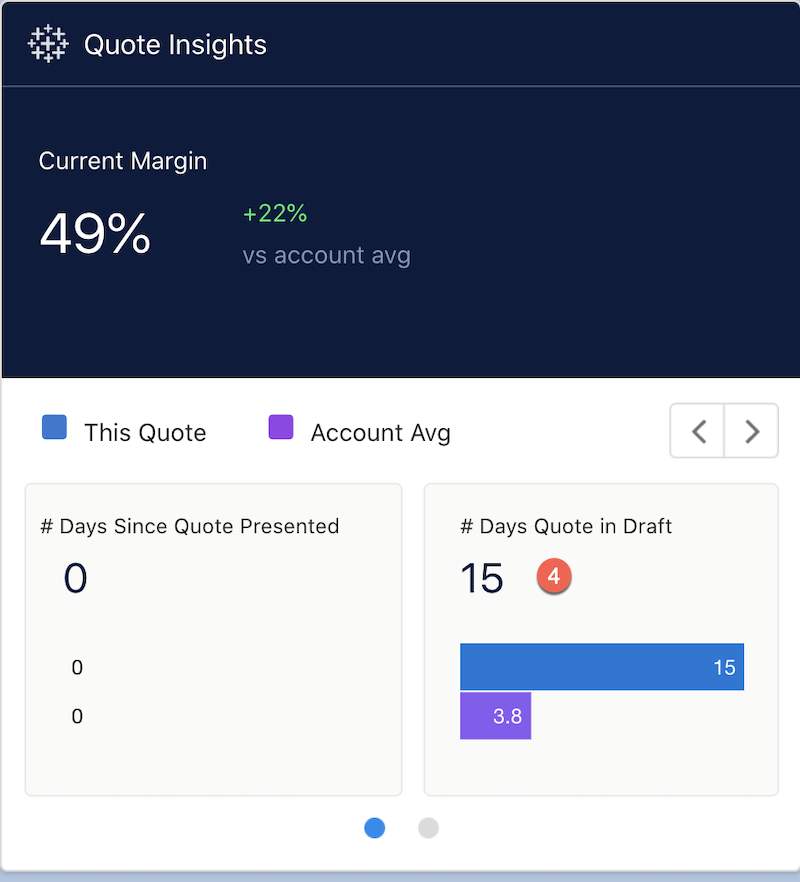
| Section | Description |
|---|---|
| ( 1.) Current Margin | The current margin for all your quotes for a given account (including quotes accepted and quotes presented). |
| ( 2.) vs account avg | The current margin for the account vs. the average margin for the account. This metric helps you to understand if you’re working above or below the margin rates for a given account. |
| ( 3.) Days Since Quote Presented | The number of days since the quote was presented to the customer. You can use this metric to determine whether you must quickly follow up with a customer. |
| ( 4.) Days Quote in Draft | The days that your quote has been in draft. You can present quotes to customers or follow up on presented quotes if there are a number of quotes in draft. |
KPI Calculations
- Current Margin:Sum of vlocity_cmt__QuoteMarginTotal__c.
- % change of Current margin v Account Average: for Account Average Margin: Avg of vlocity_cmt__QuoteMarginTotal__c for % change: absolute value of (Sum of vlocity_cmt__QuoteMarginTotal__c - Account Average Margin) / Account Average Margin as %.
- # Days Since Quote Presented:Now() - LastModifiedDate.
- # Days Quote in Draft:Now() - CreatedDate.
Which Quotes Need My Attention?
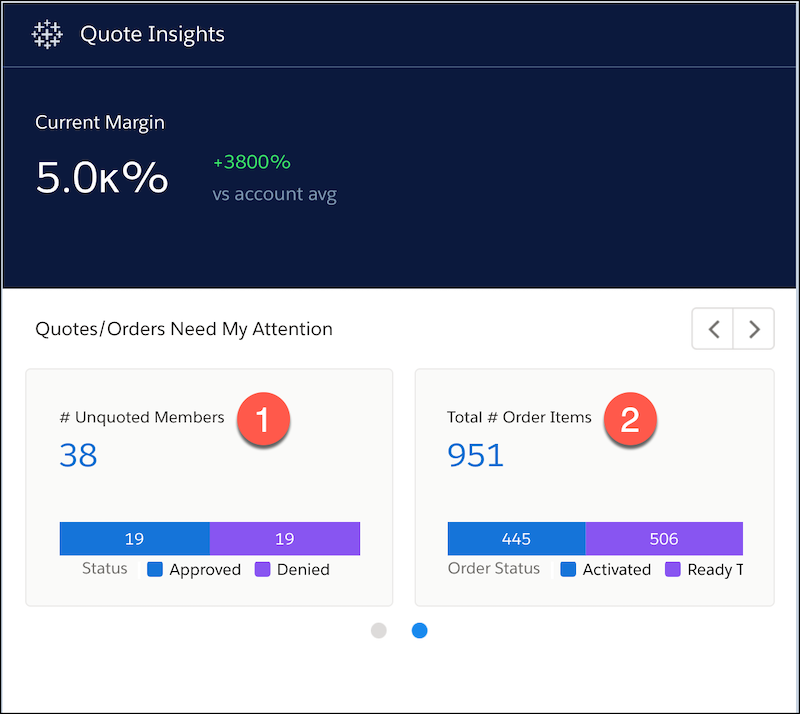
From the dashboard, click the right arrow to open the Quotes details page. Use this page to see which quotes need your attention.
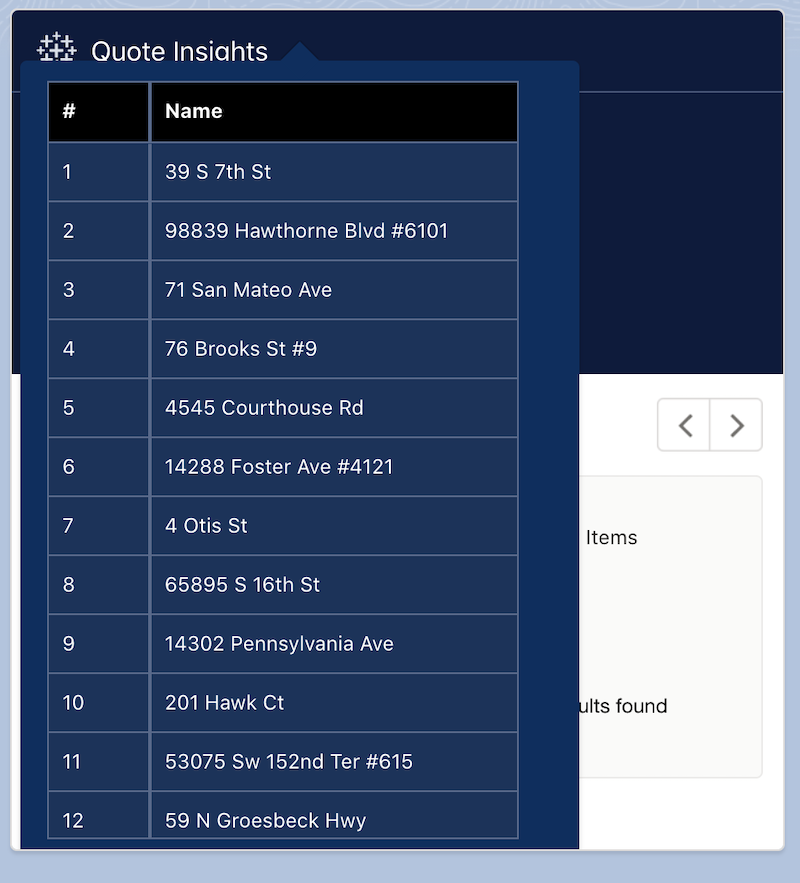
Hover over the unquoted members for a detail table.
| Section | Description |
|---|---|
| ( 1.) #Unquoted Members | Members of a given account that haven’t accepted a quote. For example, if World Telecommunications has members in California and Texas, and you have quoted California members, the Texas members represent the unquoted members. You can see where the members have denied the quotes. Hover over the unquoted members number to see the details. |
| ( 2.) Total # Order Items | Total Order Items represents the total of order line items. For example, if your customer, World Telecommunications, has purchased 951 cable boxes, then the total Order Items is 951. Out of those orders, you can see how many orders are ready to be activated and how many are already activated. |
KPI Calculations
- # Unquoted Members: Unique of Name.
- # Unquoted Members by Status chart:Count of Rows by Quote.Status.
- Total # Order Items:Count of rows.
- # Order Items by Status chart:Count of Order Items by Order.vlocity_cmt__OrderStatus__c.
