
You are here:
Self-Service Embedded Dashboard
The Self-Service dashboard offers a comprehensive view of account-specific details, such as contracts, quotes, orders, bills, and asset distribution. Integrate the dashboard into the community portal to provide Procurement Managers with a comprehensive view of the entire enterprise. Small and Medium Businesses (SMB) executives can access self-service analytics from the SMB Console for a 360° view of the complete account.
When the dashboard is embedded, it appears as a new tab on the community portal or the SMB Console. For general instructions on embedding dashboards, see Embed Dashboards Everywhere in Salesforce Help.
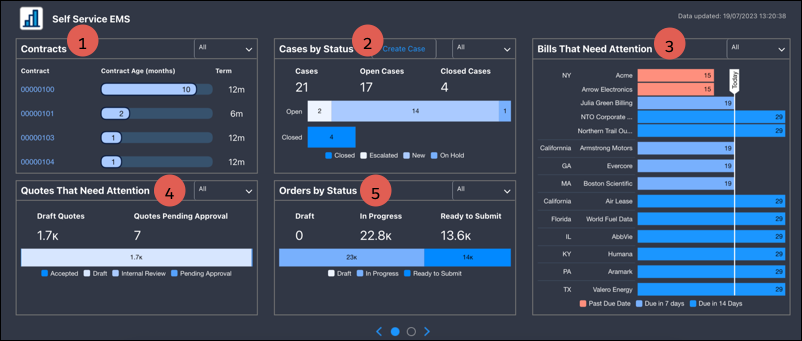
- Track and analyze your contracts to gain insights into their details, such as the number of months since their initiation and actual contract terms. Also, identify contracts that require approval and use the data to take actionable steps, such as identifying the contracts that are up for renewal (1).
- Assess the distribution of cases based on their status and create cases easily (2).
- View the highlighted overdue and upcoming bills, to take prompt action (3).
- View the quotes that are pending approval (4).
- Gain visibility into the distribution of orders based on status (5).
The dashboard also provides users with a comprehensive view of asset allocation and distribution. It offers valuable geographic insights through a visual representation of the asset distribution by location, accounts, state, and country.
