
You are here:
Lead Trending Analytics Template
Create an app from the Lead Trending Analytics Template to increase your visibility into your team’s lead conversion process. Sales operations can get instant insight into how quickly the team converts leads and can identify bottlenecks in the conversion process.
Required Editions
| User Permissions Needed | |
|---|---|
| To create and manage the Lead Trending Analytics app: | Manage CRM Analytics Templated Apps |
| To use the Lead Trending Analytics app: | Use CRM Analytics Templated Apps |


Org Requirements
Your org requires the following before you can create an app from the Lead Trending Analytics template:
- Make sure you and all app users have the CRM Analytics license.
- Your org must use lead history and have at least one opportunity linked to a lead. It must also use lead record types.
- Set Salesforce field-level security to enable the Analytics Integration User to see all fields used in the app. See Set Field Level Security to Enable Creation of an CRM Analytics Template.
Use Lead Trending Analytics
Open the app.
- From the app picker
 , select CRM
Analytics Studio to open the CRM Analytics home page.
, select CRM
Analytics Studio to open the CRM Analytics home page. - Under Browse in the left column, select All Items.
- Select the Apps tab, then click your app to open it. If you can’t immediately find it, consult your Salesforce administrator to find out the name they gave it when creating the app.
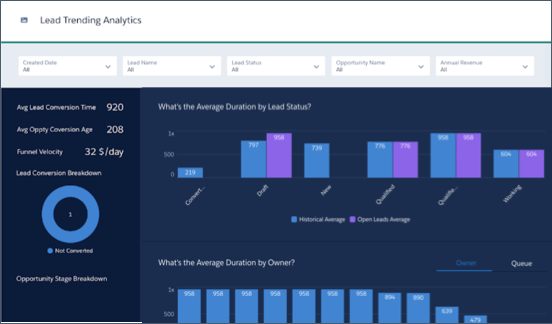
Use the chart at the top to get an overview of your lead conversion data. You can see the following:
- Leads with the most changes.
- The average change duration, that is the average time leads spend in the process before being converted.
- Average time to close leads.
- What happened to leads after conversion.
Filter the data by lead creation date, industry, conversion date, and stage.
Charts in the middle of the dashboard show lead converted to accounts and contacts.
Scroll down to see details about all your leads. Take action on a record by hovering over the lead name and clicking the disclosure triangle to the right. That opens the Actions Menu from the record. From there, post to Chatter, create a task or an event, or perform another action to move the process along.
Metric Calculations
Left Panel
- Avg Lead Conversion Time. Average time between creation of leads and their conversion to opportunities. If leads are not converted to opportunities, average time between creation and current date. Includes all leads in the org.
- Avg Oppty Conversion Age.Average time between lead creation and opportunity close date for all closed opportunities, or current time for all open opportunities. Only includes leads that have converted to opportunities.
- Funnel Velocity. Dollars closed per day, which helps sales team members determine if there is enough business in the pipeline. Calculated as the number of (Converted leads * Average conversion rate * Average deal size) / Average conversion time. Average conversion rate equals Number of converted leads / Number of leads. Average conversion time equals time difference between lead creation date and opportunity creation date.
Center Bar Charts
- What’s the Average Duration by Lead Status? Average number of hours leads have remained in the designated status (for example, Qualified or New). Includes all leads with changed status.
- What’s the Average Duration by Owner? Average number of hours designated owner has owned leads. Owner can be a user or queue.
