
You are here:
Public Sector Case Analytics Template
Public Sector Case Analytics lets public sector service organizations measure their effectiveness and identify immediate actions to improve case work performance.
Required Editions
| Available in Salesforce Classic and Lightning Experience. |
| Available with CRM Analytics, which is available for an extra cost in Enterprise, Performance, and Unlimited Editions. Also available in Developer Edition. |
| User Permissions Needed | |
|---|---|
| To create and manage Public Sector Case Analytics: | Manage CRM Analytics Templated Apps |
| To use the Public Sector Case Analytics app: | Use CRM Analytics Templated Apps |

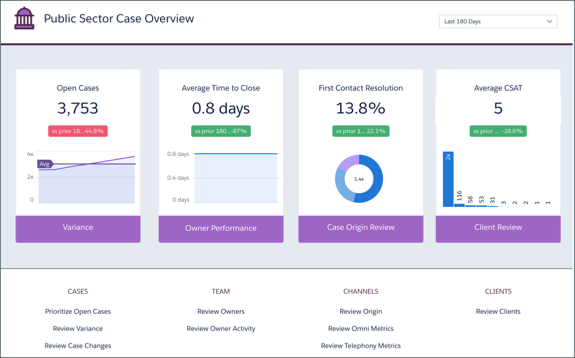
The app’s prebuilt dashboards give you instant insight into case status, surfacing the ones that require immediate attention. Visualizations surface case-related activities that are near or past due to help you stay on track delivering client services. View bottlenecks in the process so you can take action to assure effective case management and resolution. And see if you and your team are compliant with service level agreements.
Also, get details about your clients and beneficiaries, trends in client satisfaction, and case history brought to life via interactive visualizations. You can also immediately surface top-performing case managers and understand why they’re effective. And identify lower performers so you can help them take steps to become more effective.
Org Requirements
Your org requires the following before you can create an app from the Public Sector Case Analytics template:
- Make sure you and all app users have the Analytics Plus or Analytics Growth licenses.
- Your org must have at least one closed case and one closed task to enable app creation.
- The wizard checks to see if you track data about the following in your org:
- Customer satisfaction (CSAT)
- Knowledge
- Case history
- Queues
- Events
- Business hours
- Case record types
- Telephony
- Omni-Channel
- Person Accounts
- Set Salesforce field-level security to enable the Analytics Integration User to see all fields used in the app. See Set Field Level Security to Enable Creation of a CRM Analytics Template.
- CRM Analytics looks for your org’s fiscal year start date and uses it in app dashboards. To choose a different fiscal start date, use the app’s Custom create option.
- Customize Public Sector Case Analytics with the Configuration Wizard
Use the configuration wizard to make sure Public Sector Case Analytics reflects how you prefer to view case management data. - Use Public Sector Case Analytics Prebuilt Dashboard
After you create Public Sector Case Analytics, navigate to the app and use its dashboards to measure your team’s effectiveness and improve services delivery.
