
You are here:
Set Decimal Places for Numbers in Dashboard Charts, Tables, and Metrics
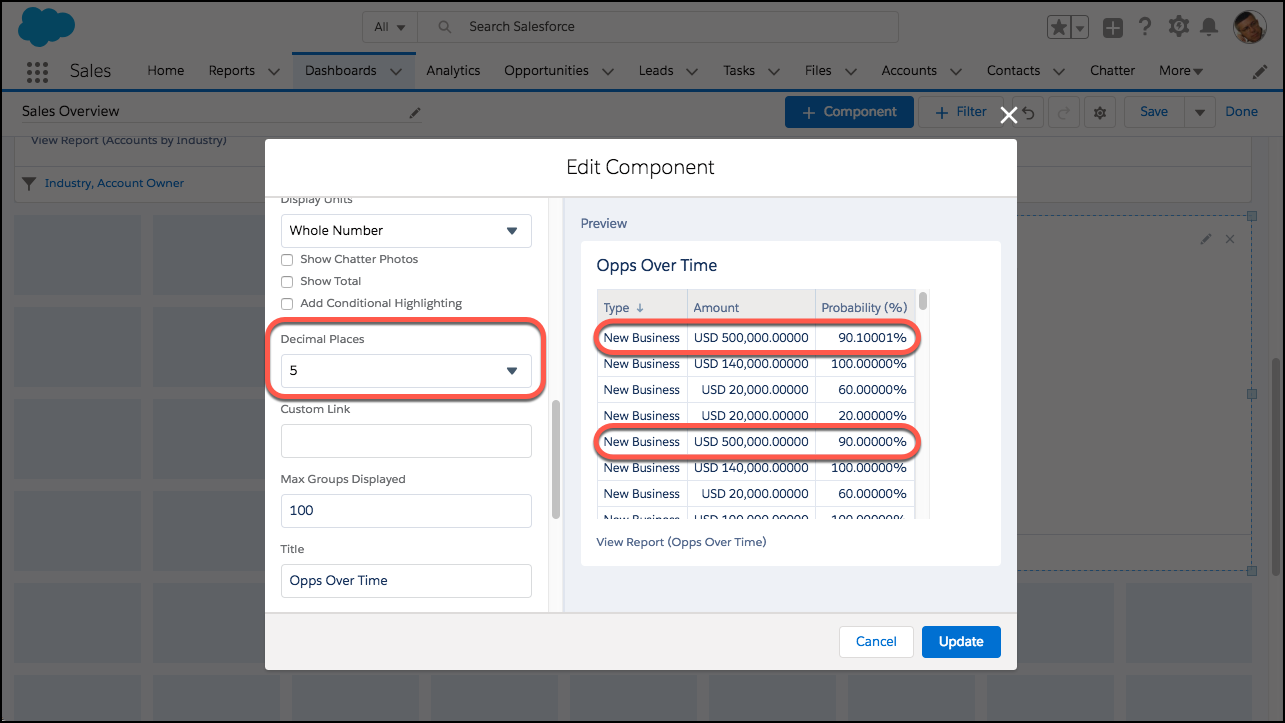
Because 14.11B is greater than 14B and the difference between 90%, 90.1%, and 90.10001% matters, choose how many decimal places appear after numbers in dashboard widgets.
Required Editions
| Available in: Lightning Experience |
| Available in: Essentials, Professional, Enterprise, Performance, Unlimited, and Developer Editions |
| User Permissions Needed | |
|---|---|
| To create dashboards: | Run Reports AND Create and Customize Dashboards |
| To edit and delete dashboards that you created: | Run Reports AND Create and Customize Dashboards |
| To edit and delete dashboards that you created in public folders: | Edit My Dashboards |
| To edit and delete dashboards that you didn’t create in public folders: | Manage Dashboards in Public Folders |
| To create, edit, and delete dynamic dashboards: | Manage Dynamic Dashboards |
- Edit or create a dashboard.
- Edit a dashboard widget, or add one by clicking + Widget.
- For Decimal Places, select a number from 0 through 5. To let Salesforce set the decimal precision, selectAutomatic. Some widgets, such as donut charts, have the option to display percentages. Setting decimal places doesn’t change how many decimal places appear after these percentages.
- Click Update. (If you're adding a widget, click Add.)
- Click Save.
The dashboard widget now displays up to 5 decimal places.
Some charts may display shortened numbers with a unit symbol.
| Symbol | Unit | Example |
|---|---|---|
| K | Thousand (10^3) | 4K = 4,000 |
| M | Million (10^6) | 4M = 4,000,000 |
| B | Billion (10^9) | 4B = 4,000,000,000 |
| T | Trillion (10^12) | 4T = 4,000,000,000,000 |
| P | Quadrillion (10^15) | 4P = 4,000,000,000,000,000 |
| X | Quintillion (10^18) | 4X= 4,000,000,000,000,000,000 |
| Z | Sextillion (10^21) | 4Z = 4,000,000,000,000,000,000,000 |
| Y | Septillion (10^24) | 4Y = 4,000,000,000,000,000,000,000,000 |
| m | Thousandth (10^-3) | 4m = 0.004 |
| μ | Millionth (10^-6) | 4μ = 0.000004 |
| n | Billionth (10^-9) | 4n = 0.000000004 |
| p | Trillionth (10^-12) | 4p = 0.000000000004 |
| f | Quadrillionth (10^-15) | 4f = 0.000000000000004 |
| a | Quintillionth (10^-18) | 4a = 0.000000000000000004 |
| z | Sextillionth (10^-21) | 4z = 0.000000000000000000004 |
| y | Septillionth (10^-24) | 4y = 0.000000000000000000000004 |
Did this article solve your issue?
Let us know so we can improve!
