Quick search allows you to find folders within the Lightning Reports tab, Dashboards
tab, or selected folder context.
Required Editions
Available in: Lightning Experience
Available in: Professional, Enterprise,
Performance, Unlimited, and Developer
Editions
Use global search when you want to find folders across your entire org. Use quick search
when you want to find folders within the select context.
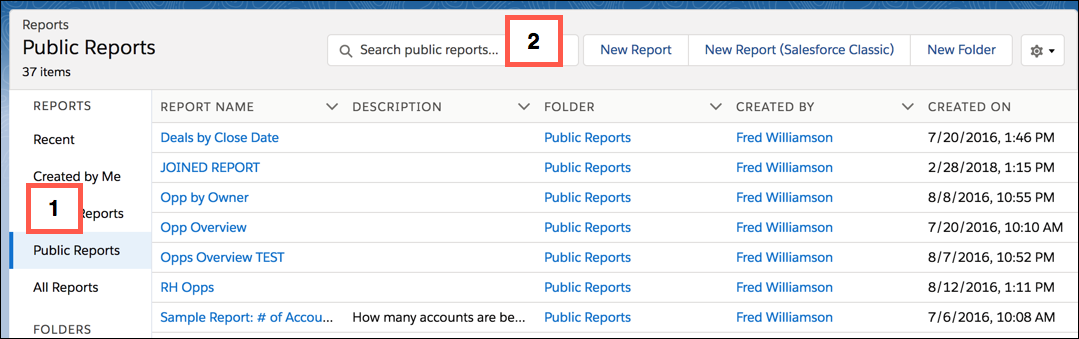
Find the quick search box at the top of each report, dashboard, and folder page. Select a
scope on the side menu [1] and the search context instantly changes to that
scope.[2]
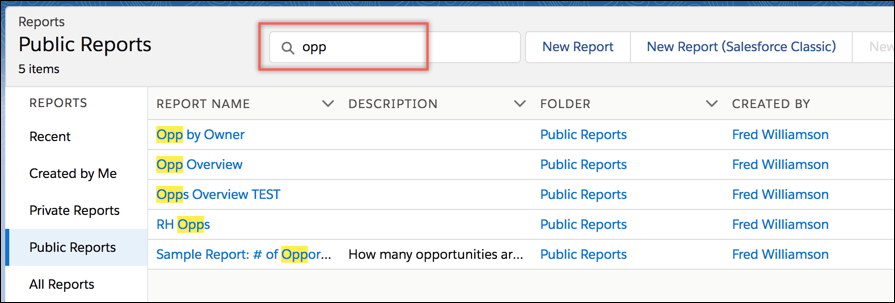
Start entering text to see the list of matches within the selected scope.
Here are some things to remember about quick search:
Quick search shows only the first 20 results. A message indicates if there are
more results that aren’t showing.
The context is always what is selected on the side menu.
Quick search on folders finds all folders and subfolders, but not the reports
and dashboards in the folders.
The options to customize columns and create folders are disabled during quick
search.
Quick search keeps the current custom column selections and sorting.
We use three kinds of cookies on our websites: required, functional, and advertising. You can choose whether functional and advertising cookies apply. Click on the different cookie categories to find out more about each category and to change the default settings.
Privacy Statement
Required Cookies
Always Active
Required cookies are necessary for basic website functionality. Some examples include: session cookies needed to transmit the website, authentication cookies, and security cookies.
Functional Cookies
Functional cookies enhance functions, performance, and services on the website. Some examples include: cookies used to analyze site traffic, cookies used for market research, and cookies used to display advertising that is not directed to a particular individual.
Advertising Cookies
Advertising cookies track activity across websites in order to understand a viewer’s interests, and direct them specific marketing. Some examples include: cookies used for remarketing, or interest-based advertising.