
You are here:
Track Changes in Your Sales Pipeline
A historical report can help you monitor your company’s sales pipeline to make sure it contains enough activity to meet current and future sales goals. For example, focus on deals whose value grew or shrank in the last three months, or deals that moved into or out of a given target period.
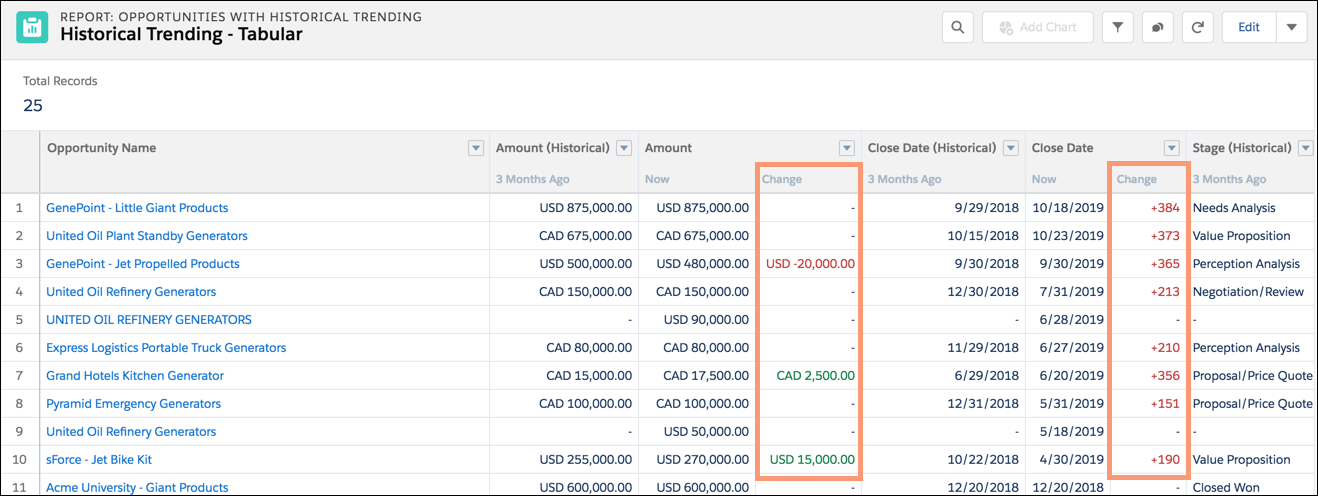
Compare historical and current values of key attributes of opportunities such as dates, amounts, and status, to see how your pipeline has changed over time. For example, this Lightning Experience report points out opportunity amounts and close dates that have changed since 3 months ago.
- Snapshot up to five dates to track day-to-day or week-to-week trends.
- Current and historical values are shown side by side for easy comparison.
- Changed dates and amounts are highlighted in red or green.
- Watch Your Pipeline Change Over Time
Let’s say you want to know how the total value of your pipeline today compares with its value yesterday. Create a simple report to compare the two dates. - Identify Historical Deals Over a Given Value
Suppose you want to focus only on deals in your pipeline worth more than $5,000, but you’re not concerned about today’s fluctuations. Use a historical trending report that filters out any deal with a value that was below $5,000 yesterday. - Find Deals that Have Been Pushed Out
To focus on deals that are taking more time to close than expected, create a historical trending report that finds deals in your pipeline that have had their close dates moved to a later date. - Identify Shrinking Deals
Historical trending analysis can help you prioritize by quickly identifying deals that are at risk. For example, target the deals in your pipeline that have decreased in value since yesterday. Use a historical trending report that gives you the deals whose value yesterday was greater than their value today.
Did this article solve your issue?
Let us know so we can improve!
