
You are here:
Deploy Tableau Next Assets in a Data Kit
Deploy your Tableau Next workspaces, visualizations, and dashboards to your target home org with a data kit. Data 360 semantic models, the primary data source for Tableau Next assets, must be deployed to target home orgs using data kits.
Required Editions
| View supported editions. |
| User Permissions Needed | |
|---|---|
| To create and edit Tableau Next assets: | Tableau Unmetered Platform Analyst or Tableau Next Platform Analyst permission set |
| To create, edit, or upload outbound change sets: | Create and Upload Change Sets |
| To deploy inbound change sets: | Deploy Change Sets AND Modify Metadata Through Metadata API Functions |
| To create and deploy data kits: | Data Cloud Architect |
Create Your Data Kit
- In your sandbox org, go to Data Cloud Setup.
- Under Developer Tools, click Data Kits.
- Click New.
- For Data Kit Type, DevOps.
- Select your data space and name the data kit.
-
Add Tableau Next assets using Visualizations, Dashboards, and Workspaces in the Data Kit Contents list
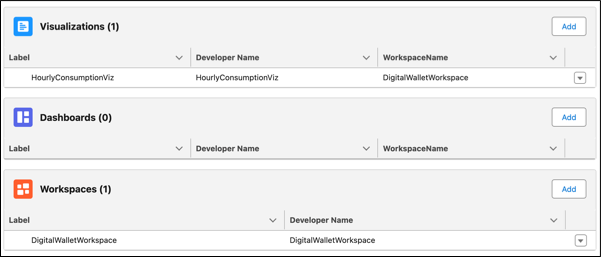
When you select a visualization or dashboard, the corresponding workspace is automatically added to the data kit.
- Add any other assets, like semantic models or other Data 360 objects.
-
Review the Publishing Sequence.
You must ensure your assets reflect the following sequence, at a minimum:
- Semantic Models
- Workspaces
- Visualizations
- Dashboards
 Important If you don't review and update the publishing sequence, data kit deployment will fail.
 - Save the data kit.
Create a Change Set for Your Data Kit
- From Setup, enter Outbound Change Sets in the Quick Find box, then select Outbound Change Sets.
- To create a change set, click New.
- To add components, click Add.
- Select the Data Package Kit Definition component type.
- Select your data kit and click Add to Change Set.
-
Optionally, click View/Add Dependencies to add dependent components.
Dependent components rely on the existence of other components. Unless you’re certain that the dependent components exist in every org this change set will be deployed to, add dependent components to the change set.
Deploy Your Change Set to Your Target Org
- Upload your change set to the target org that you want to send the change set to.
- In the target org, from Setup, enter Inbound Change Sets in the Quick Find box, then select Inbound Change Sets.
-
Find your change set and click Deploy.
Deploying installs the data kit in your target org.
Did this article solve your issue?
Let us know so we can improve!
