
Loading
Salesforce now sends email only from verified domains. Read More
Tableau Next
Table of Contents
Select Filters

          No results
          No results
          Here are some search tips

          Check the spelling of your keywords.
          Use more general search terms.
          Select fewer filters to broaden your search.

          Search all of Salesforce Help
          Deploy Tableau Next Assets

          Deploy Tableau Next Assets

          Deploy Tableau Next workspaces, visualizations, and dashboards from your sandbox org to other sandbox orgs and your production Data 360 home and companion orgs using change sets. You can also deploy Tableau Next and Data 360 assets from sandbox to production home orgs using data kits. Using sandboxes allows you to develop, test, and train without compromising the data and apps in your production org. Using change sets and data kits for deployments moves the customizations you created and tested in your sandbox directly to your production org.
          Required Editions

          View supported editions.
            Home Sandbox Orgs Companion Sandbox Orgs
          Deployment Options for Tableau Next Assets

          Use Metadata API capabilities such as change sets or Salesforce CLI

          OR

          Add assets in a data kit

          Use Metadata API capabilities such as change sets or Salesforce CLI
          Deployment Options for Semantic Models and Other Data 360 Assets Use Metadata API capabilities such as change sets or Salesforce CLI Sync Data 360 assets from the home org
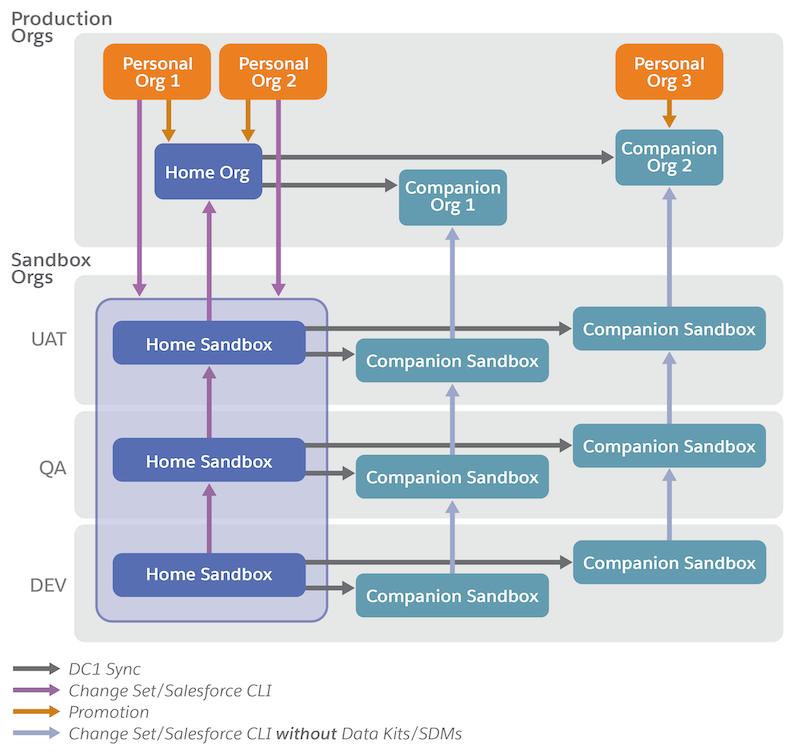
          Diagram describing metadata flow between sandbox orgs and productions orgs

          You can also deploy Tableau Next assets using other standard Metadata API tools, like the Salesforce CLI. For more information on developer tools, see the Tableau Next ISV/Developer Guide.

          Tableau Next in a Sandbox

          A sandbox is a copy of your Salesforce org that you can use for development, testing, and training without compromising the data and apps in your production org. Tableau Next sandboxes are the same as Data 360 sandboxes. Data 360 sandboxes contain only metadata. No data is replicated when you provision Data 360 in a sandbox, even in partial copy and full copy sandboxes.

          Use a sandbox to:

          • Test changes against copies of your production data and users.
          • Provide a training environment.
          • Test AppExchange packages or integrations.
          • Isolate customization and development work from your production environment until you’re ready to deploy changes.

          For more information, see Data 360 in a Sandbox Org.

          To create a sandbox with Tableau Next, follow the steps on Create a Data 360 Sandbox. Then, enable Tableau Next and create your analytics assets in the sandbox.

          Deployment Considerations for Change Sets and Data Kits

          Most Tableau Next workspaces, visualizations, and dashboards depend on semantic models for their data. Semantic models and Tableau Next assets can’t be deployed in a single change list. You must deploy semantic models using data kits.

          Data 360 companion orgs don’t support data kits, meaning semantic models and other Data 360 assets can only be deployed to home orgs. To deploy Tableau Next assets in a companion org, you must first deploy your semantic models to your home org. Next, validate that the semantic models are synced to the companion orgs. Then, you can deploy your Tableau Next assets to the companion orgs using a change set.

          • Deploy Tableau Next Assets with Change Sets
            Deploy your Tableau Next workspaces, visualizations, and dashboards using an outbound change set to your target home and companion orgs.
          • Deploy Tableau Next Assets in a Data Kit
            Deploy your Tableau Next workspaces, visualizations, and dashboards to your target home org with a data kit. Data 360 semantic models, the primary data source for Tableau Next assets, must be deployed to target home orgs using data kits.
           
          Loading
          Salesforce Help | Article