Tableau Unmetered Admin or Tableau Next Admin permission set and Assign Permission sets
Note Inspector Proactive Data Alerts in Tableau Next is a pilot or beta
service that is subject to the Beta Services Terms at Agreements - Salesforce.com or a written Unified Pilot Agreement if executed by
Customer, and applicable terms in the Product Terms Directory. Use of this pilot or beta
service is at the Customer's sole discretion.
Select the Setup icon (gear).
In the Quick Find box, type Agent and choose Agentforce
Agents.
Select New Agent. Or choose the name of an existing agent, then select Open in
Builder to edit, and skip to step 8.
If you’re building a new agent, select the Analytics and
Visualization agent template in the Agent Creator page. Then click
Next.
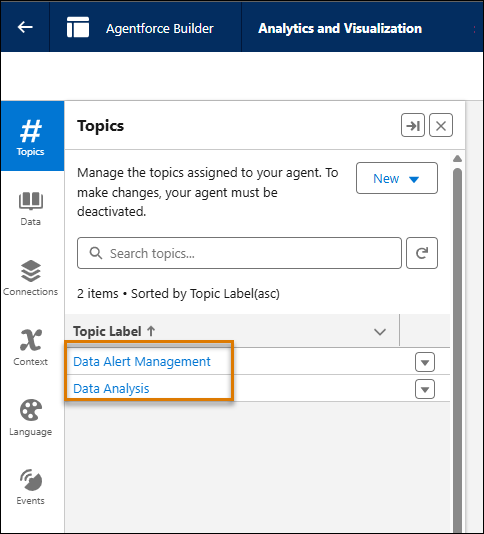
Confirm that Data Analysis and Data Alert Management are both added, and click
Next.
Enter a Name, API Name, Description, Role, and Company for your agent. Then click
Next.
Confirm your Default Language and Tone, and click Create.
In the Agentforce Builder page, select the dropdown arrow next to Data Alert Management.
Then select View Details.
On the This Topic’s Actions tab, confirm that Create Data Alert is
listed, and click Activate.
From the app picker, go to Tableau Next.
On the left side of Tableau Next, choose Administration and choose
Settings.
Confirm that Inspector: Proactive Alerts (Beta) is enabled. If you
don't see Inspector: Proactive Alerts (Beta), make sure that
Concierge: Analytics Q&A is enabled first; otherwise,
Inspector: Proactive Alerts (Beta) doesn't appear.
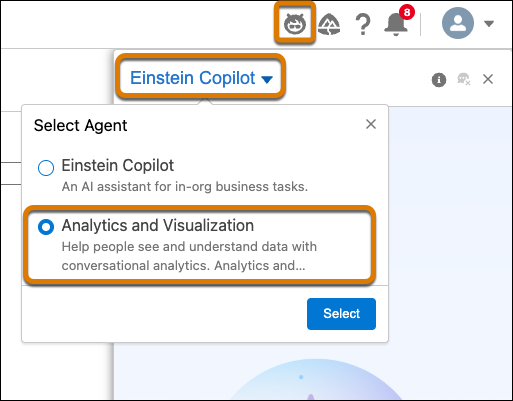
Finally, users must select the
Analytics and Visualization agent from Agentforce in Tableau Next. Then
to create an alert, open a Tableau Next metric, and open the Agentforce panel by clicking the
Agentforce icon. Using natural language, ask Agentforce to send you an alert when a specified
metric meets a certain condition, for example “Send me an alert when this metric reaches
10,000.”
Did this article solve your issue?
Let us know so we can improve!
Loading
Salesforce Help | Article
Cookie Consent Manager
General Information
Required Cookies
Functional Cookies
Advertising Cookies
General Information
We use three kinds of cookies on our websites: required, functional, and advertising. You can choose whether functional and advertising cookies apply. Click on the different cookie categories to find out more about each category and to change the default settings.
Privacy Statement
Required Cookies
Always Active
Required cookies are necessary for basic website functionality. Some examples include: session cookies needed to transmit the website, authentication cookies, and security cookies.
Functional Cookies
Functional cookies enhance functions, performance, and services on the website. Some examples include: cookies used to analyze site traffic, cookies used for market research, and cookies used to display advertising that is not directed to a particular individual.
Advertising Cookies
Advertising cookies track activity across websites in order to understand a viewer’s interests, and direct them specific marketing. Some examples include: cookies used for remarketing, or interest-based advertising.