
You are here:
Change Your Intelligent App Settings
You can change settings for your Intelligent App, such as instantly refreshing the app or scheduling an app refresh to be performed later.
You can change settings for your Intelligent App from the Settings tab on the Setup page for your app.
- From Setup, select your app instance and click Settings.
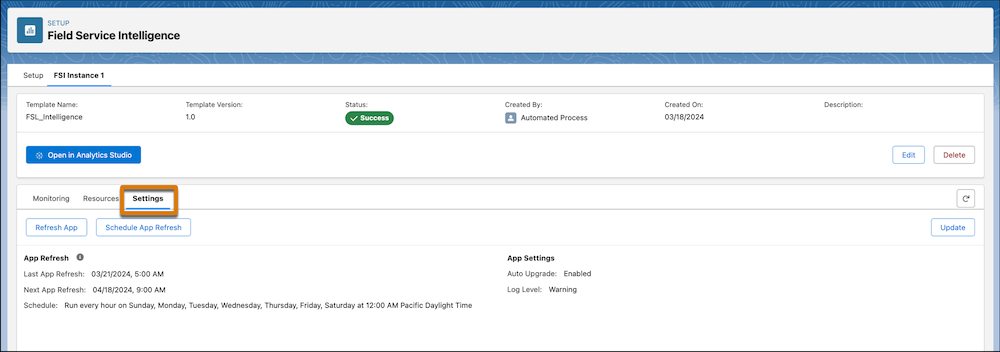
- To immediately refresh the app, click Refresh App.If your Intelligent App queries objects in Data 360, the refresh runs the data transforms and updates the data model objects. If you query Salesforce objects, the refresh runs recipes and updates the datasets instead.
- To schedule a regular app refresh, click Schedule App Refresh.
When you schedule a regular refresh, select how often and what time to refresh your data. For example, schedule a data refresh at twelve AM daily. Salesforce recommends you run a daily refresh to ensure your data is up to date. For more frequent refreshes, you can schedule hourly refreshes.
- To manually upgrade the app to the newest version of the app template, click
Update.When you update your app, it can modify the existing assets, including removing any customizations made to these assets. If you’re ready to update, click OK on the confirmation dialog.
If you schedule an immediate refresh or update your app, you can go to the Monitoring tab to see how the process is progressing.
The Settings tab displays when the last app refresh ran, when the next app refresh is scheduled, and if a schedule is set. It also shows if the app is set for auto upgrade and the log level used when the app installed.
Did this article solve your issue?
Let us know so we can improve!
