
You are here:
Active Merchandising
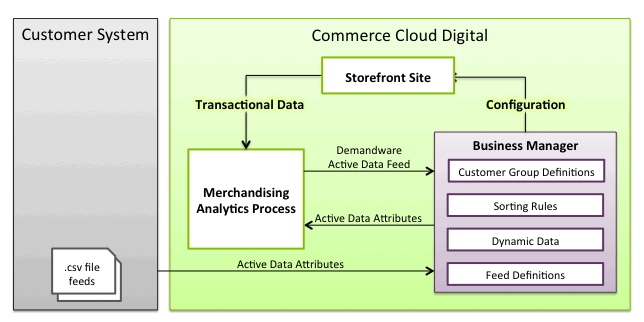
Active merchandising data is product and customer data that web analytics tools, order management systems, or other third-party systems collect or calculate. Use active data to improve how you target your customers. You can import the data from backend systems to feed metrics calculations in Salesforce B2C Commerce.
B2C Commerce collects order data automatically, with no customization required, such as changes to site configuration, pipelines, or templates. Site traffic data, such as product impressions and product detail view, are only collected if a site uses Internet Store Markup Language (ISML) tags added for that purpose. Those tags are necessary on only a few pages and you can add them to your site easily.
You can also create custom active data attributes, and import their values into B2C Commerce from customer backend systems using a custom .csv feed file. Configure the import file format as a feed definition. You can also use the B2C Commerse APIs to customize active data processes.
Consider using the metrics calculated for active data for extra reporting. B2C Commerce deposits the active data feed .csv file daily in the global upload location for Business Manager. This folder is accessible from WebDAV like any other impex folder. Use WebDAV PUT or GET operations to upload or download the daily .csv file. It isn't possible, however, to change the location of the feed.

B2C Commerce's Merchandising Analytics process collects active data once a day and uses it to calculate extra active data attributes. For example, the Merchandising Analytics calculates the average gross margin value using the average sales price and the cost price. The cost price is imported from a feed file. The average sales price is collected from the storefront.
Use the collected and calculated active data attributes to define sorting rules and content slots (that reference customer groups) to influence search result sorting in your storefront and promotion presentation to customers.
Automatic Data Collection
B2C Commerce automatically collects data from orders and customer viewing statistics throughout the day from your Production instance. After the end of the business day, B2C Commerce aggregates the data so that it’s available by 6 AM in the site time zone. B2C Commerce refers to this form of data collection as near-time data collection–data is collected in real time during the business day, aggregated overnight, and delivered to you the next day. The data can be available earlier, depending on your site time zone.
Most of the information collected is near-time and derived from orders and not static attributes. Therefore, the data used for metrics reflects the data at the time of purchase, rather than data imported at a specific point during the day. Data collected from orders doesn't require any configuration. However, to collect data from the storefront to track customer page views, place specific ISML tags in your pages. If your storefront is based on SiteGenesis, these ISML tags are already in place.
This is the process:
- Developers add specific tag to your storefront templates that automatically collect data for analytics.
- Merchants create import feeds. These feeds have information about products that 's n’t used on B2C Commerce. For example, the cost price of products, which you use to derive information about products profitability.
- B2C Commerce collects Storefront data, such as order numbers or product page views, and sends them to the Merchandising Analytics process for analysis. Feeds pass the data from the collection part of the process to the analysis part of the process.
User login and Sessions
If a customer logs in during a session, B2C Commerce associates all anonymous activity, such as categories and orders, from before the login with that customer. If multiple customers log in and out within the same session, B2C Commerce assigns each activity to the customer logged in then. If a customer scrolls in a carousel, B2C Commerce records the products viewed as part of a carousel as impressions. Each time the customer selects a search refinement, such as changing the price or size of product, B2C Commerce registers a product impression. B2C Commerce also registers a product view for any quick view window that opens.
B2C Commerce Active Data Daily Feed
B2C Commerce processes the product and customer data for a particular day on the Production instance after the end of day for the site. The data is typically processed after 12:00 AM by the site time. The time to process the data depends on the site size, amount of traffic on a given day, and other factors. When data processing completes, the Merchandising Analytics automatically process imports the Active Data Daily feed into the Production instance. It then rebuilds the active data search index for the instance. At 1:00 AM site time, B2C Commerce imports the processed data into the Staging instance and rebuilds the active data search index for the instance. B2C Commerce handles both the import and index rebuild, requiring no job or custom pipeline.
The Active Data Daily feed file is available in the global import directory. It’s accessible via WebDAV for import into sandboxes or for download to external systems.
B2C Commerce Active Data Weekly Feed
On a weekly basis, B2C Commerce processes yearly and lifetime product and customer data for the site. The exact day and time when the processing runs is site-specific. When processing completes, B2C Commerce automatically imports the Active Data Weekly feed into the Production and Staging instances. It then rebuilds the active data search index for each instance. B2C Commerce handles both the import and index rebuild, requiring no job or custom pipeline. The Active Data Weekly feed file is available in the global import directory and accessible via WebDAV for sandboxes or for download to external systems.
Custom Active Data Feeds
In addition to the data that is automatically collected from the site, you can also create one or more custom feed for the returnRate, costPrice, and availableData attributes of the ProductActivedata system object. These values can't be derived, so import them for all metrics to calculate correctly.
Create a custom import pipeline that uses the ValidateActiveDataFile and ImportActiveData pipelet. If you use a job to trigger this pipeline, import custom active data whenever you want. However, this data is only used to calculate extra metrics once a day by the Merchandising Analytics process.
