
You are here:
Data Input and Output
You can import to and export from staging, development, and production instances and replicate between instances. If your storefront uses a third-party application, you’re responsible for managing feeds into the catalog. You can create feeds from B2C Commerce for other backend systems, such as an order management system (OMS), enterprise resource planning system (ERP), product information management system (PIM), or warehouse management system (WMS).
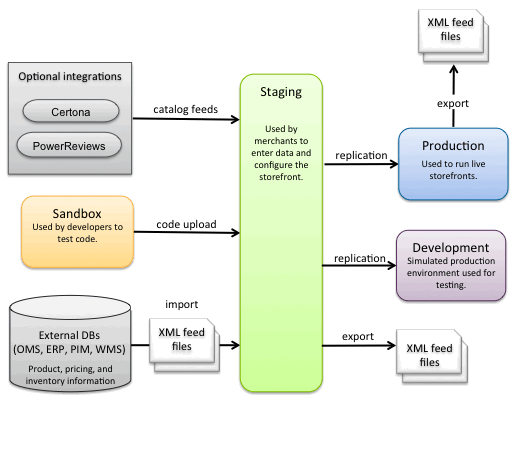
| B2C Commerce Feature | Description |
|---|---|
| Import and Export | Feeds data from external systems into B2C Commerce, such as product, pricing, and inventory information. You also Import and Export to move data from one instance type to another. Create XML feed files that conform to B2C Commerce schemas to import data into B2C Commerce. We recommend using the scheduled job feature to automate data import and export. Developers, administrators, and merchants must work together to determine the frequency and schedule of import feeds. Developers are responsible for implementing the cartridges. Admins are responsible for creating the XML files containing data from the systems of record for products, pricing, and other data. They’re also responsible for configuring the jobs required to run the import. Data is validated during import. If the import experiences too many errors, it can fail. To recover from a failed import, you must successfully complete another import. |
| Data Replication and Code Replication | Securely moves data and code between instances. Replication is a one-way process from Staging to either a Development or Production instances. You can roll back from a replication to the previous version of the instance. |
| Code Upload | Used to upload code from a developer's local machine via UX Studio to a Sandbox or Staging instance. Developers are responsible for code upload. |
| Catalog Feeds | Used to process .zip files. This feature is only for additional information that is added to the catalog that isn't part of the normal catalog import and export process. |

