
You are here:
Configure DKIM for B2C Commerce
Major email providers, including Google, Microsoft, and Yahoo, now require DomainKeys Identified Mail (DKIM) authentication. Configuring DKIM is essential to ensure that your emails reach customer inboxes and aren’t rejected or flagged as spam. Configure DKIM to verify that the emails come from the domain that they claim to be from.
- Generate a private-public key pair, a .p12 key, for DKIM. See Generate a Private-Public Key Pair.
-
Import the .p12 key for DKIM.
-
In Business Manager, click App Launcher
 , and then select .
- Click Import, and then select the p12 key.
- Provide an alias and, optionally, a password. Save the key.
-
In Business Manager, click App Launcher
-
Enable DKIM and specify a DKIM selector in Email Settings.
The DKIM selector is a unique, user-defined string within the DKIM email signature that references a specific public key within your DNS records. It’s used to differentiate multiple DKIM keys on the same domain. The selector forms the prefix for your DNS TXT record, which is formatted as: <selector>._domainkey.<domain>.
For example, if the email address is noreply@notifications.example.com and the selector is myselector, the DNS TXT record label is myselector._domainkey.notifications.example.com.
- In , select Enable DKIM.
- For Private RSA key, select the .p12 key that you imported.
- Enter a name for the DKIM selector.
-
Click Apply.
Keep these considerations in mind.
- The domain isn’t manually configured. Instead, it’s the same domain used when sending email. For example, noreply@notifications.example.com.
- An instance can have only one private key and selector, but the same public key and selector can be used across multiple instances.
- The same private-public key pair can be used across multiple domains, even on the same instance.
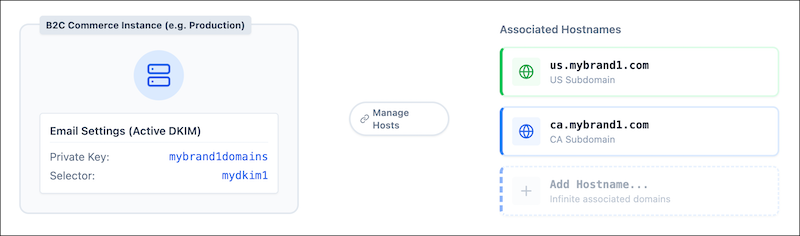
This diagram shows that an instance has only one active private key and selector at a time for DKIM. But this single private key can be associated with multiple hostnames via the Manage Hostnames interface.
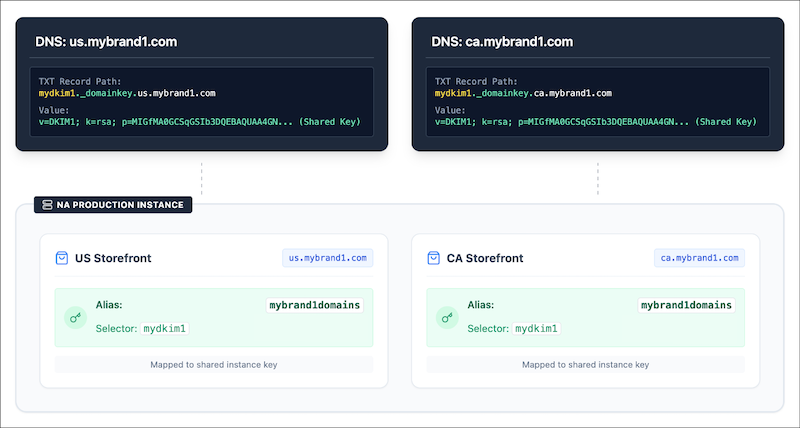
This image shows that all storefronts share the same underlying private key configured on the same instance. When hosting multiple storefronts on the same production instance, you must duplicate the public DNS TXT records for each unique subdomain.
-
Configure the DNS record for your email domain in the DNS hosting provider or domain
registrar.
Update the value of the DKIM TXT record entry in your DNS record.
For example, with a selector named myselector for the domain notifications.example.com, enter the TXT entry in the record:
myselector._domainkey.notifications.example.comThe content of the TXT entry is a long variable.
For example,
"v=DKIM1; k=rsa;"
       "p=MIIBIjANBgkqhk…
The TXT record is required to store the public key.
 Note A single string within a DNS TXT record can’t exceed 255 characters. A TXT record can hold multiple strings. If your DKIM record is longer than 255 characters, split it into multiple quoted strings within the same record. To split strings, use double-quoted characters. When an email server queries your DNS, it automatically concatenates those quoted strings into one long, unbroken public key. 1024-bit RSA keys don’t require splitting, but 2048-bit RSA keys do.
