
You are here:
Dynamic Mappings for B2C Commerce
You can configure dynamic mapping rules that use a pattern to identify a URL from your legacy site and automatically redirect it to a B2C Commerce URL. It isn't possible to use mapping rules to redirect an existing or obsolete B2C Commerce URL to a different B2C Commerce URL, nor is it possible to create redirects for static resources like images.
Mapping rules are used for large numbers of similar URLs that must be redirected. For example, for all URLs in a specific category. To redirect one specific URL, it's more common to use static mappings. For information on when to use aliases, mapping rules, and static mappings, see URL Redirects. The file size of the configuration in Business Manager is limited to 2 MB. If you exceed the limit, use the site import and export functionality to update the dynamic mappings.

Before You Begin
Before you create mapping rules, you must define a host alias. Add the appropriate list of domain names for the site in the SEO > Aliases module. By putting the simple site URL in the alias list (for example, "www.store.com") you enable users to get to the storefront without typing in the full B2C Commerce URL.
See Hostname Aliase.
See Assigning a Hostname Alias.
Mapping rules must be edited on Staging, Development, or Sandbox instances and replicated to Production instances.
Create mapping rules for top products and Categories
Mapping rules are created to preserve SEO rankings accumulated by your old site on your old platform and your new site on B2C Commerce. Salesforce recommends that you google your top-selling categories and products and use the links that appear on the first page of each search as the list of links that you want to redirect. When you have the list of links, identify any patterns you can use to apply rules to. For example, if there are many links in the same category or subcategory, you can use a mapping rule to redirect any product in those categories from the old site to the new site.
Don't use mapping rules instead of hostname-only URLs. Avoid generating intra-site links back to the home page via a B2C Commerce pipeline in those cases where a more simple hostname-only URL can be used instead.
The following standard rule is added in every case:
/?** p,,,Default-Start,,{_querystring}This forwards host-only plus parameter requests to the Default-Start pipeline and preserves the original URL parameters. You can override or extend this rule with custom rules.
Mapping Rule Syntax
Each mapping rule is made up of a URL pattern and a B2C Commerce URL template, separated by a white space. The URL pattern identifies the incoming URL and the URL template generates the B2C Commerce URL for the redirect. You can also add specific options between the pattern and template.
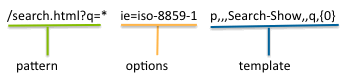
Any part of the incoming URL matched by a wildcard (*,**) can be
referenced by its position in the URL, using a numbered parameter in the template
({0}). Wildcards match any text between forward slashes in the URL
that isn't a query string.
For example, you want to redirect any products in the jewelry category of your old site to your new site, using the same product ID and category name as you used to have.
Incoming URL Example:
http://www.oldsite.com/catalog/product/index.asp?ID=576416&Cat=Jewelry.htmlB2C Commerce URL Example:
http:///www.mystore.com/pendant/576416,default,pd.html?cgid=JewelryPatterns for Incoming URLs
The incoming URL pattern contains some or all of the URL, with wildcards used to replace portions of the URL. The pattern can be either an absolute pattern including a protocol and host name or a relative pattern without a host name, starting with '/'.
Wildcards
You can use wildcards to have one mapping represent many URLs dynamically by parsing out variables from the original legacy URL. The wildcards are:
| Wildcard | Meaning |
|---|---|
*
|
Match any characters up until any forward slashes
"/"; query strings and parameters will not be
matched. |
**
|
Match any characters inclusive of forward slashes
"/"; query string and parameters will not be matched. If
** is used as a catch all, it takes precedence over specific
mappings. |
Patterns can match both http and https protocols if the host name alias file is set up correctly.
Pattern Examples:
/**/images/**
 http://www.mystore.com/**/*.jpg
/news/articles/**.html
 /catalog/special/*.*.*.html
URL Encoding
If a URL is passed as a parameter in a mapping rule, it's processed so that it retains the original URL encoding. For example, if the original URL includes a plus (+) or dash (-) as a replacement space, the character is retained and not encoded as text (%2B or %2D).
Options
You can specify several options that control how patterns are matched or pattern parameters are encoded.
| Option | Description |
|---|---|
| i (lowercase i) | allows upper, lower, or mixed case matches |
| I (capital I) | converts the incoming parameters to lowercase before substituting into the URL template |
| ie | specifies an encoding to use other than UTF-8. |
B2C Commerce URL Templates
The B2C Commerce URL templates represent B2C Commerce URLs.
The URL generation consists either of a definition for a static URL or a dynamic pipeline URL.
A static URL has the format:
s,[<protocol>],[<host>],[<unit>],[<locale>],<path> A pipeline URL has the format:
p,[<protocol>],[<host>],<pipeline>[,<locale>][,<parameter name>,<parameter value>]* If <parameter name> or <parameter value>
contains white spaces, they have to be enclosed in double quotes (" "). Don't use single
quotes(' ').
The parameter set for dynamic pipeline calls is:
<legacy URL> [i] p,[<protocol>],[<host>],<pipeline>[,<locale>][,<parameter name>,<parameter value>]*The following variables can be used in the path or as parameter values:
Example 1: Using Parts of Incoming URLs in Redirects to B2C Commerce URLs
You can use wildcards in your mapping rule patterns to match portions of incoming URLs and then use positional values in your template to transfer those values to the B2C Commerce URL you are redirecting to. The positional values are the matched wildcard strings from the valid URL mapping, in the order they are found. You can also manage spaces strings by surrounding them with single quotes.
For example, with the following mapping rule:
/**/images/** s,,,,,/{0}/{1}The table shows how positional values work for a specific incoming URL with the mapping rule.
| Pattern | //**/images/** |
| Incoming URL | http://www.oldshop.com/path/to/images/even/more/paths |
| Template | s,,,,,/{0}/{1} |
| B2C Commerce URL | http://www.newshop.com/path/to/even/more/paths |
URLs that are found by the pattern:
http://www.shop.com/path/to/images/even/more/paths
    {0} : path/to
    {1} : even/more/paths
http://www.yourshop.com//images/
    {0} :
    {1} :
(both positional values are blank!)Example 2: Product Redirect with Positional Value from Incoming URL
/**/products/*.gif p,,,Product-Show,,pid,{1}URLs that are found:
http://www.yourshop.com/path/to/products/123456.gif
    {0} : path/to
{1} : 123456| URLs that are not found | Reason |
|---|---|
|
URL has an extra forward slash after products |
Example 3: Product Redirect with Parameter from Incoming URL Query String
URLs that are found:
http://www.yourshop.com/path/to/product.asp?ProductID=123456
    {0} : path/to
    {1} : ProductID=123456
    {ProductID} : 123456
http://www.yourshop.com///product.asp?SKU=123456
    {0} : /
    {1} : SKU=123456
{ProductID} : (ProductID is blank : there is no parameter named ProductID!)| URLs that are not found | Reason |
|---|---|
|
URL is missing the forward slash before products.asp |
Example 4: Source Code Redirects from an Affiliate Site
This rule
identifies any incoming URLs that contain affiliate immediately after
the hostname. It redirects to a B2C Commerce URL that uses the string that matches the
first wildcard as a source code.
URL pattern: /affiliate/*
Incoming URL example:
https://documentation.commercecloud.com/affiliate/DOC2114/Mapping+rules
B2C Commerce URL template: p,,,SourceCodeRedirect-Start,,src,{0}
Example 5: source code redirects from an Email
This rule identifies any incoming URLs that contain a source code immediately after the hostname. It redirects to a B2C Commerce URL that uses the first position match as a source code.
URL pattern: /VIP/email/*
B2C Commerce URL template: p,,,SourceCodeRedirect-Start,,src,{0}
Example 6: extract the locale from the source URL
This dynamic mapping rule shows how you can extract elements from the request URL, such as the locale:
URL pattern: /*/product/*
Incoming URL example: www.hostname.com/en/product/productID
Redirects to:
http://www.hostname.com/on/commercecloud.store/Sites-SiteID-Site/en/Product-Show?pid=productID
Example 7: Create a Rule for a URL with Spaces
This dynamic mapping rule shows how you can create mappings for brand or product names with white spaces, without using wildcards. Managing white space via quotes rather than wildcards performs leads to better overall performance.
Example 7a: Create a Rule to Redirect a Product That Has White Space in the Product Name
URL pattern: "/*/Product Name/*" p,,,Product-Show,{0},pid,{1}
Incoming URL example: www.mysite.com/en/Product Name/MyProductID
Redirects to:
http://www.mysite.com/Sites-MySiteID-Site/en/Product-Show?pid=MyProductID
Example 7b: Create a Rule to Redirect a Product That Has White Space in the Brand Name
URL pattern: "/*/mapping with whitespaces"
p,,,Search-Show,{0},prefn1,brand,prefv1,"Brand Name"
Incoming URL example: www.mysite.com/en/mapping with whitespaces
Redirects to:
http://www.mysite.com/Sites-MySiteID-Site/en/Search-Show?prefn1=brand&prefv1=Brand%20Name
