
You are here:
Keyword Searches for B2C Commerce
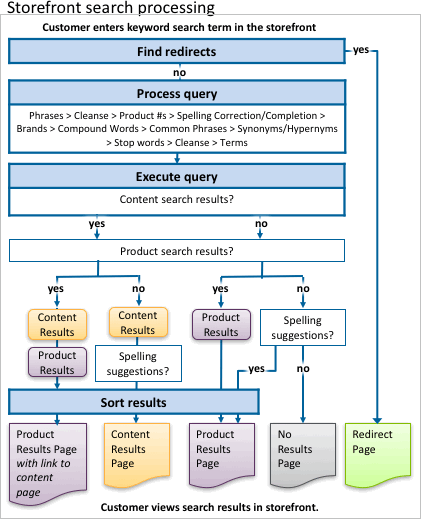
Keyword searching is how most customers use your storefront to find the products they’re interested in buying. To create a large and accurate search index, specify the searchable product attributes and configure relationships using search dictionaries. When an item is searched for, B2C Commerce runs through a search process, gathers the results, and applies a sorting rule that defines how to display the respective results.
- Search Term Completion
Use B2C Commerce to provide search suggestion capabilities in your storefront application. While customers are entering text into the storefront search box, suggestions appear, helping them to locate items faster. - Configure Searchable Attributes
When a search query is entered in B2C Commerce, only product or content attributes that are configured as searchable attributes are searched, and only products or content assets that contain the search term in a searchable attribute are returned in search results. If the searched term is contained in an attribute that isn't a searchable attribute, the product isn't returned in the search results. - Search Redirects
Use the B2C Commerce guided search redirect feature to direct a customer to a particular page, URL, or pipeline when they enter a search term. When the customer searches on a term, for example, the redirect returns a specific page, instead of returning product search results for the entered search keyword. With search redirects, you have more control over what customers see, enhancing their buying experience, and directing them to content or products that increase the likelihood of a purchase.
Did this article solve your issue?
Let us know so we can improve!
