
You are here:
Set Up Omni-Channel Routing for Enhanced Chat
Omni-Channel routing directs customer messages over an enhanced chat messaging channel to the B2C Shopping Agent, so the Agent can engage with the shopper. Create a routing configuration to define the work size and priority when assigning conversations to the messaging queue.
-
In your Salesforce org, at the top of the page, click
 , and select Setup.
- In the Quick Find box, find and select Omni-Channel Settings Enable, and turn on Omni-Channel routing.
- In the Quick Find box, enter and select Routing Configurations.
-
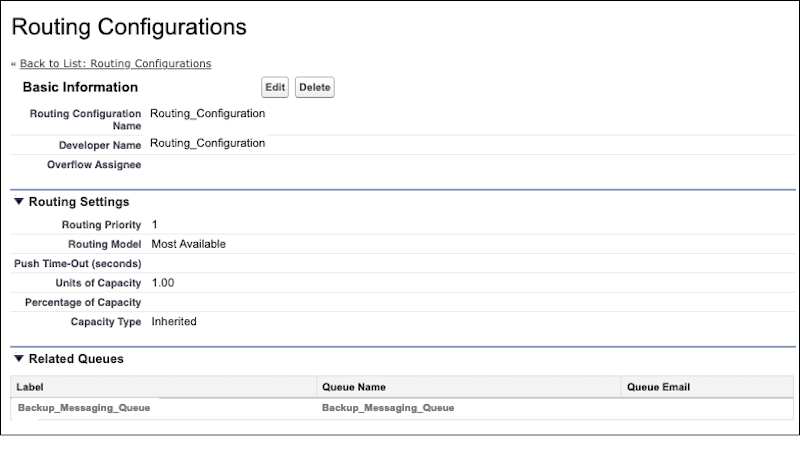
Create a routing configuration with these settings.
- Routing Priority—1
- Routing Model—Most Available
- Units of Capacity—1.00
-
Capacity Type—Inherited
- Save the configuration.
-
Create a fallback messaging queue for the primary Omni-channel routing
flow.
If the primary flow isn’t available, or a routing rule fails, the conversation is routed to the fallback queue.
- In the Quick Find box, find and select Queues.
- Click New.
- For Routing Configuration, select the one that you previously created.
- For Supported Objects, select Messaging User and Messaging Session.
- For Queue Members, select the EinsteinServiceAgent User and the System Administrator user.
Create an Omni-Channel Routing Flow for the Shopping Agent that uses this routing configuration and fallback queue.
Did this article solve your issue?
Let us know so we can improve!
