
You are here:
Website Design for B2B Stores
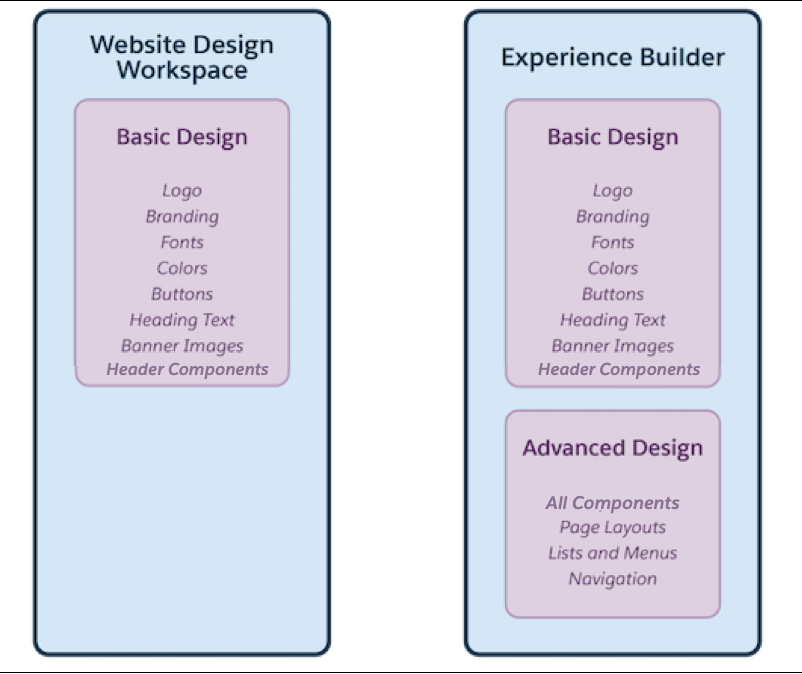
Use the Website Design workspace to add basic design elements to your store without leaving the Commerce app. For example, add your logo and set fonts, colors, and button styles. For more advanced design changes, such as configuring store components, pages, or navigation, you can move out of the Commerce app to Experience Builder.
Which Salesforce Commerce Product Do I Have?
- Design a Store in the Commerce Website Design Workspace
Use the Website Design workspace to add basic design elements to your store without leaving the Commerce app. Add your logo and set fonts, colors, and button styles. You can also modify the text, images, and header layout. - Use Experience Builder to Design a Commerce Store
Use Experience Builder for advanced design tasks, such as configuring store components, pages, or navigation. With Experience Builder, you can make the Commerce Store template yours by dragging components onto your page and customizing properties. Use the Commerce Store template to create B2B stores. You can add images and styles to your stores to create a unique experience for your customers. You can also add markup to theheadof every page. - Commerce Store Components
Components are the building blocks of B2B stores. You can make a B2B template yours by dragging components onto store pages and customizing component properties.
Did this article solve your issue?
Let us know so we can improve!
