You are here:
Einstein Recommendations Component (LWR) for D2C Stores
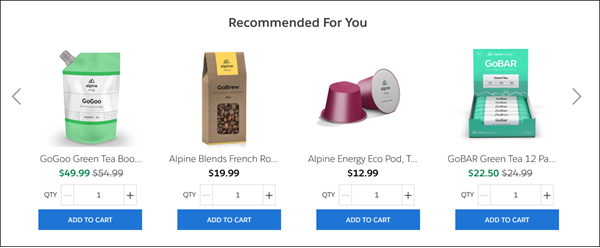
The Einstein Recommendations component personalizes the shopping experience and reduces the manual effort required to drive product discovery on your storefront.
Required Editions
| View supported editions. |
Which Salesforce Commerce Product Do I Have?

| Property | Details |
|---|---|
| Recommendations Definition | |
| Anchor | Select an option to use as initial input for making recommendations on this page. Selecting the Product ID or Catalog ID anchor shows a field where you must add a product or catalog ID to complete your selection. |
| Product ID | Add a site-specific product ID starting with 01t. This field appears only when you select the Product ID anchor. To find the product ID, select a specific product in the Commerce App and copy the product ID from the browser URL. |
| Catalog ID | Add a site-specific catalog ID starting with 0ZG. This field appears only when you select the Catalog ID anchor. To find the catalog ID, select a specific product in the Commerce App and copy the catalog ID from the browser URL. |
| Use Case | Select the recommendation outcome that you want shoppers to see. Choose from recently viewed, similar products, and the like. Use cases have predefined strategies and rules that respond to shopper interactions in real time. Selections for use cases change dynamically based on the page containing the component and the anchor that you select. See the Usage Notes for details about each use case. |
| Header Text | Enter text to show at the top of the Einstein recommendations carousel. Header text appears to shoppers only when recommendations are generated and when the number of recommendations exceeds the value defined for the Hide for Results Fewer Than parameter. |
| Maximum Products Visible | Set the maximum number of products to show before advancing the recommendations carousel to the next set of products. The default is 4. Regardless of this setting, mobile devices show a maximum of two recommendations at a time. If you choose to show the quantity selector and call to action button, mobile devices display only one recommendation at a time. |
| Hide for Results Fewer Than | Set a minimum number of products to show. If there are fewer products than the number specified, the component doesn’t appear. The default is two products. |
| Display Options | |
| Product Text | Select to show the product name for each product recommended. |
| Price | Select to show price information for each product recommended. When selected, you can choose whether to show the sale price with the original price crossed out or only the sale price. |
| Quantity Selector and Call to Action Button | Select to show the quantity selector and the call to action button. When selected, you can also change the quantity selector label text and the text that appears in the call to action button. Selecting this option limits the display to one recommendation at a time for mobile devices. |
| Price options menu | Choose between Sale Price with Original Price Crossed Out or Sale Price. This parameter appears only when the Price option is selected. |
| Quantity Selector Label | Change the label text associated with the quantity selector. The default is qty. This parameter appears only when the Quantity Selector and Call to Action Button option is selected. |
| Call to Action Button Text | Change the text that appears in the call to action button. The default is Add To Cart. This parameter appears only when the Quantity Selector and Call to Action Button option is selected. Inventory availability isn’t checked when products are added to the cart using Einstein recommendations. |
Usage Notes
Commerce Einstein can provide product recommendations based on shopper activity. You can add one or more Einstein Recommendations components to any page in D2C stores. You can customize the Einstein components using supported anchors and related use cases. The Category Viewed anchor is supported on only Category pages. All other anchors are supported on any page, but they’re intended for use on certain pages.

When you select an anchor for a page, the use case menu changes to show only the supported options for that anchor.
| Anchor | Intended Pages | Supported Use Cases |
|---|---|---|
| No Anchor | Home, Search, Error, My Profile, Service Not Available | Recently Viewed, Top Selling, Personalized for Shopper |
| Product ID | Home, Error, My Profile, Service Not Available | Recently Viewed, Similar Products, Complementary Products, Customers Also Bought |
| Product Viewed | Product | Recently Viewed, Similar Products, Complementary Products, Customers Also Bought |
| Products in Cart | Cart, Checkout, Order | Recently Viewed, Similar Products, Complementary Products, Customers Also Bought, Upsell |
| Category ID | Home, Error, My Profile, Service Not Available | Recently Viewed, Most Viewed By Category, Top Selling By Category |
| Category Viewed | Category | Recently Viewed, Most Viewed By Category, Top Selling By Category |
A use case defines the type of recommendations that Commerce Einstein shows. The strategies listed in the table are in order of occurrence. If there isn’t enough shopper activity for the first strategy listed, the next strategy on the list is used. The Text Similarity strategy works even when there’s no shopper activity.
| Use Case | Strategies | Description |
|---|---|---|
| Recently Viewed | Last browsed products | Generates recommendations based on items that the shopper recently viewed. |
Similar Products This use case recommends products that match the category of the product being viewed. |
1. Customers who viewed also viewed | Generates recommendations by analyzing the viewing behavior of other shoppers who viewed the same product. |
| 2. Product affinity algorithm | Generates recommendations by analyzing the product’s similarity to other products. | |
| 3. Text similarity | Uses natural-language processing to generate product recommendations based on similarity between products in product details. | |
Complementary Products This use case recommends products that don’t match the category of the product being viewed. |
1. Real-time personalized recommendations | Generates recommendations by analyzing the shopper’s current viewing and past viewing behavior. |
| 2. Customers who viewed also viewed | Generates recommendations by analyzing the viewing behavior of other shoppers who viewed the same product. | |
| 3. Text similarity | Uses natural-language processing to generate product recommendations based on similarity between products in product details. | |
Customers Also Bought This use case doesn’t show products purchased by the shopper in the past 30 days. |
1. Customers who bought also bought | Generates recommendations by analyzing the purchasing behavior of other shoppers who bought the same product. |
| 2. Customers who viewed ultimately bought | Generates recommendations by analyzing the purchasing behavior of other shoppers who viewed the same product. | |
| 3. Text similarity | Uses natural-language processing to generate product recommendations based on similarity between products in product details. | |
| Most Viewed By Category | Recent most-viewed products from category | Generates recommendations by analyzing which products other shoppers recently viewed in the same category for the product being viewed. |
| Top Selling By Category | Recent top-selling products for the category within the past 30 days | Generates recommendations by analyzing which products were recently purchased by other shoppers in the category being viewed. This strategy uses a rolling 30-day time frame that updates daily to return recommendations that are similar to top sellers found in your weekly sales reporting. |
| Upsell | 1. Customers who bought also bought | Generates recommendations by analyzing the purchasing behavior of other shoppers who bought the same product. |
| 2. Customers who viewed ultimately bought | Generates recommendations by analyzing the purchasing behavior of other shoppers who viewed the same product. | |
| 3. Customers who viewed also viewed | Generates recommendations by analyzing the viewing behavior of other shoppers who viewed the same product. | |
| 4. Text similarity | Uses natural-language processing to generate product recommendations based on similarity between products in product details. | |
| Top Selling | Top-selling products within the past 30 days | Generates recommendations by analyzing which products were recently purchased by other shoppers. This strategy uses a rolling 30-day time frame that updates daily to return recommendations that are similar to top sellers found in your weekly sales reporting. |
| Personalized for Shopper | 1. Real-time personalized recommendations | Generates recommendations by analyzing current and past viewing behavior of the shopper. |
| 2. Recent most-viewed products | Generates recommendations by analyzing which products other shoppers recently viewed. |