
Loading
Feature Disruption - Service Cloud VoiceRead More
Feature degradation | Gmail Email delivery failureRead More
Salesforce B2B Commerce
Table of Contents
Select Filters

          No results
          No results
          Here are some search tips

          Check the spelling of your keywords.
          Use more general search terms.
          Select fewer filters to broaden your search.

          Search all of Salesforce Help
          Improve Product Page Performance in a B2B Store

          Improve Product Page Performance in a B2B Store

          To speed up the shopping experience in your LWR store, turn on the Faster Add-to-Cart feature. By splitting processing time across Product and Cart pages, Faster Add-to-Cart improves the response time on a Product page when a customer adds an item to their cart. This setting is enabled by default for B2B stores created in Winter ’24 or later and D2C stores created between Winter ’24 and Spring ’25.
          Required Editions

          1. If you have custom components that use cart APIs, make sure that they don’t rely on an add-to-cart response when returning cart item IDs, cart item prices, or promotions. If they do, change the components before enabling Faster Add-to-Cart.
            When Faster Add-to-Cart is enabled, the Cart Badge shows only the total number of items in a cart and not the total number of unique products. Also, for stores created in Spring ’25 or later, inventory checks occur when a shopper tries to add an item to cart or update a cart item's quantity. If the inventory is unavailable, the cart item isn't added or updated, and an error message is displayed to the shopper.
          2. In the navigation sidebar, select a store from the Store dropdown.
          3. Select Settings | Store.
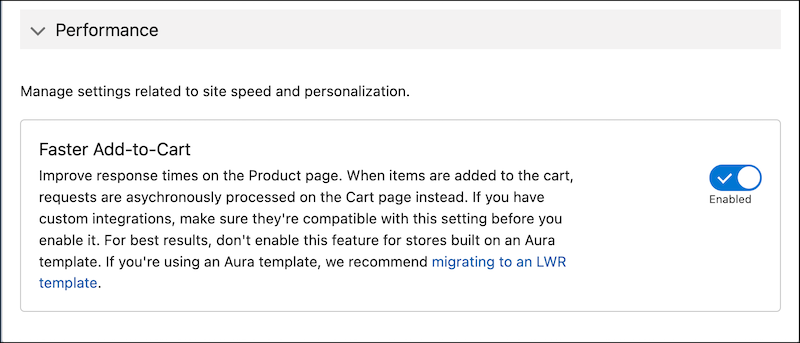
          4. On the General Settings tab, in the Performance section, enable Faster Add-to-Cart.
            Faster Add-to-Cart feature toggle
          5. To apply the changes, republish your store.
           
          Loading
          Salesforce Help | Article