
You are here:
Prioritizing Promotions
When a cart is eligible for multiple promotions, your exclusivity and priority rules determine which promotions apply. Priority is first determined by exclusivity, which specifies whether a promotion can be combined with other promotions. Next, the promotion’s priority is based on its priority number, discount type, discount amount, and promotion ID.
Required Editions
| View supported editions. |
Which Salesforce Commerce Product Do I Have?
Exclusivity
You specify the exclusivity type when you create your promotion. A non-exclusive promotion can be combined with other promotions. The default exclusivity type is class. A promotion with class exclusivity can’t be combined with promotions of the same class. For example, you want one product promotion per product or one transaction promotion per order. A promotion with global exclusivity is the only promotion that can be applied to an entire order.
Exclusivity type is prioritized in this order.
- Global exclusive product
- Global exclusive order
- Class exclusive product
- Non-exclusive product
- Class exclusive order
- Non-exclusive order
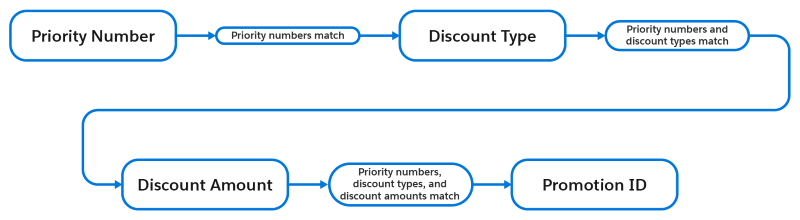
Within each exclusivity type, promotions are prioritized in this order.
- Priority number
- Discount type
- Discount amount
- Alphabetically by ID
Priority Number
A priority number is the best way to control how your store applies a promotion. You set the priority number when you create your promotion. The lower the number, the higher the priority.
Product and product category promotions are evaluated and applied first. Cart and order promotions are evaluated and applied after all product and product category promotions, even if they have a higher priority.
If priority numbers match, the store considers each promotion’s discount details.
Discount Type
When promotions have the same priority number, your store considers the discount type. Certain types of discounts are prioritized over others. Discounts are prioritized in this order.
- Fixed price
- Total fixed price
- Fixed amount off
- Percentage off
If a promotion has multiple discount targets, the highest priority discount type is used.
Discount Amount
When promotions have the same priority number and discount type, your store prioritizes the discount that results in the highest savings for your customer. Discounts amounts are prioritized in this order.
- Fixed price—Prioritizes the promotion with the lowest fixed price.
- Total fixed price—Prioritizes the promotion with the lowest fixed price.
- Fixed amount off—Prioritizes the promotion with the highest amount off.
- Percentage off—Prioritizes the promotion with the highest percentage off.
If a promotion has multiple discount targets, the amount of the highest priority discount type is used.
Promotion ID
When promotions have the same priority number, discount type, and discount amount, your store prioritizes the promotion by its alphanumeric ID. The promotion ID is part of the promotion record page’s URL, which looks like /Promotion/<ID>/view. The ID is the string of characters between “Promotion” and ”view.” The lower the number and the alphabetical order of the ID, the higher the priority. For instance, if you have two promotions with the IDs 0c8SG000000BKcvYAA and 0c8SG000000BKcvYAB, the promotion with the ID 0c8SG000000BKcvYAA is prioritized because AA comes before AB.

- Promotion A deducts 10% off the price of the pair of shoes.
- Promotion B offers the shoes for a fixed price of $100.
