
You are here:
Edit What Qualifies for a Promotion for a B2B Store
Use a qualifier to set specific requirements for a discount to be added to a promotion. For example, you can require customers to spend a minimum amount to qualify for a percentage discount on a particular product.
Required Editions
- In the navigation sidebar, select a store from the Store dropdown.
- Select Promotions, and select the promotion you want to edit.
- On the Qualifiers tab, select the qualifier to edit or click New.
-
To find a specific product or product category, select Category
or Product in the Qualifier field dropdown and then search for the
product or category.
- To base your qualifier on a specific product, from the Qualifier dropdown, select Product. You can have up to 200 product qualifiers. You can qualify all variants or later use variation attributes to restrict the qualifier to specific variants of the variation base products.
- To base your qualifier on a subsection of products in a catalog, from the Qualifier dropdown, select Category. You can add up to 25 category qualifiers. You can qualify all variants or later use variation attributes to restrict the qualifier to specific variants of the variation base products.
- To base the qualifier on only the transaction total, leave the Qualifier field empty. You can add one transaction total qualifier per promotion. Select this qualifier if you’re creating a promotion with an approaching discount alert.
- Choose a qualifier type that matches the qualifier that you selected. If the Qualifier field is empty, select Transaction Total.
-
Limit your promotion with either a quantity or price minimum.
Quantity minimums support decimal amounts up to four places.
- If you have a multicurrency store, select a currency ISO code.
-
(Optional) Enter an approaching discount threshold value.
This field is available only to promotions that target shipping, shipping rates, or transactions. This value determines when a customer sees an alert that their cart is approaching a discount. For example, if you set a qualifier amount at $100 and a threshold value at 70, customers see a message that their cart is approaching a discount when they have spent $70.
- Save your work.
-
(Optional) To add more conditions to the qualifier, click on the promotion qualifier
name and then click Edit under Promotion Rules.
- Any Condition Is Met—The promotion is applied if any condition is met. For instance, the promotion offers a 10% discount on the entire order if the customer buys either red or purple shoes. The customer receives the 10% discount on the total purchase as long as they have either red or purple shoes in their cart.
- All Conditions Are Met—The promotion is applied only if all conditions are met. For example, the promotion offers a 10% discount on the entire order only if the customer purchases both red and purple shoes.
-
Click Add Condition.
- Target Type–The type of item to apply the discount to. For instance, to apply a discount to shoes, select Product as the rule’s target type. If the main target type is a parent product or a category, you can select an attribute as the rule’s target type.
- Operator Type–The condition that determines which item within the target type is or isn’t eligible for a discount. For instance, to apply a discount to shoes, select Product as the rule’s target type, select Is as the operator type, and choose shoes as the target.
- Target–The specific item or attribute value to apply the discount to. For example, if you select Product as the rule’s target type, you can enter shoes as the target. If the target type is an attribute, such as color, you can select a value, such as red, as the target.
- Save your work.

Example To encourage larger purchases, you want to discount all orders over $100, no matter
what’s in the order. When you create a promotion qualifier: 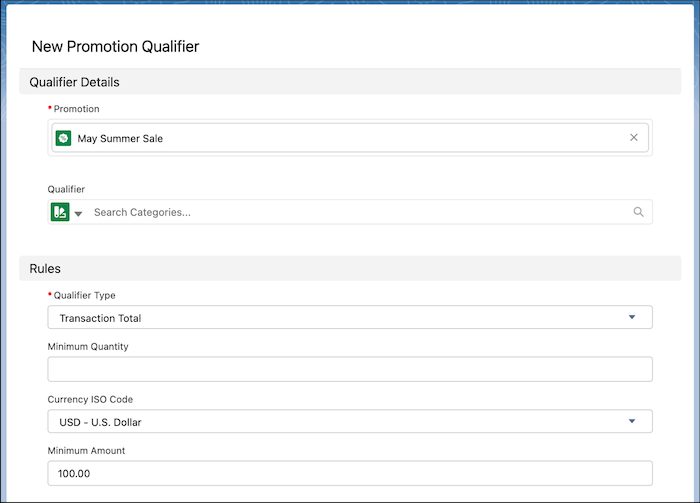
- Leave the Qualifier field empty.
- Under Qualifier Type, select Transaction Total.
- For Currency ISO Code, select USD - U.S. Dollar.
- Under Minimum Amount, enter 100.
See Also
Did this article solve your issue?
Let us know so we can improve!
