
You are here:
SEO Considerations for Store URLs
You can improve SEO performance by optimizing URL configuration in your B2B store.
Required Editions
| View supported editions. |
Which Salesforce Commerce Product Do I Have?
Canonical URLs
Choose a canonical URL to consolidate a single page that can be reached through multiple URLs or different pages with similar content. Improve SEO and direct search bots to the most representative page from a set of duplicate pages on your site. Without canonical URLs, search engines consider all of your identical or similar URLs as unique pages, which can cause SEO issues.
- Search engines can miss your unique content.
- Too much duplicate content can dilute content ranking.
- Ranked content doesn’t reflect the best URL.
Shopper-Friendly URLs
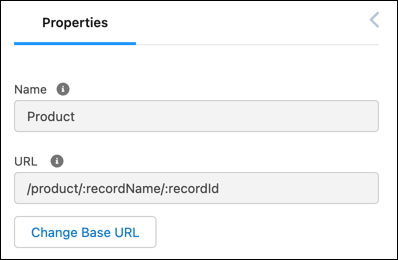
Product and Category pages generate shopper-friendly URLs based on the title of the product
or category appended to a base path and object ID. The base path is configurable in the URL
structure, but the category path or product record name and the record ID are required. For
example, a category page has the URL /category/:categoryPath/:recordId.
From Experience Builder, in Page Properties, you can edit the /category/
portion of this base URL.
URL Slugs
Create SEO-friendly URL snippets, or “slugs,” for each Product and Category page. A URL slug improves SEO value by replacing a record ID with relevant and human-readable information in URLs, ensuring that your store’s pages are optimally surfaced in search engines. URL slugs are available in B2B Commerce LWR sites.
URL slugs map to the full path store.com/product/{custom-slug} for
products and store.com/category/{custom-slug} for categories. From
Experience Builder, in Page Properties, you can edit the /product/ and
/category/ URL snippets, but you can’t remove them. For example, a
Product page can have the URL slug french-roast, resulting in the full URL
store.com/product/french-roast.
Auto-generated, canonical URLs for Product and Category pages use record IDs. Customers won't see a slug-based URL unless they directly input a link that includes the URL slug.
When adding a URL slug, keep these considerations in mind.
- To use URL slugs, enable translation workbench and add active languages for translation. For more information, see Translation Workbench.
- URL slugs have a character limit of 150 and allow these characters:
a-z A-Z 0-9
            . - _ $ & : ; * , = @
. Foreign language characters are also allowed. - In a Category URL slug, you can use
/to delimit path segments. For example, the URL slugcoffee/whole-beancreates the pathstore.com/category/coffee/whole-bean. This use of/isn’t accepted in a Product page URL slug. - Use of the term Product2 isn’t allowed in a URL slug. This URL is reserved for use in your site.
- When choosing a language for a URL slug, select a language that’s active in your org, site, and store. For more information, see Supported Languages.
- Create a URL slug in your store’s default language and translate it for each language
you support. When a customer is browsing in a language without a URL slug translation, but
the page has a URL slug for your store’s default language, the slug falls back to the
default. For example, if your default site language is English and a customer is browsing
in French, both
store.com/fr/product/{slug-french}andstore.com/fr/product/{slug-english}will redirect to the corresponding record ID URL. - When URL slugs are enabled and configured for product and category pages, they’re used as the canonical URL in sitemaps created for LWR stores. Otherwise, the sitemap continues using the record ID URL.
Redirects
If you’re migrating a site to B2B, consider redirecting users to your new store’s pages from pages outside of Salesforce. You can also set up redirects for pages within your B2B store to guide users from outdated product or category URLs to live pages.
