
You are here:
Connecting Omnichannel Inventory to Multiple B2C Commerce Instances
You can connect storefronts from multiple B2C Commerce instances or realms to a single Omnichannel Inventory instance so that all inventory is powered from a single source. All orders from the various instances are sent to a single order management for processing.
The Omnichannel Inventory integration is enabled for the entire B2C Commerce instance. After Omnichannel Inventory is activated, all sites within that instance switch to Omnichannel Inventory. You can’t enable Omnichannel Inventory for an individual site in the B2C Commerce instance.
All quota limits are applied at the Omnichannel Inventory instance level. When you’re connecting multiple B2C Commerce instances to a single Omnichannel Inventory instance, consider whether the Omnichannel Inventory limits will support your needs as they expand across multiple B2C Commerce instances and realms.
You can also connect production and stage instances to a single Omnichannel Inventory instance to work in a stage environment with real production data without needing to replicate the data. However, don’t make changes to the data.
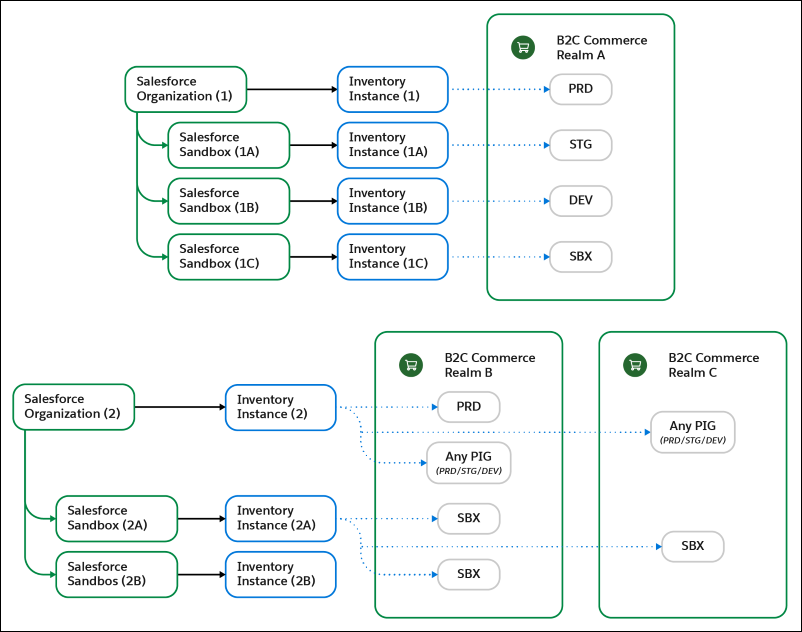
To connect one or more B2C Commerce instances to one Omnichannel Inventory instance, use the B2C Commerce Connections page in Salesforce (see Set Up the Connection Between Omnichannel Inventory and B2C Commerce).
Considerations
- When initially adding the Omnichannel Inventory license to Salesforce, determine if you
want to use an existing or new org.
- If you’re using an existing org, consider who requires licenses, access, and visibility to Omnichannel Inventory.
- If you’re creating an org, this data will be separate from other orgs, so consider how data sharing and segmenting will be impacted.
- Determine how many sandbox copies to create as part of your development and
implementation setup.
- To clone a sandbox, see Create, Clone, or Refresh a Sandbox.
- To apply an Omnichannel Inventory license to a sandbox, see Match production and sandbox licenses without a sandbox refresh.
