
You are here:
Generate a Pay Now Payment Link
To create payment links, use the Generate Payment Link flow in Flow Builder. This flow automates payment link generation. Use the flow as is or customize it.
Required Editions
-
At the top of the page, click
 and click Setup.
- In the Quick find box, enter then select Flows.
-
Click Run to run the flow, then select which type of payment link
you want to create.
The predefined amount link is available for an org with Payments on its own, or with Payments and Commerce. A With Products link is available only for an org with Payments and Commerce.
-
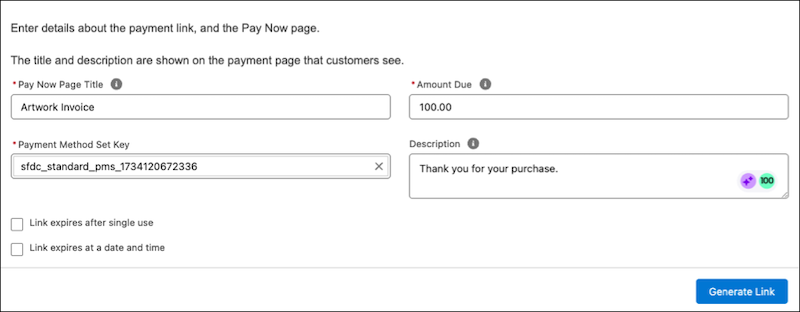
Complete the payment link form.
- Enter a pay now page title, such as your company name.
- For Predefined Amount link, enter the amount the customer owes.
- Enter a description to display on the payment page, such as a thank you message or a date when the payment is due.
-
Accept the default payment method set key, or choose another one from the list.
The payment method set and key are assigned when you set up your Pay Now store. The set contains the payment methods you selected for your merchant account. To use a different set, go to the Related tab of the merchant account record, create a new payment method set, and enter that key to override the default.
- (Optional) Select whether you want the link to expire after a single use or after a specific date and time.
- For a With Products link, select the products that the customer purchased.
- For a With Products link, specify the link status.
- Generate the link.

Here is an example of a completed Predefined Amount link form.
To customize the flow, select the Generate Payment Link flow, save it under a new name, then modify it. You can also build your own application workflow using the Payment Link object and a Salesforce declarative tool, such as Flow or Quick Actions. You can also use a developer tool, like Apex invocable actions.
You can also generate a Pay Now link for an invoice, configure the business account ID and payment settings to associate payments with the correct business account in Billing. See Generate Pay Now Payment Links for Business Accounts.
