Use the Generate Payment Link flow in Flow Builder to create links for products with
predefined amounts or with preselected products. If your org has Salesforce Payments only, then
the Predefined Amount Link is the only link type available. If your org has Salesforce Payments
and Commerce, then the Predefined Amount Link and With Products Link types are both available.
You can also create a custom flow.
Required Editions
Available in: Lightning Experience
Available in: Starter, Pro Suite, Enterprise,
Unlimited, and Developer Editions
These features are common to both payment link types.
Support for passwordless login.
During link generation, the default payment method set for the Pay Now store is
configured. You can select a different set, but the set must contain payment methods that
support the default currency of the Pay Now store. For example, if the default currency is
euros, the payment method set must contain payment methods that support euros. To override
the default payment method set, pick a payment method set thatʼs associated with the
merchant account thatʼs linked to the Pay Now store.
You can use HTML to format the description that’s shown on the payment page.
You can use store components to create the payment page that your customer sees.
Predefined Amount Link
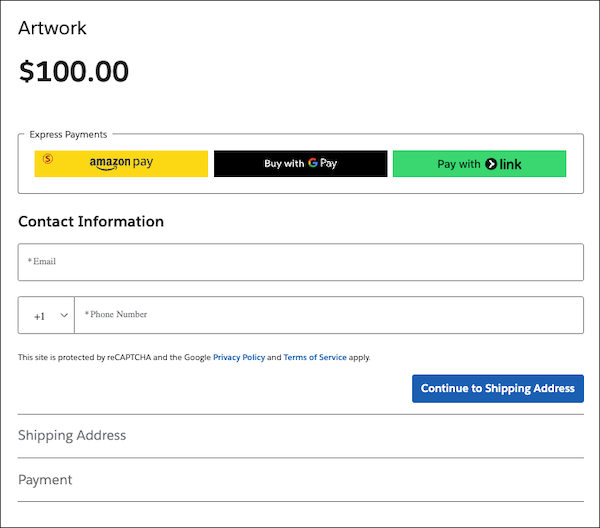
Directs a customer to a branded payment page
that shows only the amount owed. You specify the amount when you configure the link. The
store component Pay Now: Predefined Amount, available with the Pay page, provides the
payment page that your customer sees.
To determine the source of a payment that’s
associated with a Predefined Amount link, view the Payment Initiation Source record. This
record is created based on information stored in the link record. To view this information,
use the Developer Console and query the link
record.
This page is generated using the Predefined Amount Link.
With Products Link
Directs a customer to a page that shows a list of
preselected products, calculates the tax based on the shipping address on those products,
and provides shipping options. After the customer completes the transaction, an order record
is created. You can view the order using an integrated order management product, such as
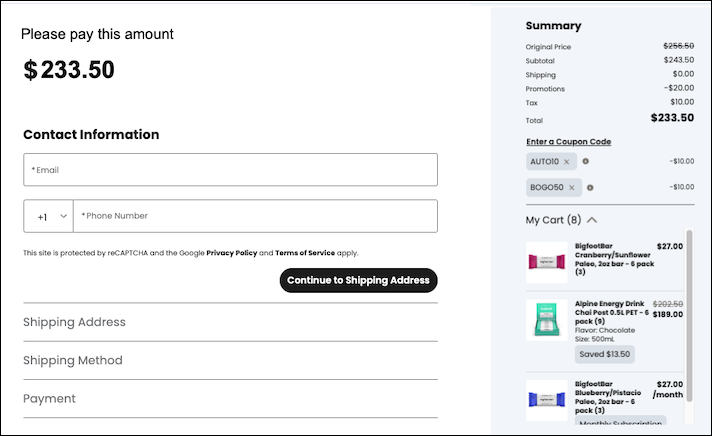
Salesforce Order Management. The store component Pay Now: With Products, available with the
Checkout page, provides the page that your customer sees. This link maps to the Checkout
with Order functionality in the PaymentLink object. The With Products link type requires
that you enable person accounts for your org.
To determine the source of a payment
that’s associated with a With Products Link, view the Store and Channel values on the
Payment Initiation Source record. The Store value is the Pay Now store and the Channel value
is Managed Checkout. If the Pay Now store has only one With Products Link, you can use the
link to determine the source of the order. If the Pay Now store has multiple With Products
Links, you can cross-check the items in the Cart against the Payment Initiation Source
record to determine the source of the order. This record is created based on information
stored in the link record. To view this information, use the Developer Console and query the link
record.
This page is generated using the With Products Link.
We use three kinds of cookies on our websites: required, functional, and advertising. You can choose whether functional and advertising cookies apply. Click on the different cookie categories to find out more about each category and to change the default settings.
Privacy Statement
Required Cookies
Always Active
Required cookies are necessary for basic website functionality. Some examples include: session cookies needed to transmit the website, authentication cookies, and security cookies.
Functional Cookies
Functional cookies enhance functions, performance, and services on the website. Some examples include: cookies used to analyze site traffic, cookies used for market research, and cookies used to display advertising that is not directed to a particular individual.
Advertising Cookies
Advertising cookies track activity across websites in order to understand a viewer’s interests, and direct them specific marketing. Some examples include: cookies used for remarketing, or interest-based advertising.