Enable Salesforce Payments for Commerce and Pay Now
Instead of using a third-party provider, use Salesforce Payments, the native service
you can use to accept payments during checkout. With Salesforce Payments, you can offer
customers a variety of payment options. Payments is available for B2B, D2C, and Pay Now stores.
After you enable Payments, you can't disable it.
Tip If you’re setting up a D2C store for the first time, bypass
this process and instead let the Commerce Setup Assistant enable and configure
Payments for your org. For more information, see Video: Choose Your
Checkout Solution and Set Up a Commerce
Store.
Before you can enable Payments manually, first enable Digital Experiences and set up
a dedicated Experience Cloud site for Payments.
From Setup, in the Quick Find box, enter Payments.
In the left navigation, select Payments.
Verify that Digital Experiences is enabled and that the Experience site is
active.
When the prerequisite tasks are complete, the Enable button becomes active,
and the Pay Now section is available.
Click Enable.
After you enable Payments, you can’t disable it.
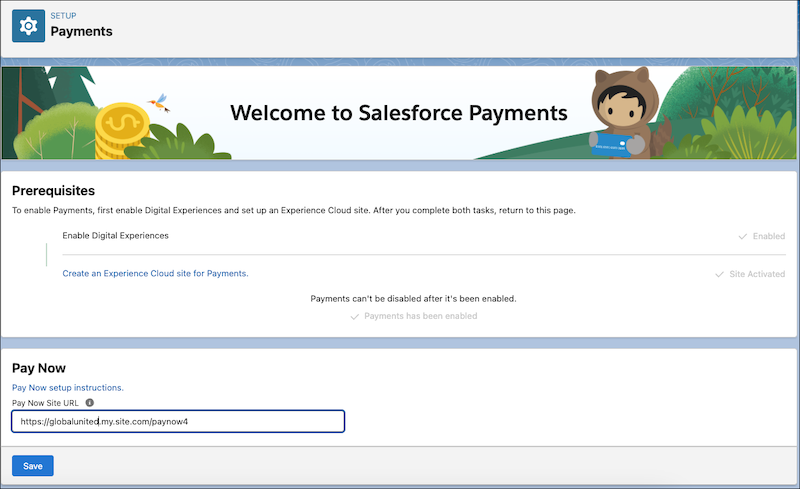
Here’s what the Payments Setup page looks like when Payments is enabled. In the App
Launcher, verify that the Payments app is available.
We use three kinds of cookies on our websites: required, functional, and advertising. You can choose whether functional and advertising cookies apply. Click on the different cookie categories to find out more about each category and to change the default settings.
Privacy Statement
Required Cookies
Always Active
Required cookies are necessary for basic website functionality. Some examples include: session cookies needed to transmit the website, authentication cookies, and security cookies.
Functional Cookies
Functional cookies enhance functions, performance, and services on the website. Some examples include: cookies used to analyze site traffic, cookies used for market research, and cookies used to display advertising that is not directed to a particular individual.
Advertising Cookies
Advertising cookies track activity across websites in order to understand a viewer’s interests, and direct them specific marketing. Some examples include: cookies used for remarketing, or interest-based advertising.