
You are here:
One-Click Checkout for Faster Transactions
Simplify the checkout process at your D2C and Pay Now stores using one-click checkout with passwordless login. Customers save their contact and payment information for future transactions, eliminating the need for passwords. If your store uses managed checkout, one-click checkout is enabled by default. If your store uses custom checkout, you can add a component to enable this feature. Customers can always check out as a guest.
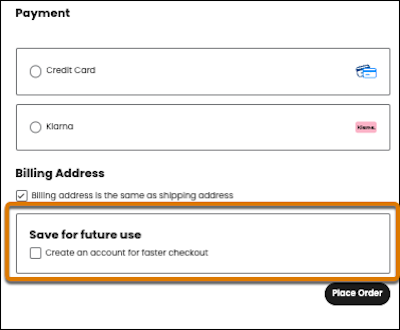
When a first-time customer arrives at your store’s checkout page, that customer enters their contact details, shipping and billing address, if applicable, and payment information. Before placing an order, they can choose to save the information for future use. By opting in, they become a registered customer.
When a customer returns to the same store and enters their registered email, a one-time passcode is sent to the customer’s phone. They can also request to have a new code sent to their email address or check out as a guest.
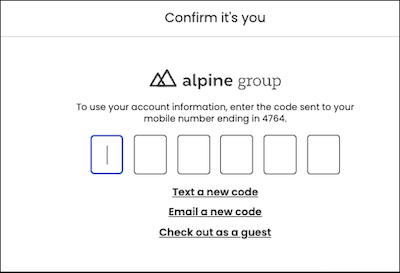
After the code is entered, the customer is logged in, and their saved information is prepopulated. They finish their transaction with one click. After the order is submitted, a confirmation page displays. Customers can view their saved information from My Account.
A single customer can log in with a one-time passcode five times per hour, up to 20,000 logins per year. To increase the anual limit, contact your Account Executive.
If a customer exceeds the hourly limit, a one-time passcode isn’t generated. The customer can either check out as a guest or wait an hour before logging in again.
- Switch to Managed Checkout to Simplify One-Click Checkout
Easily set up one-click checkout by switching your D2C store from custom checkout to managed checkout. If you have no custom checkout integrations, switching to managed checkout gives you access to one-click checkout without complex setup. However, if your store has a custom integration, you lose it if you switch to managed checkout. - Set Up One-Click Checkout for a D2C Store That Uses Custom Checkout
One-click checkout is not available by default with custom checkout, but you can configure it by adding a component to the Checkout page. - Send a One-Time Password to Any Store on the Same Org
For a registered customer to use one-click checkout, they must receive a one-time password. A customer can register only one time with an org, regardless of whether the org is hosting more than one store. To send a one-time password for any store on the same org, share the shopper profile with each store.
