Capture and Refund Payments from the Payments Workspace
Capture and refund credit card purchases from the Payments workspace, instead of going
to the payment gateway's dashboard. For example, you can manually capture payments, or process
courtesy refunds outside of the return time frame. The available action is determined by the
payment status. You can only take actions on payments processed by Stripe or Adyen.
Select an action from the dropdown menu at the end of the entry, or click the payment
intent number and select Capture or Refund on the record page.
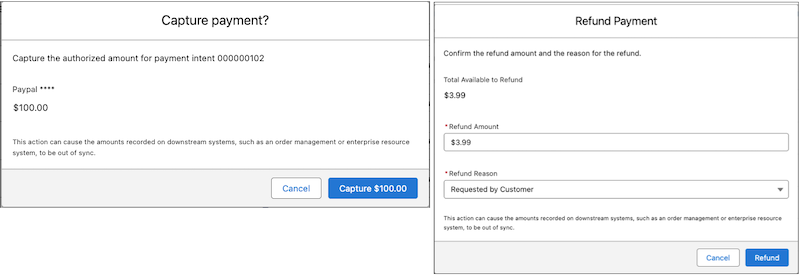
Capture is available only if you enabled manual capture for your store, and the payment
status is Authorized.
Refund is available only if the payment status is Succeeded.
Complete the action from the confirmation page that opens.
Note Captures and refunds from the Payments workspace are not automatically synced to downstream
systems, like order management systems, including Salesforce Order Management, or enterprise
resource systems. To keep these systems synchronized, subscribe to Salesforce Payments Event Notifications, and use them to
build custom business logic.
We use three kinds of cookies on our websites: required, functional, and advertising. You can choose whether functional and advertising cookies apply. Click on the different cookie categories to find out more about each category and to change the default settings.
Privacy Statement
Required Cookies
Always Active
Required cookies are necessary for basic website functionality. Some examples include: session cookies needed to transmit the website, authentication cookies, and security cookies.
Functional Cookies
Functional cookies enhance functions, performance, and services on the website. Some examples include: cookies used to analyze site traffic, cookies used for market research, and cookies used to display advertising that is not directed to a particular individual.
Advertising Cookies
Advertising cookies track activity across websites in order to understand a viewer’s interests, and direct them specific marketing. Some examples include: cookies used for remarketing, or interest-based advertising.