
You are here:
Configure the Salesforce (SF) Order Management System (OMS) in CMS
Discover the steps to configure the Salesforce Order Management System (OMS) in CMS. Point of Sale platform has an inbuilt Salesforce OMS connector. The connector is built on the best practices and collaboration with the Salesforce team.
Before reading this article, refer to Salesforce (SF) Order Management System (OMS) Integration Guide to learn the integration portion.
Based on various OMS features and declarative integration paradigms we have the following sections:
- Connectivity and Authentication
- Order Search Configuration
- BOPIS Setup
- Custom Field Mappings
- Return Field Mappings
- Order Field Mappings
- Digital Wallet Types
- Additional Payment Types
- Payment Gateway
- URL Override
- Delivery Methods
- Order Status Mappings

Prerequisites
- Refer to POS Access List - URLs and IP Addresses for a list of URLs and IP addresses to be allowlist. This is to enable the necessary communication.
- If you've yet to set up an Adyen and Point of Sale account, confirm that your StoreIDs are the same for both accounts.
- If your Point of Sale account is already live but you haven't set up Adyen, confirm that your Adyen's StoreID is the same as your Point of Sale's StoreID.
- If your Adyen account is already live but you haven't set up Point of Sale, confirm that your Point of Sale's StoreID is the same as Adyen's StoreID.
- Contact your Customer Success Manager (CSM) to configure an OMS Import Job for each environment.
Enable CMS Configurations
Turn on the Generate Order ItemId for SFOMS Order setting in Point of Sale CMS to generate unique orderItemIDs for each product in an order. Failing to turn on this setting may lead to errors in processing split order
- In CMS, go to .
- Expand .
- Turn on .
Create OMS Configuration
Now create the OMS configuration.
- In CMS, go to .
-
Fill out the fields.
Field Required Description Example General Settings Service Yes Set to for standard NetSuite implementation, for Salesforce implementation, or for merchant-specific customizations.
If Salesforce is selected, additional configuration is needed for Inventory Configurations.
If using the order SPI, a custom configuration isn't needed. The merchant is to process the order JSON and assign fulfillment workflows accordingly, by referring to the fulfillmentTypes and subFulfillmentTypes.
NetSuite, Salesforce OMS, Custom Error Reporting No Functionality has been moved to Learn more N/A Order Statuses to Process No This field is deprecated, don't use it. N/A Connectivity and Authentication Username Yes The username of the merchant's SF OMS account must be an integration account, rather than an individual user. Be aware of password reset cadences, as this can lead to inventory availability errors. username123 Password Yes The password of the SF OMS account. password123 Client ID Yes The client ID of the SF OMS account. SDOKWmwe123.sadAJS Client Secret Yes The client secret of the SF OMS account. 456xyz Environment No The environment of the account. TEST, PRODUCTION API version No The API version. The current recommended setting is v51.0. v51.0 Query API version No The query API version. The current recommended setting is v51.0. v51.0 Order Search Configuration Enable No Activate to configure the fields in this section. Deactivating it would close all the fields in this panel N/A Currency Code No Field filters search results by currency code and map to the OrderSummary CurrencyIsoCode in the SF OMS. US Dollar (USD) Sales Channel IDs No Filter search results by a list of Sales Channel IDs; should map to OrderSummary SalesChannelIDs in Salesforce OMS 0000000123abc Store ID No Field filters search results by a store ID OMS Field. For this filter to work, this OMS field should map to POS Field ORDER_STORE_ID and apply to the ORDER field in custom field mapping 1 Card Last Four No Field specifies which SF OMS custom field to use for order search by using the last four digits of the payment card CardLastFour__c BOPIS Enable No Activate to configure the fields in this section; otherwise, deactivating closes all the fields in this panel N/A Order Statuses to Import No Order status in the SF OMS that the POS needs to import for BOPIS orders DRAFT, ACTIVATED Pack Order Status No Order status to be set in the SF OMS when an associate marks a BOPIS order as packed pickpack Delivery Method Name No Delivery method of the BOPIS order in SF OMS Store PickUp Delivered Order Status No Order status to be set in the SF OMS when an associate marks a BOPIS order as delivered Fulfilled Canceled Order Status No Order status to be set in the SF OMS when an associate marks a BOPIS order as canceled Canceled Custom Field Mappings POS Field Yes Configuration property is a predefined Point of Sale field that is exclusively applicable to posted orders ORDER_STORE_ID OMS Field Yes Configuration property is an SF OMS merchant-specific field that is exclusively applicable to posted orders warehouseID__c Applied To Yes Configuration property is an SF object to which this mapping should be applied; exclusively applicable to posted orders ORDER Transform Function No Configuration property that applies a supported transform function to the mapping NONE Return Field Mappings Mapping Field No Configuration property is a predefined Point of Sale field that is exclusively applicable to returns CHANGE_ORDER_ID OMS Field No Configuration property is an SF OMS merchant-specific field that is exclusively applicable to returns ChangeOrder__c Applied To No Configuration property is an SF object to which this mapping should be applied; exclusively applicable to returns REFUND Order Field Mappings No Receipt Returns Order Type No Order type of NRR orders in SF OMS Unreferenced Returns Default Email Address No Email address to be used on the account for Guest Orders when there is no email address (this would be a Person Account Object in SF) default@email.com Endless Aisle Order Type No Endless aisles are in-store kiosks that allow customers to browse and order products that are not available in the store Endless Aisle Digital Wallet Type Digital Wallet No For BORIS scenarios, POS requires a list of digital wallets supported on the website. For more information, see Digital Wallet Types. Apple Pay, PayPal, or Google Pay SFOMS Values No Payment types configured in the Commerce system for the digital wallet type. Located in Salesforce account under Type in the Order Payment Summary. For more information, see Digital Wallet Types. DW_APPLE_PAY Additional Payment Types Additional Payment Type No Additional payment types, for example, Affirm. Located in your Salesforce account, if applicable Affirm Payment Type SFOMS Values Corresponding additional payment type values in SF OMS. Located in your Salesforce account Tender Types Tender Types No POS tender type Cash, Credit Card, Gift Card SFOMS Values No SF OMS TenderType value. Located in your Salesforce account, if applicable
Look for the value of the PaymenyGatewayName; not to be confused with the PaymentGatewayID
Cash, Givex, Adyen URL Override OMS Endpoint No Configuration is for advanced use cases. If a merchant has built a different URL to override SF OMS core flows, this endpoint and its overriding value need to be populated Submit Return, Preview Return Override Values No Overriding URL that alters the default behavior; URL must start with a forward slash, see example /services/apexrest/pos-return?step=preview Delivery Methods Delivery Method No POS order type. Located in your Salesforce account. For more information, see Delivery Methods. Ship To Home SFOMS Values No Corresponding delivery methods in SF OMS. Located in your Salesforce account. For more information, see Delivery Methods. OVERSIZE_HOME_DELIVERY Order Status Mappings Created Yes SF OMS order status that needs to be shown as CREATED on the POS. Located in in your Salesforce account, if applicable Created Completed Yes SF OMS order status that needs to be shown as COMPLETED on the POS; can be found in your Salesforce account, if applicable Fulfilled, Closed, Return Cancelled Yes SF OMS order status that needs to be shown as CANCELLED on the POS; can be found in your Salesforce account, if applicable Canceled Processing Yes SF OMS order status that needs to be shown as PROCESSING on the POS; can be found in your Salesforce account, if applicable Waiting Approval, Waiting Allocation, Waiting Fulfillment, Waiting Business Approval Advanced Enable 'Skip In-Store' Order Search No Activate to enable skip in-store order search N/A Enable Returns No Activate to enable returns N/A Enable Streaming No Activate to allow SF OMS Streaming listener to pull orders that a store needs to fulfill (BOPIS / BOFIS) N/A Enable Master of Record for Web Orders No Activate to allow SF OMS as Master of Record for web orders N/A Enable Cancellation APIs No Activate to enable cancel APIs for fulfillment orders N/A Enable Composite Query Search No Point of Sale's current integration retrieves details for SObjects endpoints like Order Items and Tax Line Items using separate requests. However, this caused issues with orders containing many items. By activating this flag, the SFOMS Composite query API enables querying multiple SObjects in a single request, improving efficiency for orders with a high item count N/A Enable Payment Update No Activate to post Payment Object to SF OMS in "Draft" status, which can be updated during Store-and-Forward (SAF). Applicable in cases where there is an incorrect tender reference ID during the initial order posting and you can correct it during the SAF process N/A - Click SAVE.
Custom Field Mappings
The field mappings provide a mapping of the custom fields between Point of Sale and the Salesforce OMS. The following properties are used to map the fields from Point of Sale's Order objects to the Salesforce objects. On a high-level overview, this is how information about an order is selectively processed and then posted to SF OMS.
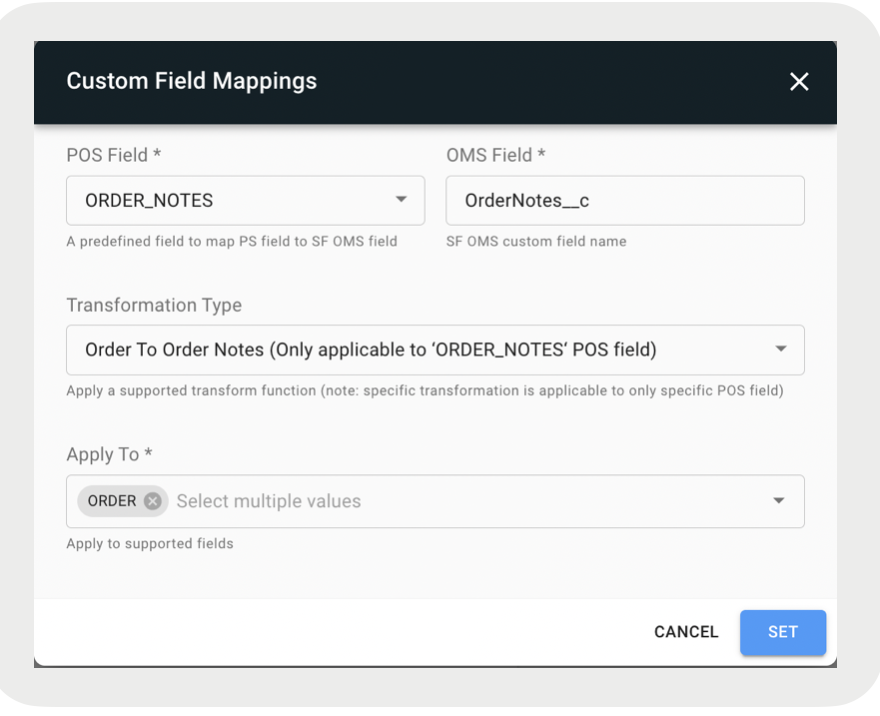
In the screenshot, the POS app field (ORDER_NOTES) is mapped to the SF OMS field (OrderNotes__c). It is applied to "ORDER" and the transformation type is "Order to Order Notes". With this configuration, we're using code logic (transformation type) to read and grab the order notes we're trying to find in the Order object (apply to).
order.notesList[0].noteText
To further explain, in the code example above, the transformation type of "Order to Order Notes" is being used to read the field value of noteText from the order.noteList[0] object. After we have the information we need, we process it and post it to SF OMS.

- - A configuration property that is a predefined Point of Sale field to map to. E.g., ORDER_NOTES.
- - A configuration property that is an SF OMS custom field name. E.g., OrderNotes__c.
- - A configuration property that is a list of SF object names for which this mapping should be applied. E.g., ORDER. The difference between Order and Product is just a way, for example, to read the order notes from either the Order object or Product object. It is specific to the POS field that is being selected.
- - A configuration property that applies a supported transform function. E.g, Order To Order Notes. This is the logic that will find the specific field value of an array object in a JSON string. It is specific to the POS field that is being selected.
- - A character that marks the beginning or end of a unit in a string of data. E.g., comma (,), semicolon (;).
- - The format of the date to be posted in SF OMS. E.g., MM-dd-yyyy.
To Add a Custom Field Mapping:
- Click at the bottom of the panel.
- Fill out the fields.
- Click SET.
- (Optional) Select the pencil icon to the right to edit a field mapping.
- (Optional) Select the trash bin icon to the right to delete a field mapping.
POS Fields
| POS Field | Applied To | Transform Function |
|---|---|---|
| ASSOC_ID | ORDER | NONE |
| ORDER_NO_RECEIPT_RETURNS | ORDER | NONE |
| ORDER_DETAIL_STORE_ID | PRODUCT | NONE |
| ORDER_NOTES | ORDER | ORDER_TO_ORDER_NOTES |
| ORDER_QUOTE_ID | ORDER | NONE |
| ORDER_STORE_ID | ORDER, LOCATION | NONE |
| ORDER_TARIFF | ORDER | NONE |
| ORDER_TAX_EXEMPT | ORDER | ORDER_TO_TAX_EXEMPT |
| ORDER_UPDATE_DATE | ORDER, FULFILLMENT_ORDER | EPOCH_TO_DATE |
| ORIGINAL_ORDER_ID | ORDER | NONE |
| PRODUCT_CARD_ALIAS | ORDER | PRODUCT_CARD_ALIAS |
| PAYMENT_CARD_LAST_FOUR | ORDER | PAYMENT_TO_CARD_LAST_FOUR |
| PRODUCT_ASSOC_ATTR | PRODUCT | PRODUCT_TO_ASSOC_ATTR |
| PRODUCT_CUSTOMSKU | PRODUCT | List to JSON string |
| PRODUCT_NOTES | PRODUCT | PRODUCT_TO_PRODUCT_NOTES |
| PRODUCT_PICKUP_STOREID | PRODUCT | PRODUCT_PICKUP_ TO_TARGET_STORE_ID |
| PRODUCT_FULFILLMENTLOC_STOREID | PRODUCT | NONE |
| PRODUCT_FULFILLMENT_TYPE | PRODUCT | NONE |
| PRODUCT_FULFILLMENT_SUBTYPE | PRODUCT | NONE |
| PRODUCT_PRICE_ADJUSTMENT_PROMONAME | PRODUCT_PRICE_ADJUSTMENT | NONE |
| PRODUCT_PRICE_ADJUSTMENT_REASON | PRODUCT_PRICE_ADJUSTMENT_REASON | List to JSON string |
| PRODUCT_TARGET_STORE_ID | PRODUCT | NONE |
| PRODUCT_TAX_CODE | PRODUCT_TAX | NONE |
| PRODUCT_TAX_JURISDICTION | PRODUCT_TAX | NONE |
| PRODUCT_TAX_REGISTRATION_NO | PRODUCT_TAX | NONE |
| STORE_FULFILLMENT_ORDER_ID | ORDER | NONE |
| STORE_REGISTER_ID | ORDER | NONE |
| TARIFF_RATE | ORDER | NONE |
Digital Wallet Types
Map online payment options, such as ApplePay, PayPal, and Google Pay, to the Retail CLoud POS app. This field(s) is not mandatory however, it is critical for BORIS flows to map online payment options to the POS. Configure the same payment types in the Commerce system and Point of Sale CMS. These are found in your Salesforce account under Type in the Order Payment Summary.
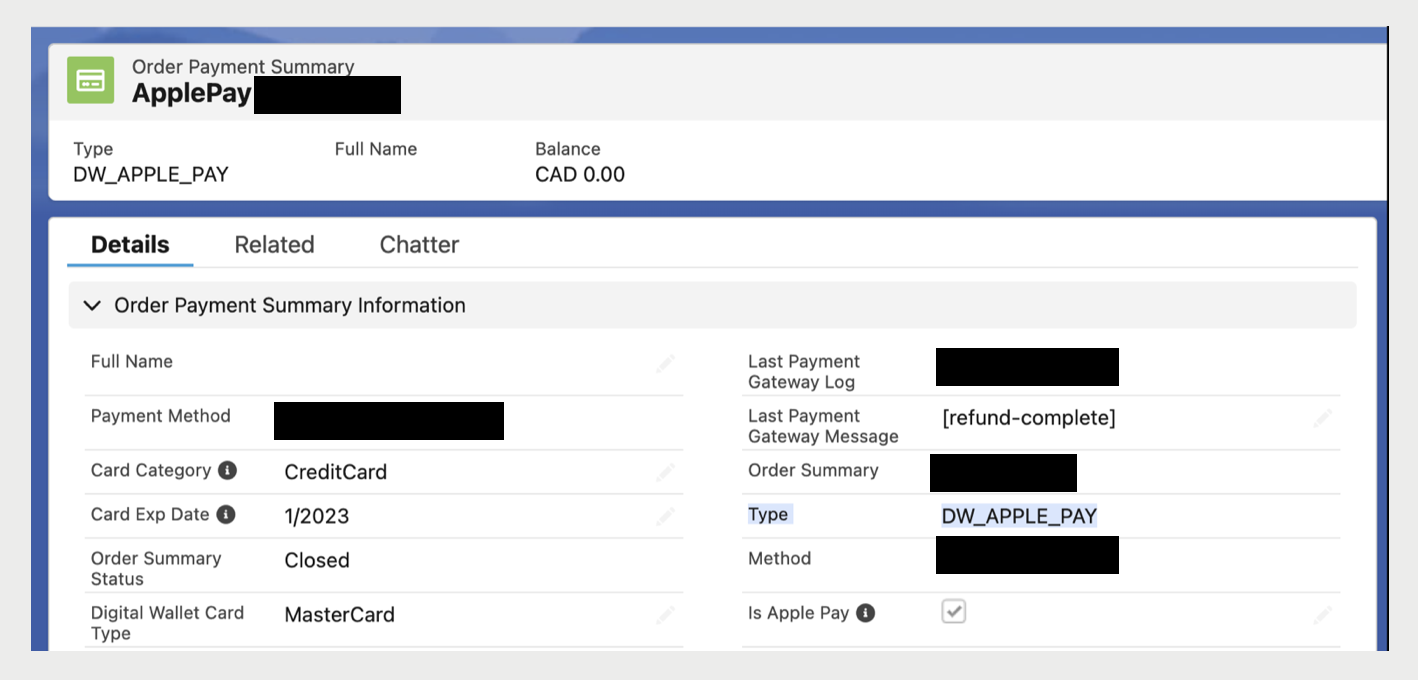
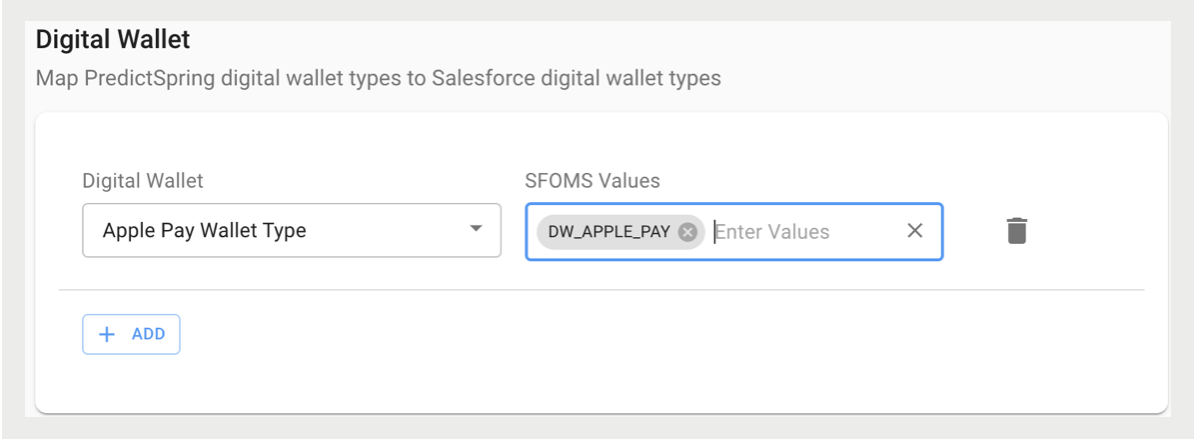
For details on the support capability for BORIS returns to credit card payments, refer to Buy Online, Return In-Store (BORIS) Payment Refunds via Credit Card.
Additional Payment Types
In terms of functionality, Additional Payment Types is similar to Digital Wallet. If you allow, for example, Affirm during checkout, then it needs to be configured so that Retail Cloud's additional payment type values can be mapped to the SF OMS additional payment type values. The values to be entered, if applicable, can be found in your Salesforce account.
Delivery Methods
View delivery methods in your Salesforce Point of Sale account in the Order Delivery Method summary.
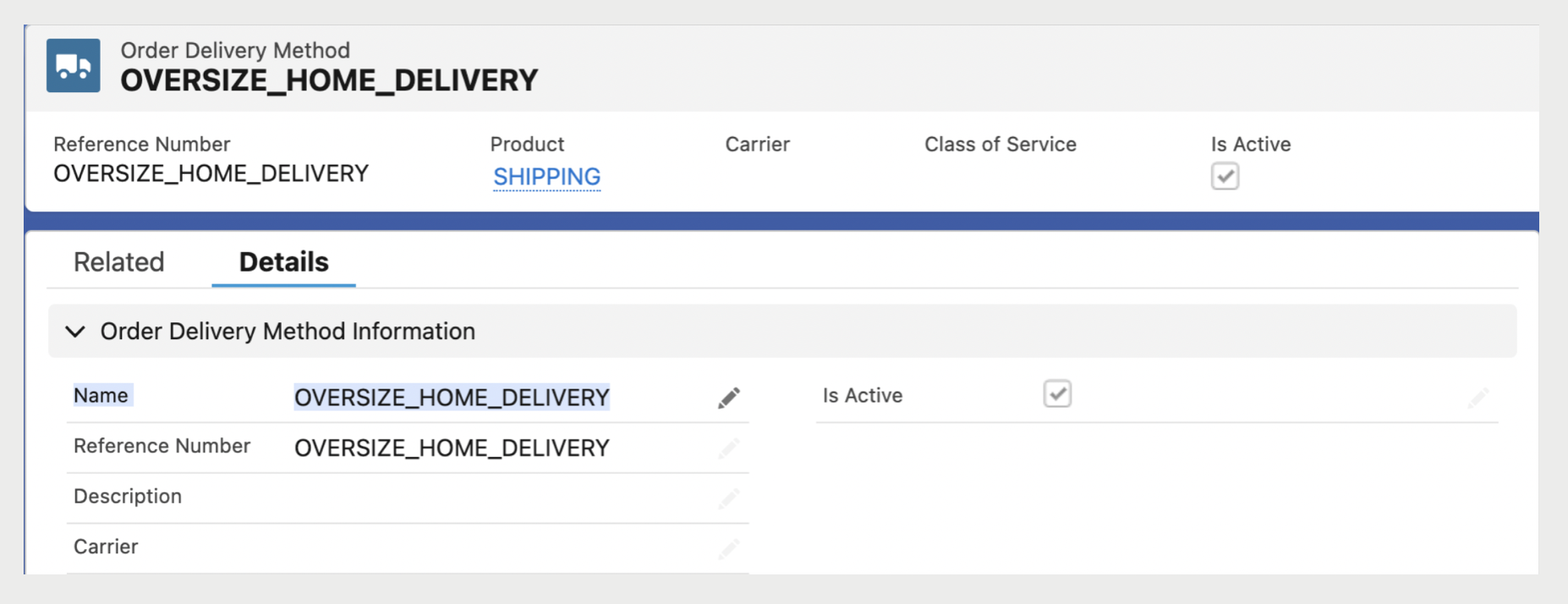
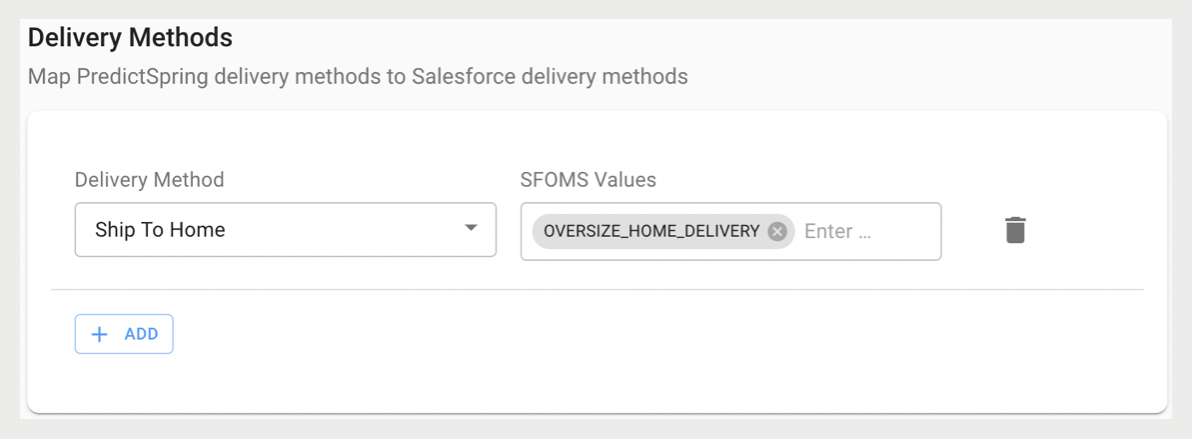
There are different order fulfillment types (for example, online, in-store) at the item-level as well as fulfillment subtypes (for example, BOPIS, try at store, pick up later). Point of Sale created the field to map a brand's various delivery methods. Point of Sale uses logic to map out the delivery methods in their subsequent fulfillment and fulfillment subtypes. In the above screenshot, since a delivery method was entered under in the CMS, with Point of Sale's logic, the fulfillment type would be online with a fulfillment sub type as default.
