
You are here:
Set Up Verifone Store and Forward (SAF)
Configure Verifone Store and Forward (SAF) so the Point of Sale (POS) app keeps processing credit card transactions if the network isn't working.
Prerequisites
- Modern POS App Build: 9.5.1 or greater
- Platform Support: iPad & iPhone
- Offline Support: yes
Setup and Configure Verifone SAF Settings in Point of Sale CMS
Enable Store and Forward (SAF) for Verifone in Point of Sale CMS to store payments if your terminal loses connectivity.
Configure Verifone Settings
The table displays the recommended settings and configurations for enabling SAF.
To set the table values on the terminal manually:
- Press 1+5+9 at the same time, x2 to open SysMode
- Supervisor
- Enter password
- Administration
- Config Editor
- config.usr1
- [perm] > Add [perm] value yes
- Enter name of setting
- Enter setting value
| Setting | Description | Default |
|---|---|---|
| SAFENABLED | Enables SAF. Enter 0 for False, 1 for True | 1 |
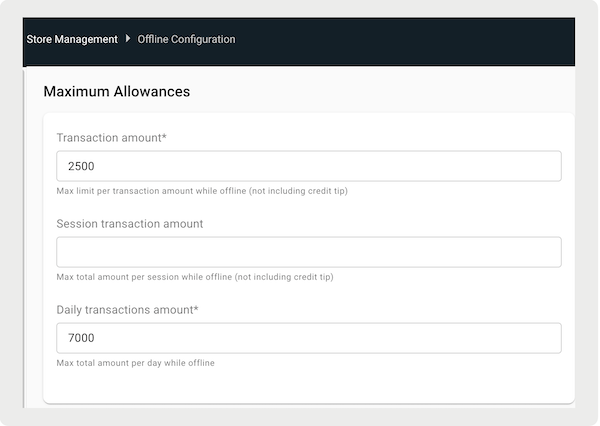
| TOTALFLOORLIMIT | Total value of payments allowed during SAF session. Value is set in minor units, that is, 25000 = $250.00 | 0 |
| TRANSACTIONFLOORLIMIT | Maximum dollar amount allowed per SAF payment. Value is set in minor units | 0 |
| SAFPINGINTERVAL | Number of minutes between which the device pings the gateway to go online | 2 |
| SAFPOSTINTERVAL | Time interval, in minutes, between individual SAF payment uploads from terminal to the host after going online | 5 |
| SAFPURGEDAYS | Number of days in which SAF payment stays on a terminal and attempts to sync to the host. Payments past this date will be deleted from the terminal | 15 |
| SAFTHROTTLINGENABLE | Enables SAF throttling. Enter 0 for False. 1 for True | 0 |
| SAFTHROTTLINGINTERVAL | Terminal creates a unique delay per device based on this setting and serial number to attempt to reconnect to the host | 250 |
| ALLOWOFFLINETRANTOGOWITHONLINE | Controls ability to post offline transactions while performing online transactions; enter 0 for False, 1 for True | 0 |

Configure Payment Gateway
- In Point of Sale CMS, go to.
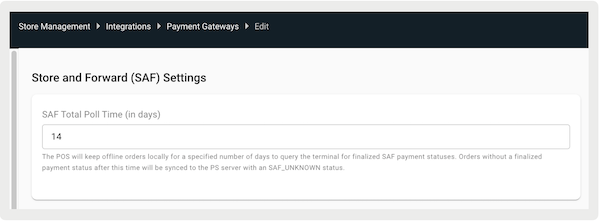
- Under , enter the total poll time in days. With this setting, the POS app keeps any orders for the specified amount of days. During this time, it'll keep checking for final payment confirmations. If an order isn't paid within that time, it'll be sent to the payment server with an "" status. It is recommended that this value match the "" Verifone settings.
Verifone SAF Flow in POS App
Process payments and refunds at the terminal, even without an internet connection, in the Point of Sale (POS) App.
Payment Lifecycle Flow
Payment and refund initiation follows the same process as online transactions. Transactions are approved or rejected at the terminal. They are stored for a short time and will be synchronized later after the internet connection is fixed.
Simultaneously, the POS system submits the offline order and stores it locally on the register. After network connectivity is restored, the POS system verifies that the SAF payment has been successfully synchronized with the host. This verification can occur in two ways:
- Automatic Verification: After a successful credit card payment, the POS system automatically initiates the verification process.
- Manual Verification: Users have the option to manually select transactions for verification and synchronization through the "Pending Orders" deep link. After all SAF transactions in an order have been successfully verified, the order will be synchronized with the PS backend.

Pending Order Screen Enhancements
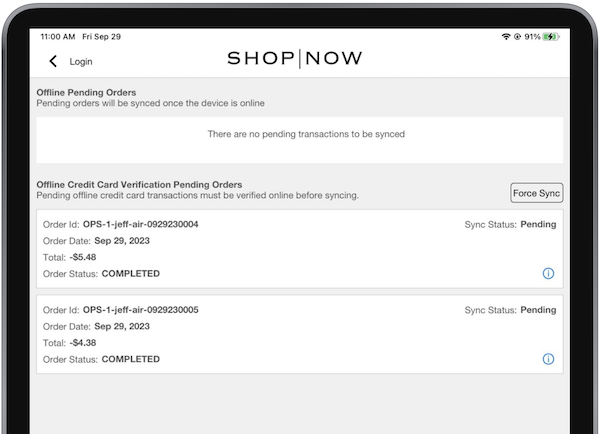
SAF orders show up on the screen. While in online mode, users can manually select orders for SAF verification and synchronization. After an order has been successfully verified, it'll be automatically synchronized with the PS backend. If the verification status isn't finalized, the order will remain on the device.
For immediate synchronization, users can use "Force Sync", which sends all orders to the Point of Sale backend regardless of their final SAF verification status. These transactions will be marked with a status of "SAF_UNKNOWN".
Verifone SAF Risks
Monitor Store and Forward (SAF) statuses to reconcile payments and refunds, and to avoid preventing Point of Sale customers from receiving their refunds. Locally approved offline transactions aren’t always approved after syncing with the online host.
New Payment Statuses
We've introduced new payment statuses to address these scenarios:
- : Status applies to payments that were locally approved offline but were declined if processed online.
- : Status is used for payments that were locally approved offline, but their online status is currently unknown.
New Refund Statuses
Similarly, for refunds, we've introduced new statuses to account for offline and online variations:
- : Status pertains to refunds that were locally approved offline but were declined if processed online,
- : Status is used for refunds that were locally approved offline, but their online status is currently unknown
