
You are here:
Point of Sale Loyalty Overview
Point of Sale supports loyalty integration. This integration facilitates the search for loyalty customers within the app, and shows and applies available rewards to the cart.
Prerequisites
- Modern POS App Build: 9.7.1 or greater
- Platform Support: iPhone & iPad
- Offline Support: no
Technical Requirements: configure Point of Sale's Loyalty SPIs
Adding a Loyalty Field during Customer Creation or Editing
Begin the loyalty journey by including a loyalty ID lookup field during customer creation or editing in Point of Sale.
Detailed instructions can be found in New Customer Signup.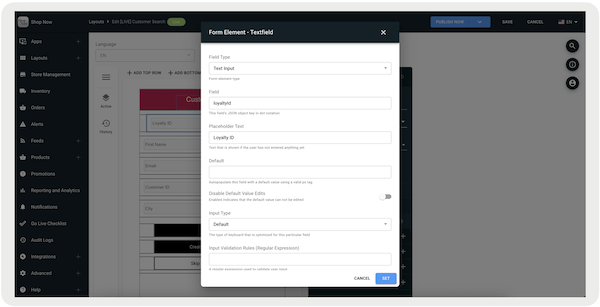
Enriching Customer 360 Profile
The Customer 360 profile can be enhanced to show information obtained from Point of Sale's SPI. These PS Tags are available to show loyalty information:
| Account Information | PS Tag | Description |
|---|---|---|
| :ps_account_number | ID associated with the customer's loyalty program profile |
| Loyalty Points & Credits | PS Tag | Description |
|---|---|---|
| :ps_total_points | Total number of loyalty points the customer has earned | |
| :ps_current_reward_points | Current balance of reward points available for redemption | |
| :ps_total_store_credit | Total store credit available in the customer's loyalty profile | |
| :ps_current_credits | Current credit balance in the customer's loyalty profile | |
| :ps_points_to_next_reward | Number of points needed to redeem the next reward |
| Current Loyalty Tier | PS Tag | Description |
|---|---|---|
| :ps_current_loyalty_tier_name | Name of the current loyalty tier the customer belongs to | |
| :ps_current_loyalty_tier_title | Title associated with the customer's current loyalty tier | |
| :ps_current_loyalty_tier_subtitle | Subtitle describing the customer's current loyalty tier | |
| :ps_current_tier_date | Date that the customer reached their current loyalty tier | |
| :ps_current_tier_expiry_date | Expiry date of the customer's current loyalty tier | |
| :ps_current_loyalty_tier_display | Display name of the customer's current loyalty tier |
| Next Loyalty Tier | PS Tag | Description |
|---|---|---|
| :ps_next_loyalty_tier_display | Display name of the next loyalty tier the customer can achieve | |
| :ps_next_loyalty_tier_name | Name of the next loyalty tier | |
| :ps_next_loyalty_tier_title | Title of the next loyalty tier the customer can achieve | |
| :ps_points_to_next_tier | Number of points needed to reach the next loyalty tier |
| Rewards Information | PS Tag | Description |
|---|---|---|
| :ps_num_rewards | Number of unique rewards currently available for redemption | |
| :ps_num_cash_rewards | Number of cash rewards available to the customer | |
| :ps_num_rewards_total | Total dollar value of rewards | |
| :ps_num_rewards_total_2 | An alternative, total dollar value of rewards, — including or excluding specific reward types | |
| :ps_num_rewards_total_2_no_dec | Total value of available rewards (no decimal) | |
| :ps_num_cash_rewards_total_no_dec | Total value of the cash rewards the user has (no decimal) |
Enriching Print & Email Receipts
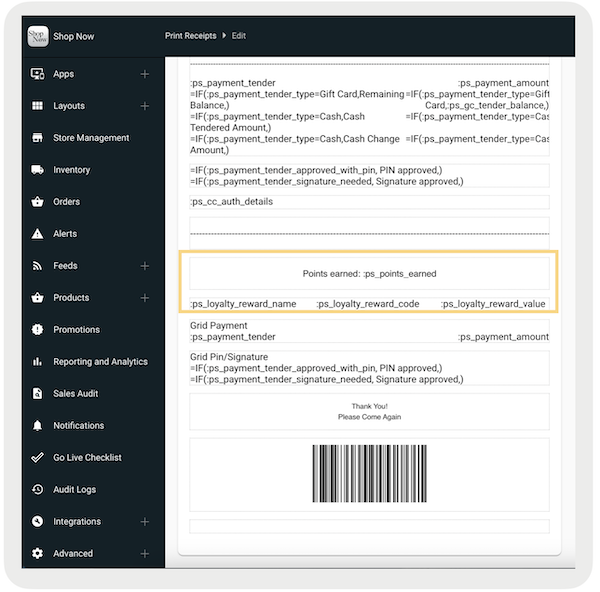
Like the Customer 360 profile, printed and electronic receipts can also be improved to show loyalty information of a customer using PS Tags. The tags in the table are available for use, but that they're only functional in app builds 9.8.1 or later For more tags related to loyalty, refer to Print Tags Comprehensive List and Email Tags Comprehensive List.
| Print Tags | Email Tags | Description |
|---|---|---|
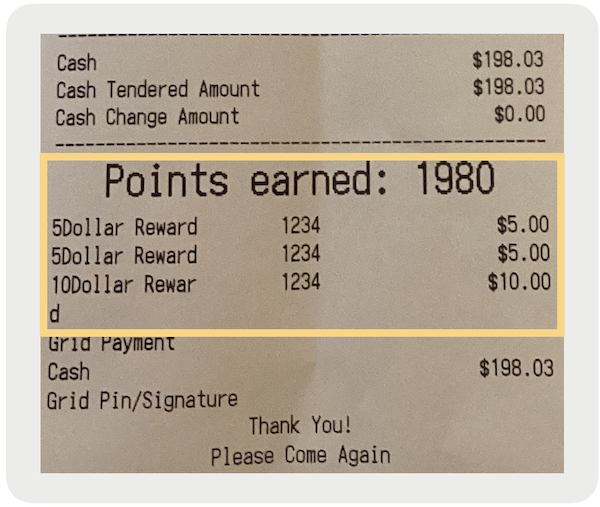
| :ps_loyalty_reward_value | {reward_amount} | Displays the amount of loyalty transaction discount rewards redeemed in the transaction (for example $5.00). Coupon rewards won't be listed as they are inherently applied as promotions and are shown on the receipt in the standard promotion format. |
| :ps_loyalty_reward_code | {reward_code} | Displays the loyalty transaction discount reward codes redeemed in the transaction (for example 1234). Coupon rewards won't be listed as they are inherently applied as promotions and will be shown on the receipt in the standard promotion format. |
| :ps_loyalty_reward_name | {reward_name} | Displays the name of the loyalty transaction discount rewards redeemed in the transaction (for example 5Dollar Reward). Coupon rewards won't be listed as they are inherently applied as promotions and are shown on the receipt in the standard promotion format. |
| :ps_points_earned | {loyalty_points_earned} | Displays the total quantity of loyalty points redeemed in the transaction. As Retail Cloud doesn't calculate points, this data is retrieved from Point of Sale's Loyalty SPI if configured accordingly. |
Example print configuration:
Example print receipt:
Adding Loyalty Visual Badge
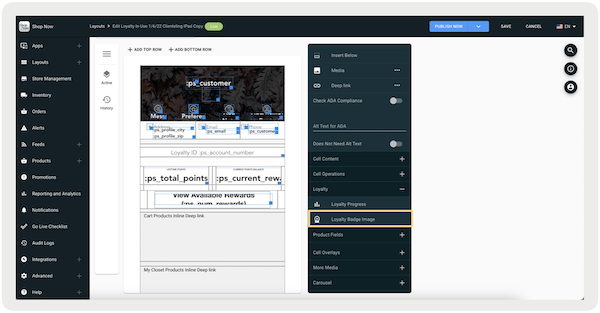
The Loyalty visual badge image is retrieved through the attribute "logoUrl" within the Get Customer API, where a URL is passed to us as a string (shown as a gold star). The image specifications are 20x20 pixels in size with a recommended file size of 5 KB. If a URL is included in this field for a customer, the badge automatically appears in both the search and header sections of the app for that specific customer. To add it to the Customer 360 experience, you can set it up using the layout editor. This is under .
Loyalty Sign-up and Enrollment
For app builds 9.8.1 or greater, customers can sign up for a merchant's loyalty program on the POS app. Created customers can also be enrolled if editing their profile. Note, after being enrolled, a customer can't be enrolled.
Viewing Customer Rewards
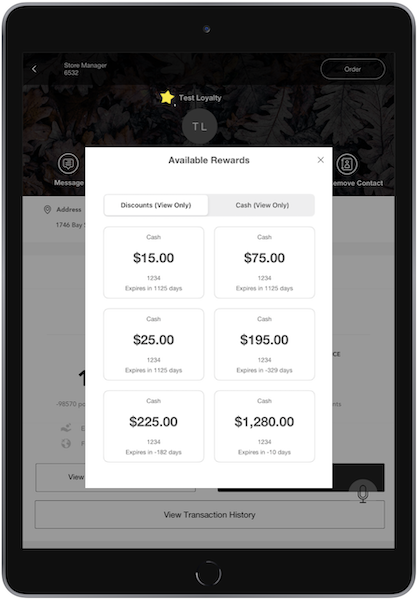
A customer's available rewards can be viewable on their 360 profile by adding and setting the deep link .
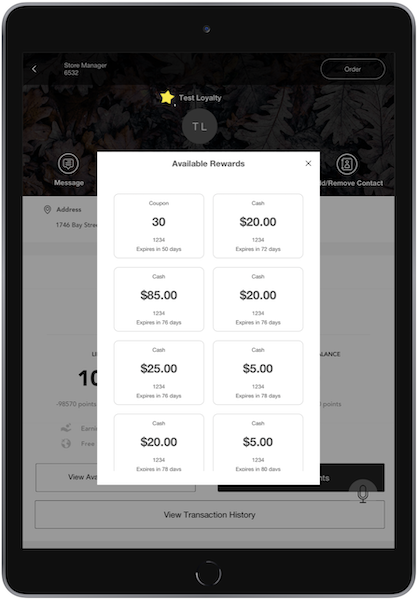
For app builds 10.10.1 or greater, rewards are split into two categories. These categories are rewards used as discounts, also known as . The second category is rewards that can be used in tendering, also known as .
Applying Customer Rewards via Cart Deep Link
A customer's available rewards can be applied to the cart by adding and setting the deep link. Setting the PS Tag can also show the number of available rewards.
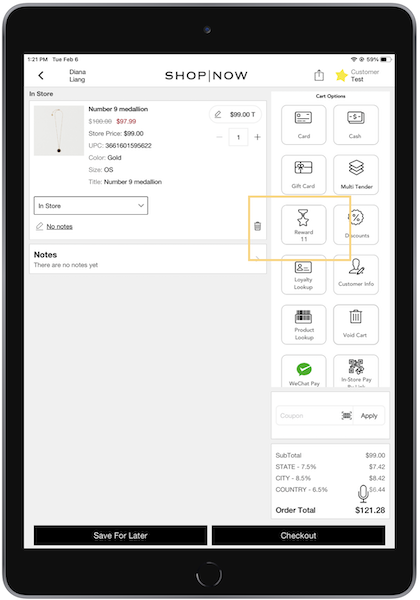
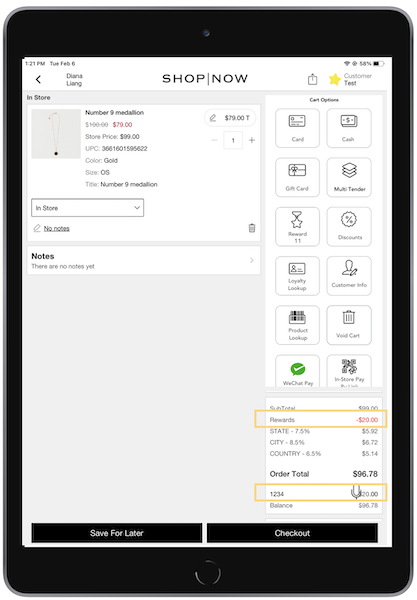
Tap a reward in the window to apply it as a discount. To remove the reward, tap on it again. The cart total shows the applied reward and its amount.

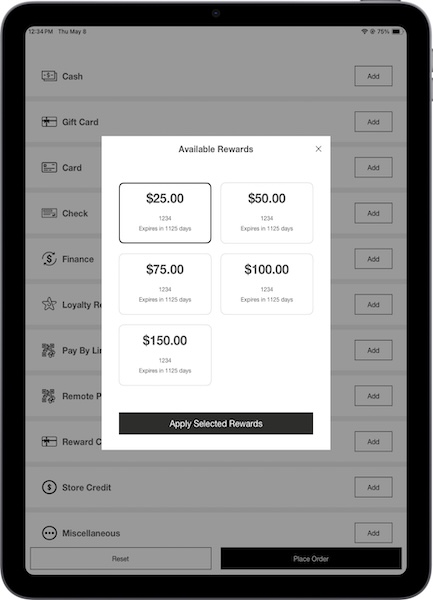
To use rewards as a tender, go to the multitender screen. Next, tap next to Loyalty Reward and select a reward.

Point of Sale Loyalty Reporting
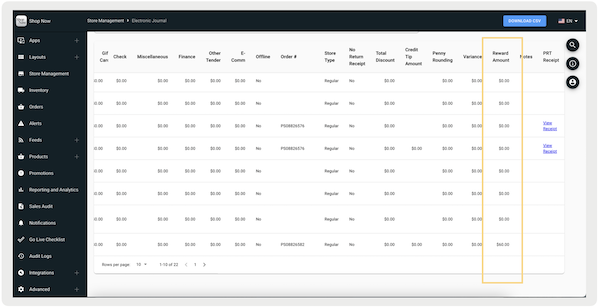
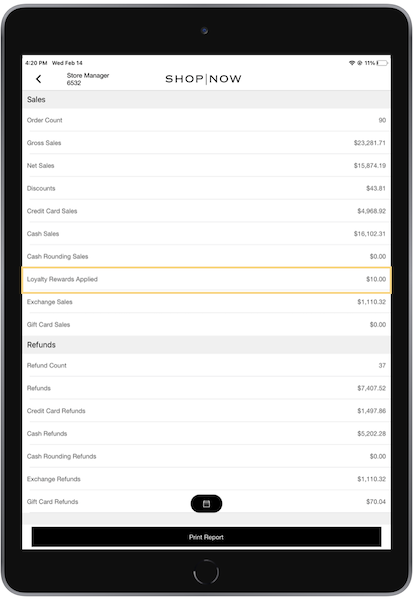
For app builds 9.8.1 or greater, the total loyalty discounts redeemed in a transaction are recorded in CMS and POS app reports. If a reward is applied as a promotion, it'll be reported through all the normal promotion reporting streams.
Electronic Journal
Recon Report via POS App
Understand POS Loyalty Restrictions
View additional issues that exist with the Point of Sale Loyalty setting.
PS Tags
The replacement of PS tags with their values on the Cart Options layout differs from other layouts. The app only checks and replaces these tags on the Cart Options layout:
These tags are supported because cart actions can update their values, allowing the display of the latest values after every cart action.
However, the tag, while configurable, doesn't always function correctly on the layout because it isn't directly tied to cart actions. It is recommended to configure this tag in the layout, where it'll be applicable across all flows.
Summary
: supported on Cart Options layout
: supported on Cart Options layout
: supported on Clienteling layout
Point of Sale Loyalty FAQs
View additional information about loyalty settings in the Point of Sale (POS) app.
Does Point of Sale apply any logic regarding tiers and what's eligible?
No, we don't apply any logic regarding tiers or eligibility.
Does the expiration come from an external system? What if it's a promotion in your system? Do merchants still send it?
Yes, the expiry information comes from an external system. However, if it's a promotion within our system, sending it isn't required.
Do refunds on orders referenced against a cash transaction discount increment the points?
We don't perform calculations in the loyalty system. We show the rewards that are passed on to us. We do handle logic and verify if rewards are active. As long as a reward is greater than the subtotal of the cart, it can be applied. Rewards are posted downstream to the order, so they can be used to mark them as redeemed in the loyalty system. If there's a return, we prorate the reward discount across the cart, and if there are returns, we note that the reward was used as a tender and there was a return against it. The merchant system is expected to handle the rest of the process. Check if your business allows refunds for rewards.
What about exchanges?
Rewards are carried forward in exchanges. For example, if a $100 order had $80 paid in cash/card and $20 in discounts, processing an exchange results in $100 worth of credits to use in the exchange.
Where is this information recorded?
Yes, the TLogs record everything about the order data, including the redemption of rewards. Merchants should refer to the TLogs.
Can the promotion API endpoints be used for retrieving information?
Yes, but only for coupon reward types.
With the coupons, do we validate them at all other than the incoming code? With a transaction discount, what conditions are required?
We don't validate coupons beyond the incoming code. For transaction discounts, they’re required to be active. However, if the code is active but has passed its expiry date, the POS app still honors it and show it as a redeemable reward.
On TLogs, how are loyalty rewards distinguished from regular coupons?
Promo code doesn't distinguish loyalty rewards, only discounts. It's recommended to create a dedicated promo code type to distinguish. For transaction discounts, they'll effectively be treated as their own discount, and recorded in the TLogs.
Is this recorded in the Electronic Journal (EJ)?
Yes, there's a new column for loyalty as a discount in the EJ report.
