
You are here:
Outlet Store Support in the POS app
Create and manage outlet stores in the Point of Sale (POS) app, providing customers with lower prices and everyday bargains.
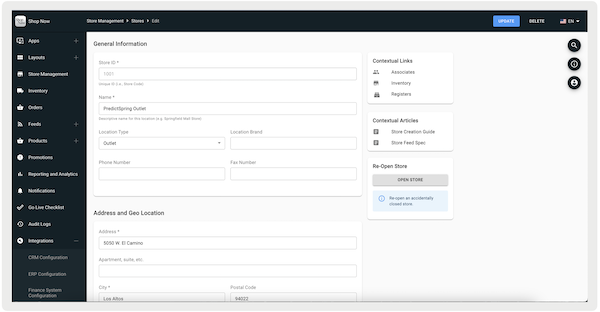
There are two ways of creating a store in Point of Sale CMS, manually and through a feed. To create many stores in one sitting, the feed method is recommended. For more information, refer to this article.
- In Point of Sale CMS, go to .
- Select in the upper right of the screen.
- Under , select .
-
Fill out the rest of the fields by referring to Store Creation.
Outlet Store Features Support
View all features capable of supporting Outlet Stores in the Point of Sale (POS) app.
Inventory Management
Store to Store (STS), Corporate, and Return to Vendor (RTV) are all supported inventory transfers for outlet stores. For STS, the receiving store is any store type, meaning a store can transfer inventory to an outlet. Similarly, a corporate transfer can occur from a regular store to an outlet and vice versa.
Offline Support: no
Promotions
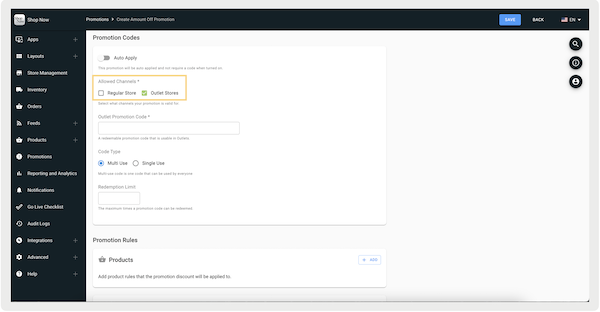
Outlet-specific promotions are available and can be set in Point of Sale CMS by configuring selected channels.
Offline Support: yes
For more information, refer to Creating Promotions.
Returns
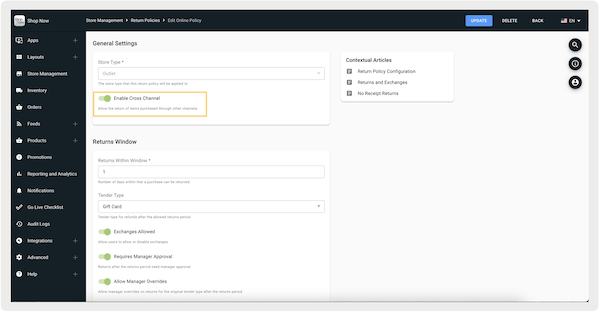
The return flow for outlets can be customized in CMS with . If this is turned on, items purchased at an outlet store can be returned at a regular store and vice versa. However, if this flag is turned off, items purchased at an outlet can only be returned at other outlet stores.
Offline Support: yes *
* In offline mode, outlet store orders can be returned to regular stores and vice versa, regardless of .
For more information, refer to Returns Policy Configuration.
Omnichannel
Outlet stores are supported for the Omni fulfillment type, . For example, items purchased at an outlet store can be picked up from a regular store and vice versa.
Offline Support: no
For more information, refer to Omni Flows.
Reporting
An in-depth review of outlet stores sales and order information is available in the CMS Report Builder. The report will include the GMV, number of orders, and AOV.
Offline Support: N/A
For more information, refer to Report Builder.
