Send more personalized communications by applying related attributes and filters. You
can send related attributes to Marketing Cloud Engagement, Data Cloud, and cloud file storage
platforms such as Amazon S3, SFTP, Microsoft Azure Blob Storage, and Google Cloud Storage
(GCS).
In Data 360, click Segments, and select a
segment.
Under Activations, click New.
Select the activation target, and click Continue.
Select the contact point, and click Next.
Click Add Attributes.
Drag related attributes to the canvas.
Note For engagement data, activation supports a 90-day lookback window. If related attributes
are selected for an activation with a rapid segment publish, the lookback window is seven
days. Activation considers engagement data within this window, and any records outside of this
window aren't considered when selecting your output values.
Click Save.
To apply criteria to attribute values, navigate to a selected DMO, and click Add
Filters.
Adding filters is optional but recommended to personalize a message with only relevant
values. Filters are applied at the DMO level and impact all the attributes within the
DMO.
From the attribute library, drag the attributes to the canvas to use as filters and
define the filter criteria.
Click Done.
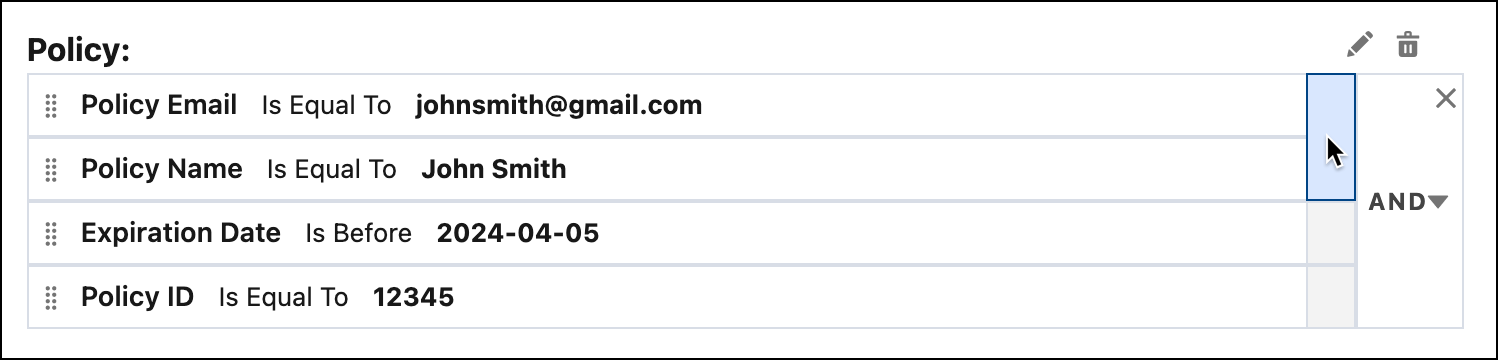
Within the DMO, use nested operators by adding AND or OR operators to create more complex
filters. Nest up to three levels of attributes.
Click Done, and then click Save.
For the selected DMOs, set limits and sort your data.
For Max # of Attribute Values, select the number of relevant values to use for your
marketing campaign.
For Sort By, select how to sort the data.
Click Continue.
Name your activation, and click Done.
Considerations for Selecting Related Attributes in Data 360 Activations Related attributes are data fields that belong to data model objects (DMO) connected to your primary or activation DMO. These attributes help you access information from other objects that are linked through a defined relationship path. There’s a direct relationship with the DMO, related attributes, and the filters you can apply.
We use three kinds of cookies on our websites: required, functional, and advertising. You can choose whether functional and advertising cookies apply. Click on the different cookie categories to find out more about each category and to change the default settings.
Privacy Statement
Required Cookies
Always Active
Required cookies are necessary for basic website functionality. Some examples include: session cookies needed to transmit the website, authentication cookies, and security cookies.
Functional Cookies
Functional cookies enhance functions, performance, and services on the website. Some examples include: cookies used to analyze site traffic, cookies used for market research, and cookies used to display advertising that is not directed to a particular individual.
Advertising Cookies
Advertising cookies track activity across websites in order to understand a viewer’s interests, and direct them specific marketing. Some examples include: cookies used for remarketing, or interest-based advertising.