
You are here:
Get Trusted AI Responses with Retriever Citations
Citations link AI-generated responses to the source content relevant to each response. Citations allow users to compare the LLM response with the source data to verify the validity of the response and identify any potential inaccuracies or hallucinations. Enable citations in AI Models (formerly Einstein Studio) at the individual retriever level to give access to citations to solution components that call the retriever, such as a prompt template.
Standard citations automatically generate citations that include a source URL and a header text. Custom citations allow you to define a base URL, a URL path, and a label from the source data model object (DMO) fields. Citation headings and links may be surfaced to end-users in downstream applications like Agentforce agents and prompt templates. Make sure that these fields are populated appropriately and that end-users have access to the source links.
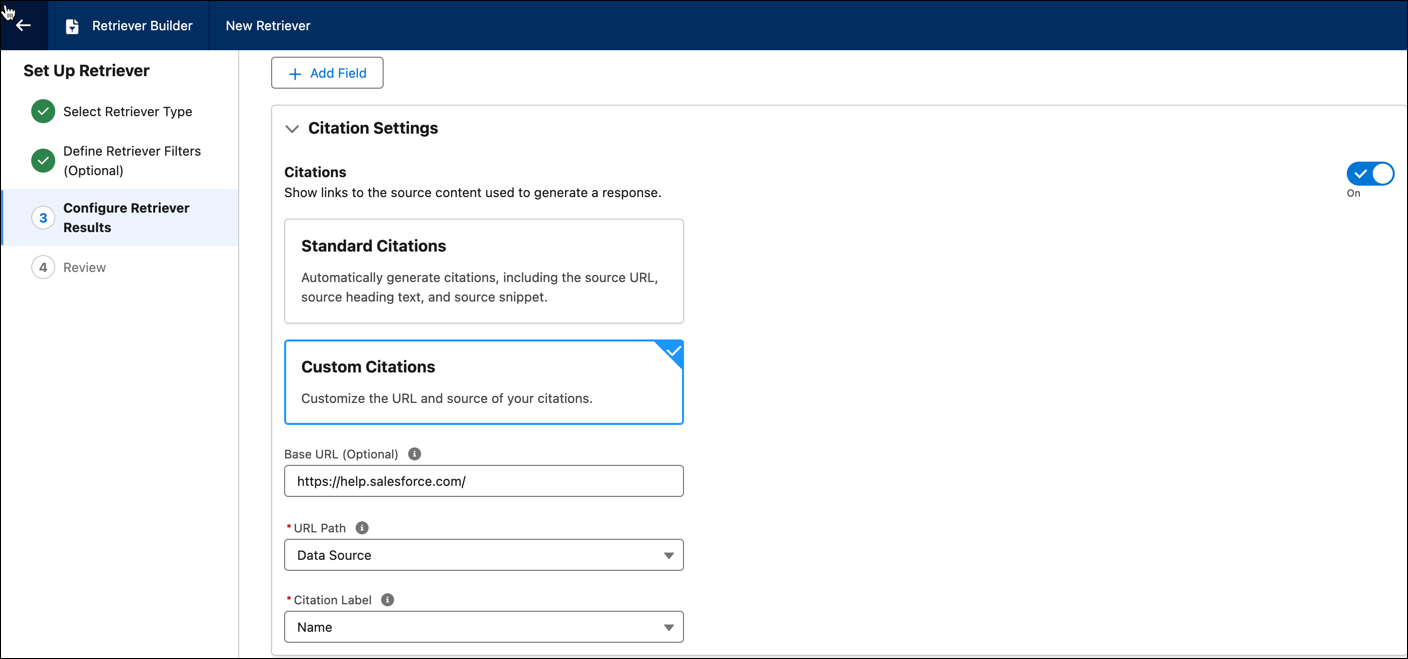
You can also configure citations in Einstein Platform with custom actions and Answer Questions with Knowledge standard action. For more information see, Build Trust in AI Responses with Citations.
Use Case: Ground Agent Responses with Citations to Image Sources
Consider a scenario where a financial planner is preparing for meeting with a client and would like to provide investment recommendations. The financial plan document for the client includes various charts and graphs such as a graph for the total portfolio value.
With advanced search index setup, you can process both text and images in the plan document and ask questions about the client’s portfolio. Graphs and charts are processed by generating structured descriptions of the image using LLMs and providing a URL link to the image. Use this general flow to process your document.
- Connect and ingest documents that include images, and other visuals such as graphs or charts.
- Transform and index the documents using Data 360 search advanced setup. Enable image
processing and select the appropriate embedding model to process images as part of your
chunking strategy.
 Note Enriched indexing is not supported for image files.
 - Create an individual retriever for the search index.
- To test the retriever, embed it in a prompt template.
- Use the retriever in a custom agent or other client applications.
So when a financial planner asks the agent a question about the portfolio allocation, the LLM retrieves the text description of the graph with a link to the image. The agent response includes the answer with a source citation. Image citations appear as external links.
