
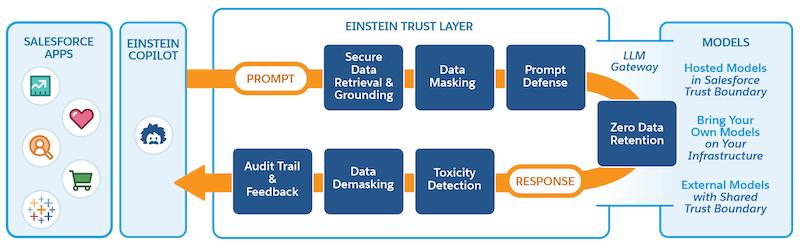
The Bring Your Own Large Language Model (BYOLLM) capability enables you to add a
foundation model hosted on an external platform and connect it with AI Models (formerly Einstein Studio). You can use
the foundation model to create a model configuration to power your generative AI. Evaluate the
model’s response to your prompts in Model Playground with different settings before you deploy the
model to production.
Required Editions
Einstein generative AI is available in Lightning Experience. Setup for Einstein
generative AI is available in Lightning Experience.
Available in: Enterprise, Performance, and Unlimited Editions with
an Einstein for Sales, Einstein for Platform, or Einstein for Service add-on. To purchase the
Einstein for Sales, Einstein for Platform, or Einstein for Service add-on, contact your
Salesforce account executive.
Add a Foundation Model Adding a foundation model in AI Models (formerly Einstein Studio) establishes an endpoint connection between the external model provider and Salesforce. After you connect the model, create a new model configuration and evaluate your model’s response to custom prompts.
Edit or Delete a Foundation Model You can edit most of your foundation model settings as long as the model isn’t a source for other models. If it’s used as a source, you must first delete all associated model configurations. You can delete a foundation model if it’s no longer needed.
Monitor Model Activity View your model inference use and errors in a dashboard. Use important indicators to help you track, adjust, and improve model performance.
We use three kinds of cookies on our websites: required, functional, and advertising. You can choose whether functional and advertising cookies apply. Click on the different cookie categories to find out more about each category and to change the default settings.
Privacy Statement
Required Cookies
Always Active
Required cookies are necessary for basic website functionality. Some examples include: session cookies needed to transmit the website, authentication cookies, and security cookies.
Functional Cookies
Functional cookies enhance functions, performance, and services on the website. Some examples include: cookies used to analyze site traffic, cookies used for market research, and cookies used to display advertising that is not directed to a particular individual.
Advertising Cookies
Advertising cookies track activity across websites in order to understand a viewer’s interests, and direct them specific marketing. Some examples include: cookies used for remarketing, or interest-based advertising.