
You are here:
Use AI Models
AI Models is your home base for AI in Data 360. Augment your business intelligence with AI to identify, surface, and visualize inferences in yourData 360 data. AI is integrated into your Data 360 environment so that you can quickly operationalize generative models, predictions, and improvements with clicks, not code.

Note As of April 2026, Einstein Studio is now called AI Models. Learn more in the release note.
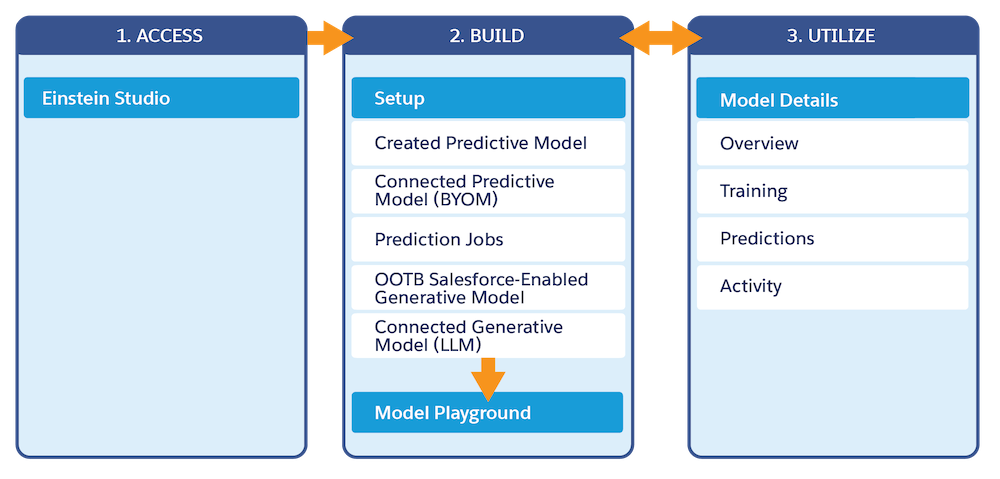
| Access | Manage AI Models |
| Build | Create, Connect, and Activate Models |
| Utilize | Utilize Model Output |
Blogs, Videos, and Webinars
Hear directly from our product team and see features in action.
Additional Resources
- Learn more about AI model usage that impacts cost: Billing Considerations
- Trailhead: Machine Learning Predictions: Quick Look
- Set Up AI Models
To use AI Model Builder (formerly Einstein Studio Model Builder), your org must be provisioned with an applicable license, and users must be assigned the appropriate permission. - Einstein Predictive AI
Predictive AI uses models built with machine learning (ML) and your historical data to predict business outcomes and recommend ways to improve predicted outcomes. - Create, Connect, and Activate Models
Create your own predictive models with clicks, not code. Establish connections to bring in generative and predictive AI from models outside of Salesforce. Then, activate models to use the inferences and insights revealed in your data. - Manage Models
After creating a predictive model, you can edit to update your settings or delete it if it’s no longer needed. - Get Predictions, Prescriptions, and Top Predictors
Put your predictive AI models into action. After a model is activated, use it to get inferences—predictions, prescriptions, and top predictors—from your Salesforce workflows. Get inferences on demand, in batches, and in streams. Use them in flows, prediction jobs, batch data transforms, agents, and prompt templates. Get them programmatically in Apex and REST applications. - Retrieve Data
Use a retriever to search and return relevant data from a search Index. Create and customize retrievers in AI Models (formerly Einstein Studio) for Retrieval Augmented Generation (RAG) in Data 360. Retrievers augment prompt templates by providing relevant, specialized grounding information for prompts.
Did this article solve your issue?
Let us know so we can improve!
