
You are here:
Allowlisting
An allowlist defines things that a system trusts. It’s used to control allowed traffic and rejects undefined traffic and can be applied at different layers of the OSI Model. Here’s how the allowlist works at the application and network layers for Data 360.
Application Layer Allowlists
Customers that onboard to Data 360 use the application either from home or corporate locations. When a customer uses a computer at home, they can use a corporate VPN to access the product.
Corporate VPN Access: The corporate VPN IP address becomes the source IP address when a customer connects. These corporate VPNs are more than one publicly routable IP address because typically they’re shared from a pool. All these IPs can be defined in a range.
On-premises Access: Marketing Cloud Engagement (MCET_225) application IP allowlisting isn’t enforced by default.
Administrator Access: Customers need Marketing Cloud Engagement Administrator access to add the source IP addresses that are trusted when working with Data 360.
Network Layer Allowlists
Some companies restrict the networks and resources that employees are allowed to access. If this error occurs, corporate network administrators must add a network level allowlisting to trust Engagement for inbound and outbound network connections. The allowlisting action must be taken on the Customer on-premises Network Equipment (Routers, Firewalls, VPN Concentrators, or Proxy Servers).
Example
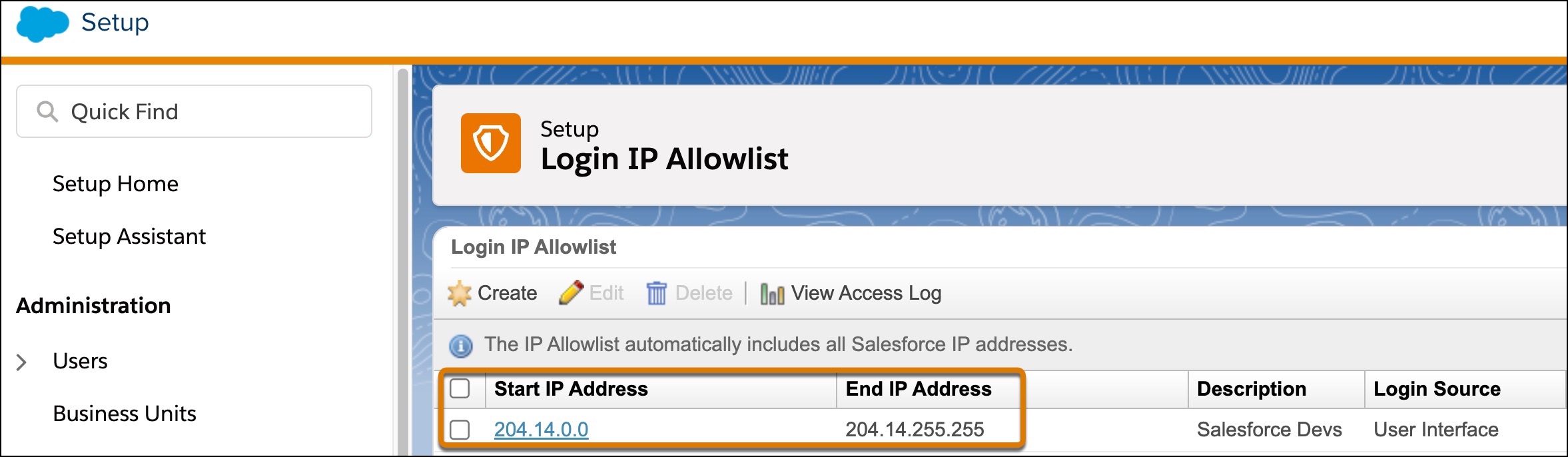
Salesforce Devs allows IP address 204.14.0.0 - 204.14.255.255. So if someone uses 204.14.3.1, they’re allowed to access the application. This inbound allowlist is from the perspective of the application running in the Engagement Salesforce data center.
- IP Addresses Used by Data 360 Services
Data 360 uses these IP addresses to communicate with external services such as Amazon S3, Google Cloud Storage, Azure blob storage, Snowflake, or SFTP. If your security policy requires a strict network ACL (access control list), make sure to include these IP addresses to your allowlists. - VPC Interface Endpoints for Amazon Kinesis Connection
Data Cloud uses the VPC Endpoints listed here to communicate with Amazon Kinesis. If your security policy requires a strict network ACL (access control list), make sure to include these endpoints to your allowlists.
