
You are here:
Lookup
A lookup returns all rows from the left Data 360 input data source object and only matching rows from the right object, the lookup source. To ensure that the grain of the results doesn’t change, the lookup output data includes one row for each row in the left object.

Our company's marketing team captures demographic data in an external data source for opportunities stored in Salesforce. To help create more targeted campaigns, the team is building a dashboard that segments our current opportunities by the customers demographics. Let’s use a lookup to add the demographic data to each opportunity record.
Consider the following two input data sources. The left object contains opportunity records. The right contains demographic data. Both objects contain unmatched rows and duplicate keys.
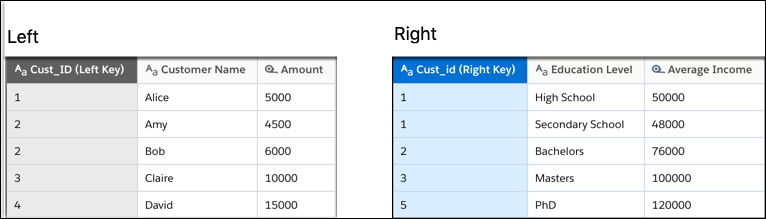
To return a single match when multiple matches are found, the lookup produces the following results based on the matching keys.
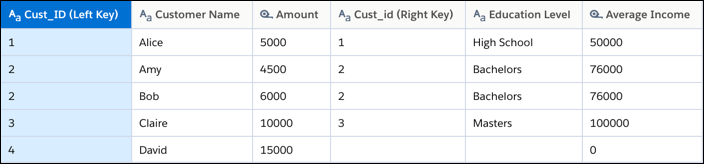
All rows from the left, including rows without a match, are included in the results. Although
Cust_ID 1 has two matches on the right, the lookup returns
only the first matching record. Also, because Cust_ID 4
doesn’t have a match, the Cust_id and Education Level fields are null and Average Income is 0 for that record. Unmatched dimensions are set to null. Unmatched
measures are set to 0.
