
You are here:
Write the Batch Data Transform Results to a Data Model Object Output Node
Write the results of a batch data transform to an existing data model object or one created through the output node. The object that holds the output is called a transform data model object. You can only write to a transform type data model object within a data transform. You can use a transform type data model object as input to another batch data transform and downstream processes such as identity resolution, calculated insights, and segmentation.
- At the end of your batch data transform, click the Add Node button
(
 ) and
select Output.
) and
select Output.- To use an existing data model object, select Use Existing. Select the object to write the results to, and then click Apply.
- To create a new data model object, select Create New.
- For the required Object Name field, enter the name of your transform data model
object.
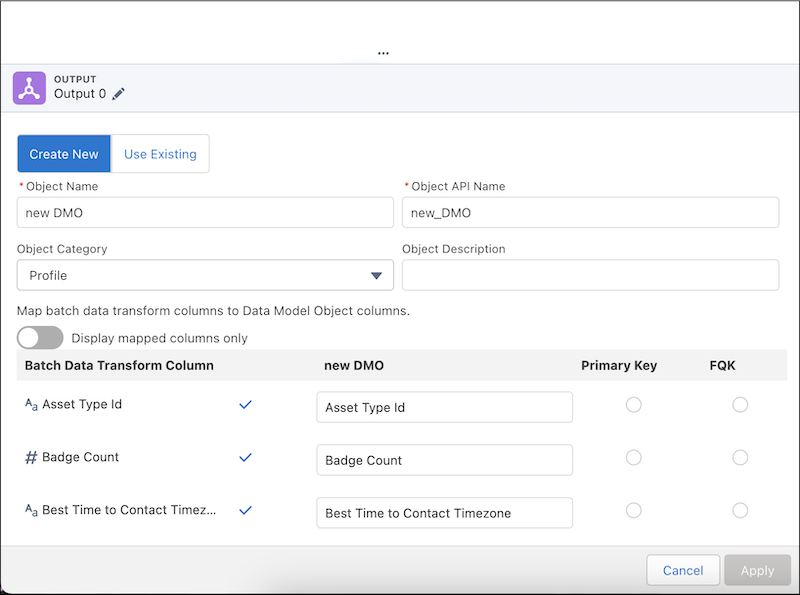
- Choose which data model object fields to map to the batch data transform’s fields. Fields
that share a name are automatically selected.
 Note You can't map the system fields, Data Source and Data Source Object. If you edit a transform that has these fields manually mapped, remove them from the output node and save your changes.
- When you map transform results to an output node, the transform’s currency (ex. USD, INR, GBP) is written to the output’s currency field.
- Select a column to be the primary key.
You can't select a currency field as a primary key.
- Select a column to be the fully qualified key (FQK).To prevent having multiple DMO records with the same primary key value, use a fully qualified key to distinguish between them.

Did this article solve your issue?
Let us know so we can improve!
