
You are here:
Customer Data Platform Billable Usage Calculations
Previously named Customer Data Platform orgs are billed based on contracted entitlements. Understanding which usage is included for billing helps you make data management decisions.

You’re billed for usage in the areas of Unified Profiles, Segment Publishes, and Engagement Events. Your maximum usage in these areas is defined in your contract’s entitlement schedule. Overages are billed monthly at contracted rates. Contact your account team if you have questions about your contract.
Calculating Billable Unified Profiles for Customer Data Platform Orgs
The billable number of profiles is based on whether you have active Identity Resolution rulesets. You’re billed for additional Unified Profiles if the number of billable profiles exceeds your entitlement.
If you’re not using identity resolution, the billable profile count is the sum of all records in all data lake objects (DLOs), regardless of category, mapped to data model objects (DMOs) categorized as Profile type. Both known and unknown profile records are counted. DLOs that are mapped only to the following DMOs are excluded from this count.
- Account Contact
- Contact Point Address
- Contact Point App
- Contact Point Consent
- Contact Point Email
- Contact Point OTT Service
- Contact Point Phone
- Contact Point Social
- Device
- Party Identification
If you’re using Identity Resolution to link source profiles to Unified Profiles, the billable Unified Profile count is the sum of both of these factors.
- The number of known Unified Profile records for all active identity rulesets. To determine how many Unified Profile records you have, view the Identity Resolution Summary for each active ruleset. Locate the number of Unified Profiles for the ruleset in the summary. Add the number of known Unified Profiles across all rulesets.
- The number of all records in all DLOs, regardless of category, mapped to DMOs categorized as Profile, excluding DMOs that are part of Identity Resolution. These records are included in the count because you can use them to create segments. DLOs that are mapped to Other type DMOs are counted as Engagement Events and not as Unified Profiles.
Anonymous profile limits are based on your Salesforce edition. When you’re using Identity Resolution, anonymous profiles are excluded from the billable Unified Profile count.
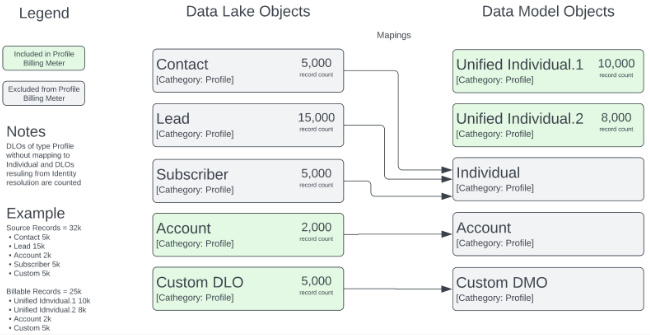

This example has two active identity resolution rulesets: Unified Individual.1 with 10,000 records and Unified Individual.2 with 8,000 records. There are two DLOs that are categorized as Profile but aren’t mapped to Individual: The Account DLO has 2,000 records, and the custom DLO has 5,000 records. For this customer, the total billable Unified Profiles is 10,000 + 8,000 + 2,000 + 5,000 = 25,000.
Factors That Affect Unified Profile Counts for Customer Data Platform Orgs
Address these factors to ensure that your profile counts accurately reflect your business needs.
Multiple Identity Resolution Rulesets
Unified Profile counts from all active identity resolution rulesets are used to calculate total billable profiles. Validate the number of active identity resolution rulesets. If more than one is active, determine if all are needed for an active business purpose.
Data Stream Growth
As you connect different source systems to Data 360 and increase the volume of data ingested through new data streams, the number of profiles increases. Review all data streams and sources categorized as Profile. Determine if any duplicate, dev, test, or staging sources exist and whether they’re still needed.
Anonymous Profiles
Anonymous profiles don’t count toward billable Unified Profiles, but they must be marked as anonymous when they’re ingested. Validate that the Is Anonymous field on the Individual DMO is correctly mapped for any data stream that includes anonymous records.
DMO Category
DLOs mapped to DMOs categorized as Profile are available to segment on and are included in the Unified Profile count. Review all mappings from DLOs to DMOs. Determine if all data streams mapped to DMOs categorized as Profile contain a population that you want to segment by or use as the starting population for a segment. Determine if any DMOs are categorized incorrectly as Profile.
If a DMO is categorized incorrectly as Profile, you can change its category to Other. You can change a DMO’s category only if it isn’t used in segmentation or activation. Delete all segments and activations that use the DMO before changing the category from Profile to Other. See Change the Category of a Data Model Object.

Additional Unified Profile Count Considerations for Customer Data Platform Orgs
- Data created from a transform that is output as an unmapped DMO isn’t counted toward billable Unified Profiles. If a DLO isn’t mapped, it doesn’t count.
- A DLO that is mapped to the Individual DMO and also to a DMO of type Profile isn’t counted twice.
- All DLOs that are mapped to a DMO with type Profile count toward billable Unified Profiles.
This count includes these scenarios.
- Data streams outside of identity resolution counts
- Consent DMOs outside of identity resolution counts
- Data transform or stream transform DLOs mapped to DMOs of type Profile outside of identity resolution counts
Calculating Segment Publishes for Customer Data Platform Orgs
Your Segment Publish entitlement is the maximum number of billable segment publishes during your contract period.
Each time a segment is published, it counts as one billable segment publish. If a segment has more than one activation or no activation associated with it, a single publication of that segment is counted as one segment publish operation. Segment publishes that are completed during the time period are summed and counted toward your entitlement.
To estimate your billable segment publication counts, review all publish schedules for all segments.
Calculating Engagement Events for Customer Data Platform Orgs
Your Engagement Events are calculated by summing all records in DLOs categorized as Engagement or Other, so everything that doesn’t count as a Unified Profile record is counted as an Engagement Event. Profile type DLOs that are mapped to Other type DMOs are also counted. You’re billed if your number of records exceeds your entitlement.
To calculate the number of billable records, go to the Data Lake Object home page. Sum the record counts of all DLOs except the ones that are mapped to a Profile type DMO because these DLOs are counted as Unified Profiles. An unmapped DLO counts for Engagement entitlement but not for Unified Profile entitlement.
For example, if a purchase record is copied from a source DLO to a target DLO using data transforms, the record is counted as two Engagement Events because all records in both DLOs are part of the sum.
