
You are here:
Zero Copy Data Federation
The Data 360 zero copy data federation is the process of querying data from multiple, physically distinct data sources. This approch allows users to treat disparate systems as a single logical system, called a federation, while maintaining the autonomy of each system. Importantly, data federation avoids duplicating data across system boundaries. Data 360.
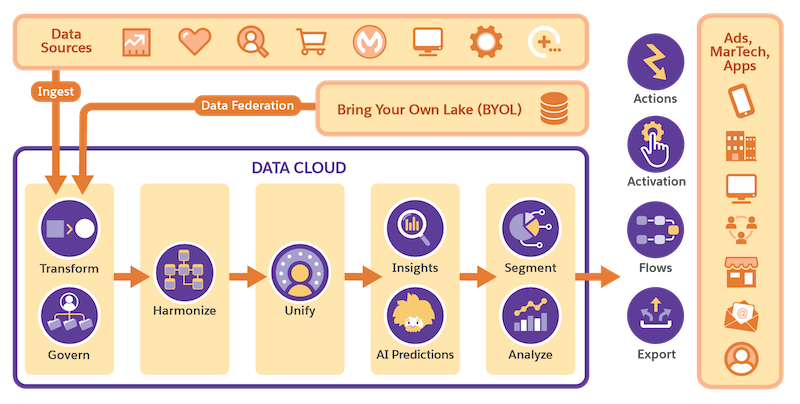
Each system involved in data federation consists of two primary components: the storage component and the compute component. The storage component is tasked with storing the data, while the compute component is responsible for querying data stored in the storage component. In some systems, the underlying data is organized using an open table format.
Data 360 supports data federation through two methods:
- Query Federation (Compute): When you launch a workflow that requires data from an external system, Data 360 sends SQL queries to the external system's compute engine. The external system executes the query and returns the relevant records to the workflow in Data 360. The records aren't retained after the work flow is complete.
- File Federation (Storage): Data 360 directly queries external storage systems, provided the data is organized using a supported open table format. Data 360 uses its own query engine (and compute) to get the necessary records for the workflow. Similar to query federation, the records aren't retained after the workflow is complete.
Regardless of whether data is ingested or federated, Data 360 creates a Data Lake Object (DLO). However, when using a zero copy connector, the DLO doesn't contain any actual data and acts as a pointer to the external physical table. Hence, DLOs created via zero copy connectors are called as external or virtual DLOs.
- Caching or Acceleration in Data Federation
Caching retrieves data from the external source and temporarily stores it in a data lake object in Data 360. When you enable acceleration while creating a data stream, you turn on caching. We recommend caching when accessing large data sets or when data changes frequently. You can refresh the cached data at your preferred frequency. - Compare Data Federation Methods
Data can be federated via live queries, accelerated queries to the local data cache, or via file federation. Each option supports different use cases. Performance, data freshness, and credit consumption considerations vary. - Billing Considerations for Data Federation
Using data federation impacts the consumption of credits used for billing for orgs operating Data 360 under a Data Cloud license.
